






Before... After...
We all, hopefully, know that there is a big difference between having a bunch of great content on your site and Google knowing about your content.
Indexing stands between your content residing at the bottom of the internet abyss and your #1 Google ranking.
Let’s take a look at Traffic Generation Cafe for a moment.
This is a very active blog that is crawled by the search engines on a daily basis.
Also, I am extremely thorough at building internal links within TGC, as well as backlinks to my blog from other blogs, which is how Google finds your content to begin with - by following links from already indexed content.
So you can imagine why I thought that all of my older content pages have been indexed a long time ago…
NOT.
As I was studying Andrew Rondeau’s Income Blogging guide - an absolutely brilliant blogging course that will take you from A (how to install a blog, plugins, themes, etc) to Z (how to REALLY make money) of blogging, and even I, an experienced blogger, am amazed how much I am learning from it - I discovered a solution to a problem I knew existed a while back, but never had a chance to look into it.
Well, thanks to Andrew, the solution proved to be simple enough that I took care of my “no-index business” once and for all.
So let me walk you, step by step, through the process of identifying the pages that are currently not indexed in search engines, even though you:
- Added the Google XML sitemap plugin
- Verified your blog via Google’s Webmaster tools
- Added internal links
- Built external one way backlinks
Step 1. How many pages are not indexed?
Go to your Google Webmaster Tools account and take a look at Site Configuration ==> Sitemaps.
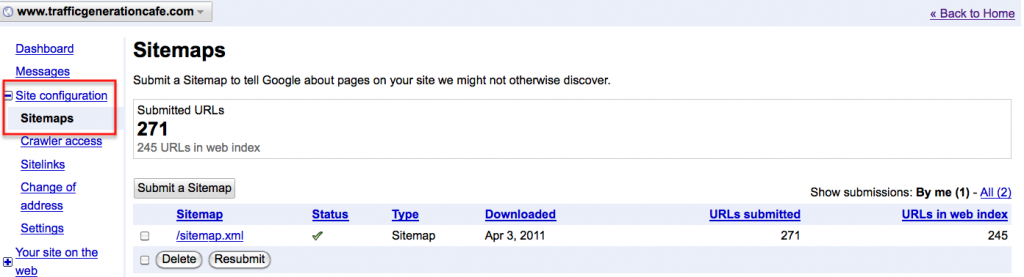
As you can see from the image above (click to enlarge), I currently have 271 URLs submitted through my sitemap, yet only 245 of them are indexed by Google.
And as you’ll see from a screenshot I’ll add in a moment, we are talking about older posts here - all my new ones are being indexed almost the same day.
Step 2. Which pages are not indexed?
And that’s where the problem lies.
Google Webmaster Tools will tell you how many are not indexed, but not which ones.
There are plenty of online marketing tools that will check for you if an individual page is indexed by search engines.
But what if you need to check hundreds of them or even thousands?
Step 3. Invest $7 into this piece of software.
Yes, only $7 and you’ll be able to check in one quick sweep which blog pages are indexed and which are not, and not only on your own blog.
You can also check your guest posts.
You can see if you Ezinearticles articles, YouTube video, Squidoo or Hubpages are indexed.
It’s actually pretty incredible - that’s what I thought of it once I started playing with it.
Here’s a screen shot from my blog, after I ran some URLs through it to see what’s going on with my indexing:

 Take a look at the full range of what IndexChecker can do for you and your blog:
Discover Which Of Your Web Pages Are NOT Indexed In Google.
Step 4. Install IndexChecker.
The instruction PDF will let you know how to install the software to your blog directory.
However, I struggled a bit with their directions, so I made a video to show you step by step as to how to install IndexChecker.
Step 5. Let’s find those unindexed pages.
…and finally take care of this little pesky problem.
Here’s your link one more time -
https://trafficgenerationcafe.online/recommends/indexchecker
Happy exploring!
PS Keisha Easley of WeBlogBetter.com is doing it again! Please check out her new guest posting contest - join as a sponsor to do some quality link building or get your creative juices flowing and keep your eyes on the prizes. I know I will. 
Image credit: http://www.freakingnews.com/
How many unindexed pages did you discover on your blog?
Comment to show me that you’re alive!

Traffic Generation Cafe happily runs on Thesis Theme

What do I love about Thesis? Everything would be the short answer.
If that doesn't work for you, then the fact that Thesis Theme framework is designed to serve is the rock-solid foundation for any website. My Traffic Generation Cafe and I fully trust and rely on the airtight SEO, incredible design flexibility, and lightning-fast loading times that Thesis provides.
Still not sure about Thesis? See what you can do with it, then decide.
- Thesis Gallery - Lots of well designed blogs powered by Thesis
- Thesis Awesome - AMAZING customization packages for Thesis
- Thesis User Guide - see how much incredible support you get












 I am a wife to a great husband of 13 years (here ya go, now I have to make changes to this sentence once a year), a mother to a beautiful and, no doubt, genius little girl, and a successful internet entrepreneur. I also devoted my life to Jesus Christ many years ago, and He remains my true priority, focus, and hope.
{ 79 comments… read them below or add one }
Good post Ana! I deleted some of my posts and realized my serps dropped. Your posts are your ranking power!
Fazal @ Make Money Online invites you to read: 5 WordPress Plugins That Will Make Your Blog Load Faster
Hello Hello Ana!
I’m going to have to check out the tool. I have not been to Google Webmasters in some time - perhaps over 6 or 7 months. So, it’s time now! Thanks for a great post; and very fresh information. Love it and tweeted it!
Tia
Tia invites you to read: Are you trying to do too much
Hi Ana
As always it is a pleasure to visit your blog. I have 86 of 88 pages in my sitemap indexed by Google. I am pretty happy with that, but it could be nice if the “Google webmaster tools” could tell me which 2 they have missed. I think that one of the reasons that Google is finding almost all my post is that I use a great little WP plugin called “WordPress Related Posts” This tools link my different post together using the Tags I have entered on each post. If I post a blog about e.g. Wordpress then it automatically shows 3-5 links of my other posts with the Wordpress tags and put it in the bottom of my post. That is a great way for Google to navigate around my blog and index all my posts, also the once that might be posted a long time ago.
Thomas invites you to read: 10 great Windows 7 keyboard shortcuts
Sounds like a pretty good number, Thomas - just make sure that, as your blog grows, most of your posts are still indexed.
Most bloggers use some form of WP Related Posts plugin.
Ana | Traffic Generation invites you to read: Content Writing vs Link Building- Chicken or the Egg
Ana,
I’m not sure if I feel dumber or a little bit smarter when I stop by here lol. Of course - I’m just referring to the techie side of blogging.
Needless to say that I went back to Websmaster Tools to plug in my sitemap xml because I didn’t even have it included there for some reason - even though my site is indexed and I do have the Google xml plugin installed and all . I know - yikes!
So I got this ridiculous number - in like the 1000 area and but nothing yet for what’s indexed. Just a nice little dash right now so either I have a few sleepless nights when I get around to this or it hasn’t updated yet.
Either way - this product sounds like a real steal at 7 bucks and definitely worth it.
Thanks for another of your awesome tips Tzarina.
Enjoy the rest of your week.
Cheers
Might sound like a dumb question, sunshine, but have you actually submitted your site map to Google Webmasters? you need to do that by hand, despite the plugin.
Hey Ana,
Yes I did do that actually - by hand .
.
But I think I’m gonna’ have to buy the tool you suggested because right now only 65% or so of my URL’s are indexed.
Ingrid Abboud invites you to read: Bring IT! What is Your Blog Posting Schedule A Chance to Promote Yourself
My blog is still infant and there are only few pages.. however, the tools is useful for only $7.
zammax invites you to read: HTC Thunderbolt 4G For Verizon Review
One of the most ignored fact is i.e Google take seriously the amount of external links and the number for pages to be indexed I’m not sure about how much and second Google does index your pages but place them in supplementary index.
Sonu invites you to read: Google Page Speed Online – New tool to Improve Page Speed on desktop and mobile devices
I am not sure I ever heard of supplementary index, Sonu.
Ana | Traffic Generation invites you to read: Duplicate Content Phantom- Don’t Be Duped- Be Informed
Thanks, Ana. I don’t often jump on tools like this but, as Dennis said, paid beats free any day when it comes to time and ease of use.
I snagged the profile checker as well, so now I can get busy looking at these links!
One thing I hope I find: if my old garbage is not indexed, it’s going to disappear from my blog. LOL
Cheers,
Mitch
Mitchell Allen invites you to read: Colic Spice
Glad we sorted out our glitches, Mitch - still a great deal!

Ana | Traffic Generation invites you to read: Content Writing vs Link Building- Chicken or the Egg
This is pretty cool to know. I checked mine out and it seems that 10 urls have not been indexed.
Once you get this software and learn which pages are not indexed, how do you go about indexing them? How do you “ping them” or do you just link to it from your next blog post that seems to get indexed quickly?
I’ll probably grab the software - with multiple blogs it seems smart to make sure things are indexing.
I really love seeing how you build one way backlinks. I’ve noticed a few things and I’m sure you’ve wrote about some things I noticed but I need to look around more. I’d love to chat with you sometime like link building geeks over coffee.
This stuff is really interesting
Scott Webb | Instagram App Incubator invites you to read: Instagram Android- Surrendering Selfishness
Especially with multiple blogs, $7 will go a long way.
Yes, when I discover unindexed pages, I build links, ping links - do whatever it takes to index them. Usually, not too difficult.
If you love link building so much, why don’t you write a link building guest post and we’ll talk about it!
Hi Ana,
On a side note, I just read about your faith in Jesus at the bottom of your blog. I knew there was something sweet about you.
Don | Virginia Beach Wedding Photographer invites you to read: Wedding Photography for Nicole and Evan- Heritage Hunt Country Club- Gainsville VA
God does that to us, doesn’t He?

Ana | Traffic Generation invites you to read: Search Engine Ranking Tip- Keywordcom or MrSmithcom
PS And how I know your first name.
Another great find - thanks for sharing this great tool, Ana.
$7 is a steal indeed! I’m curious to see how many of my blog posts are still not indexed.
Warmly,
Mavis
Mavis Nong invites you to read: Traffic Generation Blogging Contest – Get the Inside Scoop!
I haven’t done anything to index those pages yet, so about 30 are still unindexed.
More stuff to do!
Hi Ana,
After reading this article, I went back to my Google Webmaster tool and I have seen all of my articles got indexed. Well that’s a great news for me. But that’s only for my internet marketing blog. I have few other blogs too and I hope this piece of software is a must one for me. Thanks for providing the info about this awesome tool.
Sathish
P.S.: I know we had a rough time handling your first guest article at my blog, but I want to rectify it. Can you come over to my site and write a guest article for my readers?
Sathish | Make Money Online invites you to read: 3 Social Media Marketing Tips For Your Business
That’s great, Sathish - not too many bloggers can boast that (including me, as you read).
Don’t worry about our first guest posting encounter - let bygones be bygones.
Not sure about a new guest post; pretty swamped. But will let you know if I can!
Ana
Presently, Index install checker should be most important one. So, it would be useful to all the people without any doubts. Thanks a lot for sharing your valuable tips on here

Kavya Hari invites you to read: VPS Hosting And Its Benefits
You are welcome, Kavya, and I agree.
I hope that it should be work well. I’ll try this:(
Hi Ana,
Wow only $7?
That’s great, since it can check which posts are indexed which are not.
I always check my webmaster tool to see my site’s performance in the web.
Thanks for the recommendation, and will be back for the review =D
Kimi invites you to read: GD Image Imagepng support is not enabled wordpress
Definitely, Kimi. $7 bought me a whole lot of insight into my blog!
Here is a neat little trick that will allow you to have all your pages indexed even without the use of any software. All you have to do is add your sitemap.xml link to your main page. Next time Google spider visits your main page it will find your sitemap link and will index all pages within. Enjoy !!
Goran | Black Hat Source invites you to read: How SEO Works
Nice little trick, Goran - unfortunately, doesn’t do the trick.
I had my sitemap link on my home page till about 2 weeks ago - before I started the big TGC remodel (which I believe you missed); still unindexed pages.
And you thought you got me…
Hm it worked in the past but I have been out of the game for a while so I guess a few things changed in the mean time.
Goran @ Black Hat Source invites you to read: Google Standing up to Facebook- Launching 1
Apparently….
What I am having trouble with is figuring out why some of the older posts are still not indexed with all the backlinks, etc.
Ana | Traffic Generation invites you to read: Search Engine Ranking Tip- Keywordcom or MrSmithcom
You can always set up featured section on your home page and include those articles on it. I’m sure they will be indexed that way.
Goran invites you to read: Guerilla Marketing
Why not - sounds like a great creative solutions, Goran.
I am checking how many pages I have indexed via webmaster tools and I have an other program with which I check which ones are still waiting to get indexed.
I usually don’t ping them, but I build some backlinks in order to get indexed. I always think that getting some backlinks to get your page indexed, is much better then pinging it.
Alex invites you to read: Grija de Bebelusi
I agree about backlinks vs pinging, Alex, but I still do both.
What do you use to check for unindexed posts?
I use scrapebox , it has a google index module, and take my website’s sitemap and away I go.
Alex invites you to read: Mini Raliuri
Surely glad you are not using it on my site!
Actually, it was a pretty bad investment because since I bought it I hardly used it, except to check other linkbuilding campaigns, the see what links got indexed and to ping some urls.
The rest of the time it’s collecting virtual dust on my desktop

Alex invites you to read: Curse Formula Unu
Ana,
Thanks for buying the tool via myself. For $7, it is a great little tool. It helped me get all my ‘old’ posts indexed.
Andrew
P.S. Thanks for the kind words around my course, as well - I really appreciate it.
Andrew @ Build Blog invites you to read: What Do Small Business Bloggers Do All Day
All well-deserved, Andrew - come back on Friday and then probably Monday.
Ana-
Great post here, and glad to know we are not connected on Facebook. It’s important to make the most of your web assets, and making sure all your pulished content is indexed is a great way of doing just that.
Question: Sitemaps can be problematic on Wordpress, do you know of another (maybe RSS-based) tool that can list all your posts, and then you can run that through the tool you are recommending here?
Thanks,
Travis
Travis Campbell invites you to read: Pingback Optimizer Review and Bonus Video
Glad you came by, Travis.
Why are sitemaps problematic on WP? I don’t think I’ve heard of a problem in the past…
You can also do your regular feed URL, but it’ll only run the URLs that are currently showing in the feed.
Worth looking into, but off the top of my head - have no idea.
Ana
Drats, sorry for the typo above, glad we are now connected on Facebook.
I don’t remember the exact issue with sitemaps, but it was problematic enough that it was removed from our higher trafficked sites, as did some friends of mine who had similar issues. I’ll look into this and post back if I can.
Good thing about WordPress, it is structured in such a way it is easy for the SEs to crawl.
-Travis
Travis Campbell invites you to read: Is Google’s 1 Search Results Feature Useful for Marketers
I figured out what you meant.
Maybe WP fixed the issue with sitemaps, who knows. There are various plugins to generate them and Google recommends having one, so I figure how can we go wrong with having one?
On the other hand, you are right: with proper linking any blog should be crawled without any problems.
Ana
It’s coming back to me. Sitemap file would be problematic, and the plugin could not update it. Google was looking at the sitemap, and saw no updates, and would move on. I have a message to my tech to verify this was the issue.
As I recall, the only way to index fresh content was with pings, and inbound links.
Appreciate all you are doing.
Travis
PS: You in Tucson? I lived in Phoenix, ich habe on der Universitaet Regensburg studiert!
Hey Ana,
another great suggestion. How do you come up with all these ideas? It takes me longer to come up with an idea than to write an article about it.
Goran | Black Hat Source invites you to read: Guerilla Marketing
We should trade, Goran - I will come up with ideas, you write.
Thanks for the reminder. I purchased this through Andrew some time ago and completely forgot about it.

Dennis Edell@ Direct Sales Marketing invites you to read: Does Blog Post Size Matter Just Get Your Point Across!
Dennis
I do remember you buying! Wow…that was a while ago. Use it…it may highlight a number of posts that are not indexed.
Andrew
Andrew @ Build Blog invites you to read: What Do Small Business Bloggers Do All Day
Ya know, I was Google’ing a little on free ways to do it, and WOW do some make free, complicated; talk about involved.
There’s definitely a post somewhere in here on how paid beats free any day when it comes to time and ease.
Dennis Edell@ Direct Sales Marketing invites you to read: Does Blog Post Size Matter Just Get Your Point Across!
Wow. Once again, I find an awesome tool that I never knew existed, and never knew that I never knew I needed it. =)
Of course, I know they say the truth hurts, but I bet that when I use this, it just might hurt a little more than I expect. I tend to be an optimist. =)
Delena
Delena Silverfox invites you to read: epc Belfast
Let me know how it goes, Delena - it might be painful, but it can be fixed! And needs to be fixed, most importantly.
Ana
Ana | Traffic Generation invites you to read: Article Spinning- You Spin Me Right ‘round- Baby- Right ‘round
Hey Ana - Good one! Will having a sitemap not help?
Yeah - the tool you mnetioned is good one to check if your posts have been indexed or not.. Generally it shows that if you’re a blog with regular content updates / new posts, you’re new content will be indexed within a few hours… or a few minutes at times as well..
Sandeep@CuriousLittlePerson invites you to read: Is Blog Commenting A Link Building Strategy
Apparently not, Sandeep. It’s good to have of course, and I am sure it helps, but for some reason, some of the URLs still don’t get indexed.
Ana | Traffic Generation invites you to read: Search Engine Ranking Tip- Keywordcom or MrSmithcom
More timely information. I will be purchasing this software today!
Thanks, Debbie - let me know how it goes.
Ana:
Again you come out with the rock star info for us. This is something I have been looking into on my blog recently but wasn’t sure how to fix it. Of course, I should have known a trip over here to TGC would solve my problem!
Lisa@blog seo invites you to read: Twitter Relations- 4 Tips to Build Your TwitShips
Hi Ana,
From what i can tell only about half of my pages are indexed. I tried some RSS in the past, but that didn’t work that good for me.
That IndexChecker looks promising and it’s only $7, i might give it a try.
Maria Pavel invites you to read: CNA Training in California
$7 is still $7, but in this case it’s definitely worth it, Maria.
If you don’t know what needs to be fixed, you can’t fix it.
Have a great night!
Ana,
This is very interesting. I would never have thought to even check this. Now I’m scared to look at how few posts are actually indexed…
Thanks for the heads up.
Steve Roy invites you to read: The Grind Within Us All
You never know, Steve; you might be ahead of the game. All you need is check.
Ana
Ana | Traffic Generation invites you to read: Duplicate Content Phantom- Don’t Be Duped- Be Informed
Hello Ana, I am so sorry I haven’t been around for a while. I have been as busy as a one-armed paper hanger. Even so, I have felt niggled at the thoughts of missing some of your always-awesome posts. I can’t wait to spend a couple of hours and go back to see what you’ve been sharing.
This post, as always has yet again taught me something new … that I had wondered… but didn’t have a clue that such a tool existed.
This will be added to my to do list in short order.
Thank you for sharing!
Jayne
Jayne Kopp invites you to read: Train Your Brain for Success
So good to see you, Jayne - I know how thin mompreneurs have to spread themselves to get anything done!
Always great to know you learned something here, at TGC - look forward to the next time you find a few minutes!

Ana | Traffic Generation invites you to read: Link Building Tip- How to Do It the Smart Way
I was also wondering why I have X amount of URL’s submitted vs what is actually indexed. At least I know that there is a tool that I can use to find out which posts didn’t get indexed.
Justin invites you to read: My Three Month Blogging Experience
Knowing is being half way there.
I am now looking into more effective ways to make sure our posts are indexed, the quicker the better.
Thanks for coming by, Justin - love seeing you around TGC.
Ana | Traffic Generation invites you to read: Article Spinning- You Spin Me Right ‘round- Baby- Right ‘round
It’s been my pleasure.. Thanks Ana.
Justin | Mazzastick invites you to read: My Three Month Blogging Experience
Great post Ana. Looks a great plugin and am about to see how my blog has been underperforming. Thanks for the quick and easy instructional video. Good work.
Wayne
Wayne Lambert | Generate Website Traffic invites you to read: Facebook FBML No longer Valid- Causing Major Problems
You are welcome, Wayne.
Ana | Traffic Generation invites you to read: Duplicate Content Phantom- Don’t Be Duped- Be Informed
Hi Ana,
Another brilliant post from you. I always found that you come up with something new and amazing. Keep it up and make me a perfect blogger.

Riya @ Couponseasy invites you to read: HostGator Coupon Codes- Latest Promo Discount Vouchers Daily Updated
Thanks, Riya, and you can become a great blogger IF you act on all these tips I share.

Ana | Traffic Generation invites you to read: Duplicate Content Phantom- Don’t Be Duped- Be Informed
Funny Ana, as I had been wondering about this late last night… not kidding! I’m definitely heading over to the webmaster tools to check this out.
Thanks!
Moon Hussain invites you to read: Why Closing Comments Can Absolutely Kill Your Blog
Welcome back, Moon - missed seeing you around!
Sounds like we are on the same wave.
Ana
Ana | Traffic Generation invites you to read: Link Building Tip- How to Do It the Smart Way
Nice idea, I wasn’t aware that a soft that is cheeking this exist. But I think Google is not indexing all the pages because it is considering that is duplicate content. If this is the case the it will not help you with much, because you will not receive visitors from Google.
Bit Doze@ SEO Tips invites you to read: Build My Rank Review
They still index those pages, they just don’t list both in SERPs.
The size of your site is one of the ranking factors and the more pages you have indexed, the better - Google will start visiting you more often.
Plus, without ever knowing which pages are not indexed, it wouldn’t be smart to assume it’s just dupe content.
Ana | Traffic Generation invites you to read: Content Writing vs Link Building- Chicken or the Egg
Hi Ana,
Wow. I have totally forgotten about this. Actually, after reading your post. I discovered that I haven’t even verified my Google Webmaster Tools account, and I don’t have a xml-sitemap. I have been to occupied with all the other parts of marketing / blogging and networking.
Thanks a lot for this. Now, I have at least verified my account and downloaded and installed the wordpress xml-sitemap plugin. I have a lot more work to do, but I’ll eventually end up buying the index checker as well.
Thanks again. The timing was perfect for me
- Jens
Jens P. Berget invites you to read: The presentation of my first novel
These are incredibly important, yet often overlooked steps, Jens - you are not alone.
Look at me, I just recently got to IndexChecker to see which pages need a push.
All in due time.
Ana | Traffic Generation invites you to read: Content Writing vs Link Building- Chicken or the Egg
Another great tip Ana. I already had Google XML plugin installed, but that’s where I stopped. It’s like being on a desert and knowing where the water is and not knowing how to get to it. I only had part of the equation. Thanks for the other part.
I have a feeling that my time is going to be used a little differently today. I’m really going to have to use oDesk.
Connie
This is the kind of tip that can actually make a difference to your search engine rankings, so definitely something to pay attention to, Connie.
So glad you are using ODesk to track you time - I love it!
Ana | Traffic Generation invites you to read: How My Optin Email Marketing List Got Cut Down in Half in One Day
Hi Ana,
I’m glad to see you’re sending us more work, as usual. Question: Is that why PR is different on the URL’s for the individual posts than for the home page? Shall we submit a sitemap for each post?
By the way…HAPPY BIRTHDAY!
Lou
Thank you, Lou - getting older and wiser by the minute!
Answer: PR of each page is determined based on the merits of that particular page, as in on-page factors, backlinks, etc.
When creating a sitemat, it’s best to use a plugin that will automatically take care of ALL URLs on your blogs (unless you blocked them with robot.txt file).
I use Google XML Sitemaps plugin, and don’t for get to submit it to Google Webmaster Tools, Lou.
Ana
Ana | Traffic Generation invites you to read: How to Build Links and Generate Traffic Using Web 20 Tools