

I know, I was shocked myself.
Here’s the scoop: I usually do regular cleaning of my Aweber optin email marketing list.
About once a month I would say.
I currently have 4 lists and each one of them has people who at some point unsubscribed or entered wrong email addresses, usually hoping that I don’t use double opt-in (if you don’t know what it is, I’ll explain later) and then can just download my absolutely awesome, if I may say so myself, 7 Steps to Complete Search Engine Domination report. That group of people is called undeliverable subscribers.
First of all, what’s the point of taking your time to do this kind of email list cleaning?
Well, the biggest reason is money. What else, right?…
Aweber, as most other autoresponders, charge per quantity of email addresses stored in their database, whether ACTIVE or UNSUBSCRIBED.
Of course you want to keep your list lean for that reason alone.
So back to my story.
Here I am trying to cut down on my list as much as I can before meeting the next pricing tier, and that’s when I stumbled upon John Chow’s post on the topic.
Turned out there’s a whole lot more you can and need to do to keep your list lean and healthy.
Step 1. Delete Unsubscribed/Undeliverables
Already talked about that; very easy to do - if you are with Aweber autoresponder, of course, which is the one I use and love.
Go under Subscribers ==> Search tab - that’s where all these functions are.
From the View Segment window, choose “unsubscribed” or “undeliverable subscribers” and press “Search”.
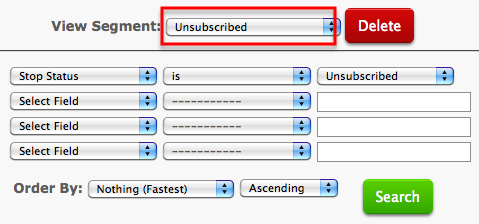 When you see the list displayed below, just erase all the names on this “You don’t want my tips, your loss” sorry list.
Double/Confirmed Optin Email Marketing List
Before I go on to the next step, let me explain something.
When I wrote my Aweber review, many commentators said that they wouldn’t use Aweber because it requires a double (confirmed) opt-in.
What is a double opt-in?
With this option, instead of you sending your new subscribers directly to the product download page, you politely ask them to check their email inbox and confirm that they indeed would like to get information from you.
By the way, Aweber DOES give you an option to turn off double optin and that’s exactly what I did in the beginning of my “how to build an email list” career.
The reason bloggers do it is because your list grows faster, and when you are a beginner blogger, you want those numbers to be high no matter what.
Partially, it’s because the size of our list becomes one of the factors by which we measure our blogging success - for all the wrong reasons.
As I learned from my personal experience, here’s the problem with no double optin way of building your list: what’s the point of having a big list if only a small percentage of people every open your emails or click on the links in them?
Isn’t that the point of building an optin email marketing list to begin with? To provide your subscribers with value and ask for a sale every once in a while? But if no one opens your emails, what your ROI would be?
I now use double optin and realized I should’ve done it from the very beginning. It
- gives me proof that someone actually subscribed to my list without me twisting their arm;
- I get a lot fewer unsubscribers;
- I get no spam complaints;
- my open and click rates improved dramatically.
And that’s why YOU should always use double confirmed opt-in.
Step 2. Remove the “Not Confirmed”
So now that you use your confirmed optin option, you’ll realize that so many people sign up just in hopes of getting your freebie without any intention of staying on your list.
Away with them.
I actually spoke with an Aweber representative about this and other “list cleaning” issues (because the next step literally took my breath away and I had to speak to someone to confirm that what I was seeing was correct) and I was told that if a subscriber doesn’t confirm their request for information within 30 days, they will be automatically removed by Aweber system.
I am sure they do, but to be doubly sure, I still do it by hand as well.
Once again, you do this under Subscribers ==> Search tab.
Since a picture is worth a thousand words, here’s a screenshot of the options you should choose:
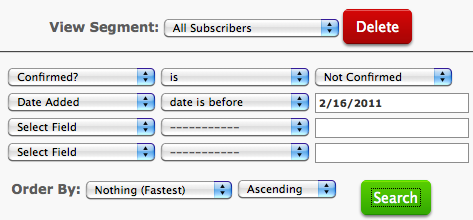 As you can see, it’s important to choose a date in the second field - you don’t want to accidentally delete new subscribers who haven’t had a chance to confirm their optin.
Note: if you had turned off double optin in the past, like I did, but now went back to it, your numbers will be all wrong, because it’ll basically show you your entire list is unconfirmed, which technically it is. So make sure you delete only more recent unconfirmed subscribers.
Step 3. Remove the “Un-opens”
Ever wonder why your open rate is so low (mine was between 20-30%, which I considered very low)?
I was blown away to find out that about half of my list NEVER opened my emails.
Many subscribers will go to such lengths as to create a special email address for your follow-up emails, thanks to the abundance of free email providers, so your emails get collected into this giant “I don’t care what you have to say” vacuum no one ever visits.
So when I went to clear out my list of unopens… well, I already told you what happened: I couldn’t believe my own eyes and rushed to call Aweber to make sure that what I was seeing was correct.
Roughly HALF of my optin email marketing list hasn’t opened emails for MONTHS.
No wonder my open rate was so low!
Yes, it hurt to delete all those names. But it had to be done.
Of course, you can give these folks one more chance to “activate” their interest in your emails by sending them a discount or a special offer of sorts.
I didn’t do it though.
In my opinion, I am already pouring out my heart and soul into producing quality content on this blog.
I am not in favor of begging people to join or stay on my email list.
So here’s what you do for this step of your email marketing list cleaning:
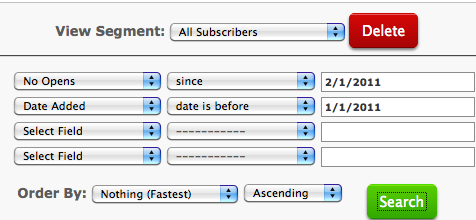 Let me explain what I did here:
- Out of all subscribers, I chose the “no opens” option and set the date almost 1.5 months ago - to be on the safe side. Basically that means that this particular group of people hasn’t opened a single email for over a month. Of course, you can be much more conservative here.
- Then I added another segment “date added” to make sure I included only people who have been on my list for a while.
Voila!
My list was quickly reduced by several hundred of subscribers who could care less whether they heard from me or not.
Email Marketing Wakeup Call
If you don’t have a list, you need one and I bet you already know that.
There’s no better time to start than NOW.
Make sure you start it right though and use confirmed optin - it will save you a lot of trouble later.
And if you don’t have any freebie to give away to your subscribers, don’t worry: just use my 7 Steps to Complete Search Engine Domination report - you have full distribution rights to it, as long as you don’t try to sell it or change anything in it. 🙂
Also, make sure you are thinking long-term and pick the best autoresponder around: Aweber. Most bloggers, big or small, use it and are very happy with the results.
Join us here:

Optin Email List Marketing Takeaway
Remember the goal: not the biggest list you can built, but the most responsive one.
Make sure you make use of confirmed optin option, clean up your list every once in a while and stay in touch with those subscribers who actually want to hear from you.
Start Your Own Email Marketing List for Only $1.00
If you haven’t started building your list yet, let me tell you - you are missing out big time. My list is number one reason I make the money I make with this blog and have such a strong readership.
Aweber is the best email autoresponder I have even used. And I am not the only one. Many A-list bloggers I know also use it for their businesses. This segmentation feature is just one tiny example of what you can do to improve your email marketing with Aweber.
Aweber offers a $1 trial month for all new customers. You’ll have access to all features a paid account is entitled to: unlimited lists, email campaigns, automatic follow-ups, broadcasts, and many, many more. If after 30 days you don’t like them, just let them know and Aweber will give you your $1 back. Guaranteed.


Hi Ana,
I am about to start building my list and i want to reduce the running cost, so i am thinking about using an email list provider who provides a free account as long as my subscribers are less than 500 persons.
After that i would use aweber or stay with the same provider, so what do you think? should i proceed with that or use aweber from the beginning?
I went with Aweber from start, Ali, because I’d read about all the problems various marketers had had loosing some of their list during a transfer.
In the end, your business - your decision.
Thank you Ana for the advice. I will also use aweber to avoid any problems in the future.
Rachael Macgregor says
YOWZERS. I clear off about 7K
I know a lot were duplicate email address as I have several (as in FIFTY) lists, but man, that was a lot of extra inactive addresses to be paying to store!
Think I probably saved myself over $100 a month.
Thanks hun!
Rachael Macgregor
You are so very welcome, Rachael.
Wow, 50 lists?! That’s a lot to keep track of!
You’re welcome, Vijay. I know it’s painful, but as you say, what’s the point if they are not going to read it?
As you said, Ana,
They don’t want your awesome, eye-opening advice, their loss.
Take a deeeeep breath and Delete, guys!
I’m about to get started on my e-biz and I regularly read your posts, I find them very useful, detailed, well-written and, above all, Practical.
Agreed. And thank you for the great compliment.
This is really good Ana,
I use Feedblitz for Seven Sentences Email List but I am sure that i could do a similar thing, I already have a double opt in which is good, but I am sure why open rate could be at 50 to 60%.
Going to go check now.
Mind you I kind of like knowing who doesn’t open. Especially when I meet these people and they tell me that they love reading my blog — but secretly I know they havn’t opened it in months.
Makes me smile. You are awesome.
Geoff
Yes, I also like to have a chuckle to myself about that. Thanks for stopping by.
Great article. It is important to have a definite list of who the actual subscribers are and in order to ensure we are not wasting our time, regular cleaning of lists should be practiced. Although AWeber does have automated systems to do this, manually cleaning is a great idea! Thank you for sharing.
Yes, I do use the automated systems, but it is a good idea to do it manually too. Thanks for visiting, Zarina.
Glad you found that advice useful. 🙂
Thanks Ana… your words inspired me to do some house cleaning.. in fact, the first one I’ve done! Now I feel dumb, paying for all those list members who never opened an email or unsubscribed!
I love what you say…. the money is not in the list, it’s in the relationship you build with your list. Up until recently I have been focused more on numbers, but lately I’ve been working more on providing valuable content and “taking good care” of my email list subscribers.
I’m sure it will make a big difference when it comes time to introduce them to a product or two.
Thanks again, Ana.
I’ll never buy a list - it hurts way too much to remove those contacts who don’t open the mail. You are right, you will see the result when you market to them.
Hi Ana,
I have never cleaned my list, and now that I have, I understand that I should have been doing this a long time ago. What I couldn’t find was the option of “no opens”? I looked everywhere, but still can’t find it. Do you have an upgraded version of AWeber?
Thanks again for the brilliant tips.
I do have the upgraded version and yes, if I remember correctly, that is a premium feature.
Great article. I think the double-opt in feature should be used since it is a good security measure. We can make sure legimate subscribers are added to our list and that the email addresses weren’t entered from nowhere.
Yes, Zarina, that’s absolutely correct.
Chuck Rylant says
This is excellent information that I’ve never considered. Thanks for sharing.
thank you for this information. it was a great resource. so, interestingly enough, however, Aweber will not allow me to delete my non-confirms…and, i have also noticed that Aweber does not recognize (or cannot rather) when someone has opened your email from a mobile phone. i know this because I am the first person who subscribed to my list (to catch any errors i may have missed before anyone else gets an email) and i open ALL of mine from my phone…yet i am on the no-open list. Well, thanks again…cheers.
Thanks for the heads up, Ana.
Just like you, I was advised to turn the double optin off when I was starting out with Aweber.
I think they must be make it compulsory since they’re giving you an option to turn it on and off now.
I’ll be cleaning my list, so tired of paying for the dead bodies!
Thanks for sharing this.
Mavis
When I was on the phone with Aweber, they tried to tell me that even when the double-optin is off, it’s not entirely off - I couldn’t quite get how they keep tabs on this, but apparently they do. 🙂
Happy cleaning!
Codrut Turcanu says
I’d not delete people who did not opt-in my emails, unless I sent them at least 7 follow-ups and none opened, as you and I both know, people do not open for various reasons not necessarily because they don’t like your content or offers.
I don’t think a polite and well written new email is going to change people’s minds. If they haven’t confirmed yet most probably they won’t do it. And if they do, most probably you won’t get conversions from them. If someone is really interested on you they will sign up again.
I totally agree with your approach, Ana. Quality over quantity.
Good info about cleaning your list.
Years ago I used Get Response, but for a number of years now I’ve been using a software based system. I love it because I have complete control of my own list and don’t have to pay anything for keeping or mailing to the list. It’s an option that might work for some of your readers, too, depending on their needs.
To be quite honest with you, Alison, I’ve never heard of anyone using a software of sorts for list keeping tasks…
I wonder why…
I might do some research into this, if I can ever find time.
After thinking about it, I wanted to add something.
I will definitely get more clicks in my newsletters by turning off double-optin. There are more people on my list that can potentially receive my emails. But yes, my clickthrough and open rate will be much lower.
In your article, you say “the size of our list becomes one of the factors by which we measure our blogging success”. But by enabling double-optin and cleaning your list, you now measure your success using clickthrough and open rate and not number of clicks.
By having the double-optin disabled, I can still clean my lists by removing subscribers which have not opened my emails recently all the while growing my list faster and getting more clicks in my newsletters.
What other good reasons are there to enable the double-optin apart from augmenting the clickthrough and open rate and diminishing the spam complaints? It will not cost much more money to have a bigger list.
I really want to believe in double-optin but I am not yet convinced. 😉
Thanks for everyone’s input
Very valid question, Alex.
The best answer to it you’ll find in one of the comments below from Ari Herzog: if you are located in the U.S. or Canada, it’s ILLEGAL for you to send out an email newsletter without a double optin.
Now if that doesn’t do it for you 🙂 , then here’s another thought, which made me switch back to double opt-in.
Metrics and analytics.
To know how effective your email marketing campaigns are you need to keep a close eye on who is opening what; what topics are hot; what headlines work the best; what time of the day you should send out your newsletter, etc.
If over half of your list NEVER opens your email, your metrics will be way off.
Obviously, choosing quantity over quality is absolutely your choice, other than that legal matter I mentioned above.
Ana
Yea great Post Anna,
Youve raised alot of good issues here and ur right, its better having a tiny responsive list than a big list with no relationships..
Didnt know about their pricing structure though..
have to check that out..
cheers
Good to see you, Jack.
Yes, many autoresponders structure their pricing that way. So it literally pays to keep your list clean and tidy.
As usual, another great tutorial. Thanks, Ana!
I have itty-bitty lists, so I’ve never played with AWebers advanced reporting screen.
Thanks for sharing your cleaning techniques. If nothing else, I can now make sense of the “open rate” statistic.
Cheers,
Mitch
N.B. The floating widget on the right side obscures the text of your posts (Firefox 3.6.15) It works fine in Chrome, so it may be a setting issue on my PC.
You never know - one of these days you might get yourself a huge list you won’t know what to do with, Mitch.
…Oh, wait; you will know what to do with it - clean it up! 🙂
PS Thanks for letting me know. I use Firefox as well, the latest version, and it looks fine on mine.
LOL! Good point, Ana. You just reminded me to bookmark this post 🙂
Cheers,
Mitch
P.S. Glad it’s not Firefox. Probably a setting or plugin on my profile.
Ana, thanks for the eye opener. I am taking action on my list right at the next tab while typing this comment.
Cheers,
Jane.
I hope it won’t be as bad as mine was, Jane. 🙂
Hi Ana,
Great advice on this. I really need to go clean up my list and I have been lazy about it. Thanks for the heads up on cleaning up the subscriber list!
Sherman
You are welcome, Sherman.
I was lazy about it until it started costing me money. 🙂
As usual a rockin brilliant post from yourself.
What can I say you are great!
This stuff is gold dust.
I am hanging on to every word
Warmest
Phill
Hey Ana,
I’ve always cleaned up my list because like you said, they’ll charge you for it down the road even though they unsubscribed. And I’m happy to say I’ve always had the double opt-in in place since building my list.
I’m thrilled to be able to report that I only have a few that haven’t opened theirs at all this year but I’m sure my list is no where near the size of your either. My open rate is really good too so I must be doing something right.
Great post and a great reminder for many.
Thanks for sharing.
Adrienne
I will take good open rate over the size of the list any day, Adrienne - you are definitely doing something right!
This is a totally awesome tip. I have 29 lists for various things and am heading over to AWeber to do some major house cleaning. I really like the ideas of simply removing people that haven’t opened anything for months too. For anyone sending out regular emails low open rates can be very disheartening. This is a great way to help keep the hope alive.
That’s exactly how I felt - disheartened, Robert.
No more though. Now I know that most people on my lists actually want to be there.
I agree 110% that double opt-in is the only way to go. For both the legal reasons stated above in comments and for the practical reason that anybody who is going to be willing to actually open your e-mails and act on them is going to be willing to do a double opt-in.
Thanks also for the gentle reminder of doing some spring cleaning on my list. It has probably been a few months since I’ve gone through the steps of decreasing the list deadweight.
Thanks for coming by, Steve!
I absolutely agree on double-optin: having been on both sides, I like the confirmed side much better.
Ana I agree with you that quality versus quantity is what it’s all about. Period.
We live in a world, especially online where the belief that “bigger is better” rules. What a most ridiculous illusion to be victim to.
What I most like about what you’re doing is that you are taking control of your list by cutting away the dead wood so that you’re left with a responsive list.
There is no point in attempting to change the nature of your list as there will always be dead wood that floats in. You can’t control this by doing anything more than implementing the double op in which you’re already doing.
~Marcus
Now I am looking for bigger quantity and quality in my list at the same time - wouldn’t that be great, Marcus! 🙂
Hi Ana:
This is something I REALLY need to do. I get frustrated with the unopens and have just let them sit there. I dont want to have to pay for people who don’t even open my brilliance! 🙂
Love that your back!
Lisa
Worst part for me was that I did start paying for the dead wait until I realized what I needed to do about it.
All better know. 🙂
I don’t know where you live, Ana, but in both the United States and Canada (if not other countries) it is illegal to send someone an email newsletter (which an emailed blog subscription is) without double opt-in. Don’t risk being sued; include the double opt-in.
http://business.ftc.gov/documents/bus61-can-spam-act-compliance-guide-business
http://www.ic.gc.ca/eic/site/ecic-ceac.nsf/eng/h_gv00567.html
Very wise point, Ari, and I had no idea it was actually illegal.
All the more reason to make sure we all use double opt-in - stay on the right side of the law and build a healthier list.
Thanks for the link!
Ana - Good advice. Another reason to clean up your e-mail list is to protect against being blacklisted by e-mail hosts. Too many bounce backs or recipients that mark your e-mails as spam, and you could be at risk of getting blacklisted and not having your e-mails delivered at all. In particular if you use words that appear on e-mail spam filter lists (as an example “free”), I would recommend being vigilant about cleaning up your list as the combination of bounce backs and filtered words can land you on blacklists. The following is a list of 100 e-mail filtered word that can lead to trouble, particularly when used in subject lines. blog.mannixmarketing.com/2009/08/spam-trigger-words/
As always, wise advice, Randy.
Thanks for the link!
I read that post on John Chow’s blog earlier this month. I am using MailChimp now because it is free. I will eventually switch over to Aweber because they seem to be the Mailing List choice for most high traffic bloggers.
We’ve had quite a discussion about MailChimp in comments at this post: https://trafficgenerationcafe.online/best-aweber-autoresponder-review/
Aweber is definitely the way to go, Justin; I agree.
Ana
I remember doing this kind of cleanups with one of our project’s mailing lists on MailChimp, it’s always sad to see the REAL numbers behind the apparent ones, especially when you have this kind of no-openers behavior. However, it’s necessary as you say, so kudos for the nice heads up 🙂
Sad? Shocking!!!
This was my first-ever in-depth cleanup. Next time I will at least know what to expect. 🙂
Ana,
I am with you on using aWeber. I have been so pleased with their service.
“Remember the goal: not the biggest list you can built, but the most responsive one.” Yes!
I appreciate this detailed training and I will follow your guide next time I am in updating my aWeber account.
Glad to hear these tips will be used, Sheila. Hope you wouldn’t be as shocked as I was when I found out how big my true list was. 🙂
Hi Ana… I’m just starting to build my list through Aweber, and I didn’t know they charge per name in the database. That’s even more of an incentive to keep yous list clean.
I just sent out my first newsletter via Aweber this morning and when I look at my Quick Stats Summary, I can see who’s opening. What’s really cool is that you can instantly segment these subscribers into a sub-list. Of course my list isn’t big enough for this yet. But if you sell a product, I definitely see the value of having instant access to a hyper responsive audience.
You got my wheels turning!
So glad to hear that, Dahlia - it’s amazing what you can do with analytics, isn’t it?
Look forward to seeing your list grow!
Ana
I really have to go clean up my list.. my open rate is usually around 30-40%, but I’m sure it could be much higher if I delete those who haven’t opened one in months..
thanks for sharing Ana
You are welcome, Hector - it makes a whole lot of business sense to do this every once in a while.
Hi Ana,
Some good tips there, and since I thought aweber signed you up at certain levels, and not by subscriber, I would have been paying a lot more than I should. I like the dishwashing tip, too. Your dog can take over the task of rinsing the dishes before you put them in the dishwasher. Pretty neat! 🙂
Lou
Yes, I am very good at dishing out cleaning tips, Lou. 🙂
I’ve been paying for a whole lot more subscribers than I should’ve; no more.