February 2011

sunday coffee with anaAs most of you know, there won’t be a live Sunday Coffee with Ana broadcast today.

I know you are very sad. :(

However, I am not letting you off the hook that easily. Everybody is entitled to my opinion and I am going to give it to you on the topic of networking, social engagement, and the lack thereof.

If you think you’ve heard it all and know it all, then let me tell you: you missed a big piece along the way since your business is not where you’d like for it to be.

Am I right?

And trust me, I am not excluding myself from this; I am just as guilty and that’s about to change.

Questions:

I had a few questions regarding some of the products I use on TGC.

1. MaxBlogPress Subscribers Magnet

“Ana,
I took a look at this, but the Max Blog Press website says that sales have been stopped for now - provide contact info to join their waiting list.
Too bad - it looked like a great product.” ~ Greg
Hi, Greg - you are right, the MaxBlogPress Subscribers Magnet has been closed for a while now.

However, it’s being re-launched and will open back up on Tuesday, February 15. It’ll be offered for only $97, compared to the regular price of $147.

For now, check out this link https://trafficgenerationcafe.online/boost-link-building; make sure to opt in and they’ll let you know when the shopping frenzy begins.

2. TweetAdder vs MarketMeSweet: Which One?
“I am trying to decide between Tweet Adder and MarketMeSuite. They seem pretty much the same but the feature in Tweet Adder for Re-tweeting is perfect for my authors but I do like the marketing aspect within MMS that allows you to put your link at the bottom of each tweet. What to do?” ~ Mike Webb
I can definitely relate to your dilemma, Mike! :)

That’s why I own both. I use TweetAdder for most of my following, market research, etc. However, I use MMS for all my day-to-day social engagements. By the way, did you see MMS new Facebook signatures feature? Awesome.

facebook signature with marketmesuite
Whatever you decide, either product will be great and… yes, incomplete. :)
3. Guest Posting
This time we are not talking about guest posting on other blogs; rather inviting guest writers to write for us.
Here’s the question:
“Based on what you know from your own and others’ experience, what is the minimum traffic level to start inviting guest posts? I have only recently reached 1,000 visitors/month with Web Tracking Guide (it’s 2 months old).”
As you can imagine, there’s no right or wrong answer here.
You can always try: make a page about guest posting on your blog and start talking to other bloggers who write good stuff, but who “haven’t gotten there yet”.

If their traffic is around the same, they might be apt to write a guest post for you. If their traffic is much more than yours, they might snob you.

However, any time to request guest posts is good time!

From my personal experience, finding quality guest writers is a challenge no matter what stage your blog is at.
Even I have to beg people to write for me, and even when they do, most of the time it’s terrible posts that they wouldn’t publish on their own blogs…
Have a great move, Val! (Val is moving from Ukraine all the way to Berlin this week - let’s wish him a safe journey!)

This Week on Traffic Generation Cafe

Yes, Start Engaging with Others by starting engaging with me.
Monday Why All Your Make Money Blogging Efforts Will Fail Without This
There is one cornerstone principle that will make or break your aspiration of becoming a professional blogger - we’ll talk about that, and I’ll strongly urge you to give me about 5 seconds of your time to take a quick poll.
Tuesday Got Traffic? So What?
Learning to turn your visitors into subscribers is the single most important thing you can do today to monetize your online business, and you know the best part? It’s entirely UNDER your CONTROL.
Wednesday How To Write Titles With Teeth
Not all that good at writing great headlines? Suck at it? Wait till you read this post. If nothing else, you’ll get a great laugh.
Thursday Still working on the post - I am sure it’ll be great!
Friday Blog Audit Friday: Traffic Generation Cafe at Your Mercy
You are going to love this one! Not only this is one of the most popular days around here, but this time you get to tell me what you REALLY think of me and my blog. Remember, the only way to improve is to know what it is wrong and I need your help with that. Hold nothing back!
Sunday Sunday Coffee with Ana
Still no live broadcast, but I am sure I’ll have a thing or two to say - it’s shutting up that I have problems with! Please send me your questions throughout the week; I’d love to take a shot at them on Sunday.

Marketing Takeaway

If you don’t know anyone, no one will know you.
Let me know who you are! Leave comments, start debates, ask questions - stop lurking behind the scenes, in other words.
SHOW ME YOU ARE ALIVE!

ana hoffman yournetbiz

{ 85 comments }

blog traffic white glove challenge image

Hey, you!...Yes, YOU!

A couple of weeks ago I threw a white glove in your face challenging you to come up with a great post based on my 202 Bite Sized Tips To Increase Your Blog Traffic post.

If you haven’t read the original post, take a look at it first:

Before I go ahead and tell you about some of my favorite entries, I need to say this:

WHAT’S GOING ON?

Why do I have to beg bloggers to write an original post for THEIR OWN blogs? Why do I have to convince you that getting a link from a post on TGC is some of the best link building you can do and all you need to do is… yes, write for YOUR blog!

Needless to say, I was disappointed with how many of you actually walked the walk.

OK… take a deep breath…

I did absolutely love some of your posts though - I saw your heart and soul went into this and these posts once again proved why your blogs are growing by leaps and bounds and will certainly continue to grow.

So here are some of my favorites. If your blog didn’t make it this time, I would love for you not to give up and give it another go.

Listing in the order I got them:

1. 101 Surefire Ways To Attract Targeted and Endless Prospects

By Mavis Nong from AttractionMarketingOnline.com

What I loved about it:

It’s not easy to come up with 101 tips on any topic, especially on how to attract the right prospects to your business.

Why “especially”? Because there are not very many people who talk or write about it to the extent Mavis does, yet this is one thing that is a must for ANY online business.

Thanks, Mavis!

2. Internet Marketing: Hey Yo, You Talkin’ To Me?

By Lisa Drubec from TheFriendlyBlogger.com

What I loved about it:

Lisa based her post on Tip #151. Make a post about what in your niche is being done wrong and how to correct it.

I learned a new word, learned that I am not a guru and neither do I want to be one, and decided not to get on Lisa’s bad side… Just kidding on the last one. :)

This was definitely an incredible post identifying the problems in internet marketing niche and providing solutions.

I so much liked her solution that I am thinking of actually doing it. Seriously…

3. 77 Best Practices for Landing Pages That Rise Above Status Quo

By Sheila Atwood from NewbieLifeline.com

What I loved about it:

For some reason, I really have hard time convincing bloggers that traffic conversion is at least as important, if not MORE important, than traffic generation.

Wouldn’t you rather have 100 visitors, of which 10 became customers, vs 1000 visitors, of which only 10 became customers? Of course, some of this has to do with the quality of your traffic, but if your blog doesn’t make people want to take action, then what’s the point of having a blog, right?

Well, Sheila’s post goes to the heart of this and gives you an abundance of quick tips you can put into action within minutes - and GREATLY improve how compelling your site is to your visitors.

I HIGHLY recommend you check out this post, and not only that, but actually implement at least some of those tips.

4. 101 Strategies To Drive Traffic To Your Website or Blog

By Phill Turner from PhillTurner.com

What I loved about it:

No, these are not nearly the same tips I offered in my original post.

In fact, I saw quite a few I haven’t thought of - including some inexpensive paid methods that have great potential.

Once again, this is not the kind of post you check out and say “wow, great tips!“. These tips are only as good as you implementing them.

5. Twitter trend – Nicholas Cardot

By Brankica Underwood from Live-Your-Love.com

What I loved about it:

I think I am going to go ahead and say “everything”.

Brankica based her post on Tip #193. Do a Twitter search on a particular subject, compile them in photoshop and do a review of the trend.

And she couldn’t have picked a better person to talk about - the all-around cool and sociable Nicholas Cardot.

Just take a look at how masterfully Brankica turned some fairly ordinary information, like a bunch of tweets, into an eye-candy.

Brilliant!

PS: I so loved what she said about Nicholas that I actually challenge him to a duel - you guessed it: I love me a good challenge (I stole this phrase from Lisa the FriendlyBlogger :)

The challenge: Twitter and how to get the most out of it. Stay tuned!

6. 8 Blogging Tips From Expert Bloggers: Why I Love Comment Spam

By Cheryl Ragsdale from ThatGirlIsFunny.com

What I loved about it:

I would classify this post under Tip #174. Be a comedian – “They’ll be standing in line for that old honky-tonk monkey shine!”, although it’s more than that.

First of all, a little background: I’ve never heard of Cheryl until I saw her trackback to my blog. Since I always visit every blog that links to me, I went ahead and paid her a visit as well.

Long story short: she made a fan out of me! Goes to show that no matter what stage of blogging you are in, let your content be incredible and speak for itself and the readers will flock to your like bees to honey.

Back to her post.

Essentially, it’s one of those “speedlinking” posts, where a blogger links to a bunch of other blogs that they read and found interesting that week.

A little honesty: I am not a big fan of those kinds of posts - unless I am mentioned there, that is. :) Truth is I don’t have time to visit 10-20 links - at best, I leave a polite comment and bookmark it to never come back to it.

Cheryl did something different though. She gave me a good laugh first and then hit me with those links. Because I already liked her and her post so much, I actually did check out some of her suggestions, which turned out to be quite good.

Anyway, if I ever do a link mashup type post, this is the way I’d do it.

Great work, Cheryl!

Marketing Takeaway:

Yes, this could’ve been you, getting a write-up and a DoFollow link from this post. But I suppose I gave you enough grief on that already. :)

Now you have a chance to redeem yourself and go implement at least some of those incredible tips these great bloggers wrote about.

And, as always, I’d love to hear what you thought about this!

ana hoffman blog traffic challenge

{ 56 comments }

How to Get Targeted Twitter Followers the Easy Way

how to get followers on twitter image

Groovy, baby!

Not too long ago, you and I had a heart-to-heart on what it really takes to get targeted traffic from Twitter: quality or quantity.

Here’s the original post on that, to refresh your memory:

I was really looking forward to your comments on that post and was really surprised: turned out that you largely agreed with me that you’d rather generate TONS of Twitter traffic, bring them to your blog, and network with them there as opposed to spending every waking minute of your day (and night, in most cases), cultivating the relationships there just to see tweeple stopping using Twitter in about 30 days or so.

Wow, that was one long sentence… Give me a minute; I need to catch my breath…

OK, so…. The reason I wrote that post to begin with was the fact that Twitter stopped being my largest referral traffic source. And it all happened right after I started testing the notion of “quality over quantity“.

Now don’t get me wrong. I am not a spammer who blindly follows thousands of people just to spam them with self-serving links.

Nothing further from the truth, as a matter of fact. Just check out my main account @WebTrafficCafe - you’ll see nothing but quality there.

Yes, quality still matters.

However, spread that quality to as MANY Twitter followers as YOU CAN GET.

That’s my Twitter motto.

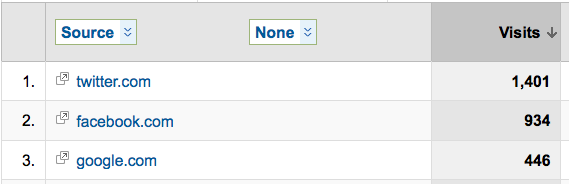
Yes, right after I wrote that post (or right before - can’t really remember), I went back to my old ways of getting as many Twitter followers as possible, and lookie here:

twitter traffic generation google analytics image

It’s back to number one spot - BY FAR.

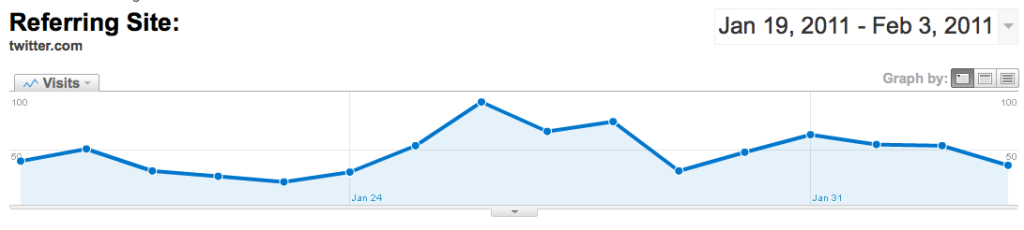
And here’s another one:

twitter traffic generation graphThis is a span of 2 weeks - granted, not a huge amount of time, but remember this is not the first time I went for quantity Twitter traffic generation.

I wrote my previous post on the 27 of January and that’s about when I started getting more followers my way - you can seek the peak of traffic corresponding to those dates.

How to Get Quality Twitter Followers

Want to have some?

Follow these steps:

  1. Create several Twitter accounts - I would recommend 5. They should all be personal (remember, we don’t spam people) and reflect different aspects of your business or your personality. For instance, my accounts are: @Christpreneurs (because I am a Christian), @Mompreneurs (because I am a mom), @SuitcaseCafe (because I love to travel and my primary business has a travel section), @YourNetBizCafe (because it’s my primary business), and @YourNewsFeed (because I love to stay in touch with what’s going on in the industry). And now you know all of my Twitter shenanigans. :)
  2. Get TweetAdder - this is a must; there’s no way you can do this by hand and trust me, this one is worth every penny of it.
  3. Search for TARGETED potential followers - people who might be interested in what you have to offer.
  4. Start adding them on a daily basis - while watching Twitter limits of course.
  5. Send them a killer DM message, bribing them to come to your blog.
  6. Automatically tweet other people’s blogs as well as yours - that way you’ll always have fresh content posted to all your accounts without any effort on your part. Both TweetAdder and MarketMeSuite will do that for you.
  7. Monitor your @Mentions - make sure you get back to any of your followers when they ask a question, RT your content, or simple stop by to say Hello.

All in all, my Twitter involvement is about 20-30 minutes per day. I let TweetAdder do the rest.

Results? As you saw in the screen shots above, I get thousands of new visitors per month - with very little work.

Marketing Takeaway

Once again, I am not proposing to spam Twitter; just use it more efficiently.

The floor is yours: how’s your Twitter traffic generation going and are you considering doing it my way?

ana hoffman get twitter followers

{ 91 comments }

traffic generation via podcasts

Making sense of traffic generation...

It is 100X easier to get Itunes traffic than it is to get Google traffic and in this post I’m not only going to prove that to you, I’m also going to show you how.

Excited? You should be!

Ana & Her Love For SEO

Now, we all know Ana is all for SEO.

On page and off page tactics, link building, keyword research, and h1 tags are all things you need to learn if you want to rank higher in Google the search engines. Over the past 6 months, she’s provided more than enough information to make you an SEO expert.

I’ve even gone to Ana with some questions pertaining to on-page SEO that she happily helped me out with.

But here’s the thing about SEO, and I’m sure she will agree - it takes time.

It takes time to see traffic coming in from your targeted keywords, even if they’re long tail.

Those who follow me at my blog know that I don’t talk much about it there. It’s a topic that I rather leave to the experts (like Ana) to deal with.

Your Unbelievable Advantage With Podcasting

If you want to start podcasting, you have an unbelievable advantage over those who don’t know jack about SEO.

Here’s why: iTunes is its own search engine. Right now, there are over 100 million active users (with credit cards) on iTunes. That’s like saying it’s a marketplace filled with buyers.

iTunes ranks podcasts based on different elements.

Just like a blog or a website, your podcast has a title, a description, keywords, and “votes”.

If you’ve been studying SEO for any length of time, you’ve probably heard of incoming links described as “popularity votes” for your blog; and the more links you have coming in, the better your site will rank.

Well, iTunes has a rate and review feature that allows your listeners to rate and review your podcast. The better your ratings, the better you’ll rank.

I’m sure they have a more complex algorithm that I wouldn’t know how to explain to you, but what I’ve been doing has been working very well for me in terms of ranking.

Here’s How I Know This Works

podcasting for traffic generation image

Besides the thank you emails, tweets and increase in subscriber count over the past 2 months, I can actually show you how my website ranks in iTunes for a few of my best keywords. These are keywords that would take me years to rank for in Google; if at all possible.

In Google the term “Blogging” has 68 million competing pages. “Internet Business” has 1.1 billion competing pages and “Traffic Generation” has 11.5 million.

Now, let’s go see how well I do for these terms in iTunes.

Check out the video below:

You see why knowing how SEO works will help you rank better in iTunes?

This is the part where you thank Ana for all she’s taught you. :)

If you have any questions or feedback about anything we’ve discussed, feel free to leave it in the comment section below.

{ 43 comments }

how to generate traffic with interviews

One of a Kind Traffic

When Ana suggested that I write a post for her site about how I got started, it really made me think.

I had forgotten about the many attempts I had made and the heartaches I created for myself, galloping off on what I thought were the routes to success.

I was wrong! I realized that no amount of energy and enthusiasm can replace knowledge and experience.

I lacked direction.

But, where to go, what to do?

The answer came to me in a flash. I needed a mentor. Someone whose advice would be personal to me, recognizing my strengths and weaknesses.

That’s what I got. An expert who through talking to me and probing my expectations and ambitions told me “You should do interviews”.

What a great idea! Something I would really enjoy doing, which would give me great content both for my blog and products…

But could I do it? Little did I know that in the process I would gain invaluable knowledge on where I had been going wrong in my own business and considerably increased exposure to the internet world.

Traffic Generated Through Interviews

So here I go, interviewing people whose names I had only heard mentioned with immense respect and with whom I never dreamed I would get the opportunity to speak.

Believe me, it took an immense amount of courage to initiate contact and ask if they would do an interview for me. Unbelievably scary!

But they were very polite and helpful, not dismissive as I had imagined at all, and oh how glad I am that I plucked up the courage to go for it!

It took about 25 contacts to arrange the 12 interviews. I’m nothing if not persistent.

I created an incredible product from the first round of 12 interviews, but not only that.

As a bonus I’ve also gained all of the following benefits, which are increasing both traffic and customers.

Incidental Benefits

  • Interviewee Mail Lists - My product was sent to most interviewee’s mail list resulting in mammoth exposure and traffic.
  • Affiliate Sales - My product is being offered on their sites.
  • Associated Contacts - Just having a product associated with these gurus has brought untold interest and credibility to my own expertise.
  • Backlink Traffic - A product promoted by known experts has given it good credibility and brought many visits to my site.
  • Other Products - I am now in the process of repurposing those same interviews in every way I know. Every quality product is a bonus.

What Did I Learn From The Interviews?

The most important thing I learned from each and every interview was to focus my efforts.

There are numerous ways to generate traffic and when I thought about them all, it totally blew my mind. How on earth was I going to be able to do them all?

The answer is very simple. You can’t.

All are relevant, all can be successful, but no-one uses them all.

The way of course is to consider each and every one. Think about what you enjoy doing and dump the rest.

Of these, select the three that you would most enjoy and think will be successful. Direct all your efforts to these three, whatever they are.

If you take pleasure in something you are half way to doing it well.

Research, hard work and experience should do the rest, but mindset and mentality are key to success. Just read Ana’s post Law Of Attraction Marketing: Attitude Determines Altitude and you’ll see.

Once you have made your choices, the next step is to record and monitor your results.

I use free tools: Woopra www.woopra.com as my main source of information and Google Analytics www.google.com/analytics.

If you don’t know why you are getting traffic and where it’s coming from, you have no way to judge whether your selections were justified. If you realize the effort you are putting in is not getting the required results, rethink your strategy and try again.

Last but not least, try new ways from time to time.

Don’t just sit back and assume you have the best and only way. Today’s state of the art soon becomes tomorrow’s old hat.

So keep up to date and be imaginative. Initiate new innovative ideas.

Successful businesses are usually those who offer something very special and totally different.

After my first set of interviews, I set up satellite pages on my website - one with a dedicated link for each of my interviewees. Each page gives that interview free to whomever they give the link and at the same time offers my product for sale.

It worked, I got traffic and conversion.

The Resultant Business Model

So here I am, practicing what I’m preaching. I’m following a strict regime and building on it all the time.

  • Create a process that you will enjoy doing time and time again. (With me it’s interviewing)
  • Concentrate your effort on just three strategies.
  • Write a mind blowing 1st post (I did 101 Ways to Get Traffic to Your Website)
  • Syndicate as much as possible. This gives ongoing circulation and return traffic. I put my first post on Facebook and on the first day it was shared 42 times.
  • Do more posts and continue to strive to create amazing content.
  • Record and analyse your traffic results regularly.
  • Get other like minded associates to include you in their mailing lists.
  • Think of new ways to get traffic and conversion.

I trod that same path that no doubt most budding millionaires have. It took me great effort and persistence and some time to realize the right niche for me.

Luckily I’ve found my way and I love it.

What do you think? Could this be for you ? I’ll look forward to your thoughts in the comments.

Marketing Takeaway from Ana

Phill is definitely everything he says he is and then some.

He is persistent (got me to say yes to him :) ), driven (fairly new to the industry, but already successful), and brilliant (got me to give up some golden traffic generation nuggets during our interview).

His newest product 9 of the World’s Women Experts on Traffic is finally out and the first thing I did was called him and told him that it was unacceptable to give away my best traffic generation secrets practically for free!

I guess “money-savvy” is not on the list of his best qualities. :)

Low price point aside, this is a brilliant product with lots of hands-on traffic generation knowledge - I highly recommend you pick up your copy right NOW:

==>9 of the World’s Women Experts on Traffic

By the way, Phill - where did you dig out that picture of me?

Image Credit: http://www.funnybeez.com/

{ 47 comments }

website traffic generation imageNothing is new under the sun. Nothing is new in website traffic generation.

There’s no traffic generation strategy that one can claim as a “new breakthrough” that someone else hasn’t used years ago. That’s just the way it is.

So where does it leave us?

We need to learn how to use what we have to the fullest, and that’s what this post is all about.

Website Traffic Generation Secret #1: “Diversification

You and I chose to build a business in an immature online world.

Why is it immature?

Take direct mail marketing, for instance. It’s been tested and proven and it works. If you can make it work for your business, you are as good as golden.

Online marketing, however, never stands still. It constantly changes and evolves, keeping us all on our toes, to say the least.

Remember what happened with Adwords? A few changes sent thousands of businesses down the drain; all because they chosen to put all their eggs in one basket.

I don’t know about you, but I want to sleep well at night - whenever I get to sleep, that is.

So I make a point to use as MANY website traffic generation ways as possible: 20-30 different sources at a time.

If any one of these traffic sources goes away for any reason, sure it might hurt a little, but my business will keep running.

Don’t ever think that this one brand NEW website traffic generation source will become the KEY to your future wealth.

Website Traffic Generation Secret #2: “Systemization”

So now that you have 10 or more unique traffic sources bringing you new visitors daily like clockwork, how do you keep track of it all?

Here are 3 simple steps I use to make sense of it all; start with one traffic source at a time:

1. Study: study the new website traffic generation strategy from a trusted authority on the subject, i.e. online course, ebook, training software, etc. Then put what you learned in theory into practice. After all, you’ll never know it works until you try it.

See what I use to master traffic generation:

2. Master: now that you know the new strategy works, you need to test it, tweak it, work on it until it becomes profitable. By “profitable” I mean until you can make one cent more than what you put into it.

3. Autopilot: once you are making one more cent than you invest into it, you need to figure out how to put this strategy on autopilot. That might mean getting automated software or outsourcing the task altogether.

After you complete all three steps, all you need to do is monitor the progress and more on to the next strategy.

Overtime, your sources will continue to grow and your business will start working as a well-oiled machine.

But remember, it all starts with ONE strategy and 3 simple steps to follow to make it work for you.

Website Traffic Generation Secret #3: “Set Goals”

If I were to ask you “What is your purpose of driving traffic to your website?”, would you be able to give me a clear and definite answer?

Let’s dig a bit deeper on this one.

When new visitors come to your website, what do you want them to do?

Subscribe to your RSS feed?

Opt in to your email list?

Check out the affiliate products you offer?

Buy into a membership site you have?

Whatever your goals are, you need to make sure you focus on ONE of them at a time and drive your traffic to fulfill that one specific goal.

Traffic that doesn’t take ACTION is useless and it’s your job to make sure you work on your traffic conversion goals even BEFORE you start driving traffic to your site.

Website Traffic Generation Secret #4: “Track Everything”

I am sure we are talking about something you already know here.

However, you and I both know that there’s a vast difference between knowing and doing.

Tracking your website traffic generation may be your single most money and time saving habit you can acquire.

I am often asked what is my single best secret to traffic generation, as if I were hiding something and as if there were such a thing.

The biggest secret here is you test everything until you find the BEST website traffic generation secret that works for YOU and YOUR business.

One size doesn’t fit all when it comes down to traffic.

Marketing Takeaway

You can’t play an NFL football team, unless you are one yourself.

You can’t create a successful business without knowing the basics.

And what you just read are the basics of website traffic generation. Period.

But I wont’ leave you hanging here, you know that. For the rest of this week, we’ll be learning more about some “less traveled” traffic generation strategies and how to apply them to your business, so STAY TUNED!

Love it or hate it? Comment to show me that you’re alive!

ana hoffman website traffic generation

{ 63 comments }

traffic generation coffee with ana imageWhat better way to spend a Sunday morning than to hang out with other bloggers, network, share some thoughts and links, acquire new friends and possibly new customers/clients?

Can’t beat that and that’s exactly what happened this morning on out Sunday Coffee with Ana live broadcast.

Here’s what you missed:

Questions:

1. HTML code errors

Last week on Sunday Coffee with Ana, we talked little bit about HTML code errors, and I have one more point to add to it.

My number one recommendation still stands: GET A GOOD THEME!

WordPress produces error-free code by itself (so they say, anyway), so most of your code errors result from your theme. If you get a reputable theme, like Thesis (that’s, of course, what I use on this site), then you should have to worry about code errors.

Let me clarify this: ANY theme will still produce errors - one way or another, but not all errors are worth worrying about.

Soooo….

Now that you have a good theme (you do, don’t ya?), take care of any and all errors listed in your Google Webmaster Tools.

Don’t have Google Webmaster Tools? Get it for free at www.google.com/webmasters/tools.

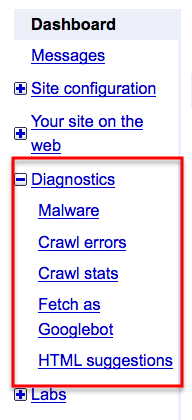
When in your tools, go to Dashboard => Diagnostics, as in:

html errors in google webmaster tools image

These are some of the errors that Google pays attention to, and although some folks would argue with me on this one, I am sure, these are the ones that are definitely worth fixing.

And you don’t need an expert to do this - you should be able to do this all on your own.

2. CommentLuv Tip

For those folks who are using CommentLuv plugin on their blogs (for those of you who don’t, I highly recommend you do): have you ever thought of using CommentLuv to do some deep linking on your own blog?

When you respond to comments on your posts, you always have a choice of including one of your own posts with ComLuv - and I don’t see many bloggers taking advantage of this feature.

Makes sense?

Here’s a screen shot of my point:use comment luv for deep linking

Perfect deep linking tool!

More on deep linking:

3. Anchor Text Tip

I published an anchor text post last week: Your Ultimate Anchor Text Tutorial - from Basic to Advanced.

As I was reading the comments, I stumbled upon a very interesting one and wanted to bring it to your attention.

“Since I am just starting out, I haven’t had the guts yet to use anchor text when backlinking to my niche site other than my keywords (with some variations) or long-tail keywords. I feel like I am “wasting” a backlink.

Is it worth it then to use some more of these random words, i.e., “click here” or “read more” on sites I would otherwise not even leave a link on?

Does that make any sense?” Lonnie from My Income Lab

This makes a whole lot of sense, Lonnie.

You use less targeted anchor text on for lower-quality links, and the dead-on version on the higher quality ones.

Brilliant!

4. Scribe SEO Plugin

What do you think about Brian Clark’s Scribe plug in? Adam Smith

You know, Adam, I’ve been going back and forth on Scribe SEO plugin, but chose to still stick with it and I’ll tell you why.

A little background on the plugin - these are my main reasons to use it:

1. Keywords: Scribe shows you the language searchers use before you begin to write. Once your content is created, Scribe reveals other profitable keywords.

2. Content: Scribe analyzes your natural, reader-focused content, and tells you how to gently tweak it to spoon feed search engines based on 15 SEO best practices.

3. Links: Scribe helps you build back links, crosslink the content within your own site, and identify influential social media users who want to share your stuff.

What I use it on a every post I write:

  • to make sure I make the most of my kewords;
  • to suggest new keywords, I might’ve not thought of;
  • make it a cinch to come up with tags;
  • show me what my post would look like in SERPs - if anything I would change to make it look better;
  • to look up some possible links withing my blog as well as other blogs to links.

All around, I still find it an amazing tool that I am certainly more than willing to cough up $27 per month.

Get your own copy, see what you think and you can always get your money back:

Scribe SEO Made Simple.

There were two other tools suggested along with SEO Scribe: SEMRush and KeywordWInner.

SEMrush is a great tool, but only worth it if you get the pro version. KeywordWInner I know nothing about, other that the fact that everyone is jumping on the bandwagon pasting their affiliate link all over. Is is worth it? I don’t know, but planning on finding out.

5. PostRank at http://www.postrank.com/

Ileane from BacisBlogTips.com suggested PostRank as a great tool to use to track your social media performance.

Here’s an excerpt from there site:

Tap into the intelligence of millions of online users active on the Social Web. PostRank delivers objective, real-time data and analysis on any topic, trend, or interest relevant to you or your business. Learn how you can use PostRank.

Something to test out.

6. Coffee talk

Ana I have to send you some special coffee from Italy! Elena Cobez

Elena - I lived in Germany for 3 years and traveled much of Europe. I can honestly say that I tried the BEST coffee in the world during my travels and refuse to drink American water-down version of it. I am now more of a espresso girl!

7. Trackbacks

One question though what’s the perfect way to get trackback and how to send multiple trackbacks?? Vivek Parmar

Trackback are done automatically between WP blogs. Every time you link to a blog in your post, that blog will be notified via trackback.

If you mention more that one post in your post, ALL those blogs will automatically get notified via trackbacks.

Trackback Tips:

  • link to a specific post vs home page, otherwise the blogger you are linking to will not get a trackback.
  • to make sure you send trackbacks to non-WP blogs, use “send trackbacks” feature you’ll find close to the bottom on the “edit post” page.

trackbacks in wordpress

Using this feature you can ping as many blogs as you would like to.

Traffic Generation Cafe Post Schedule

This week we’ll be talking about… well, traffic generation!

I’ve got some great and fairly unexplored traffic generation strategies to talk about, and here’s your lineup:

Monday: Website Traffic Generation: Practical Secrets To Getting A Lot Of Traffic

I thought it was important to give you some pointers, as I see them, on how to REALLY generate traffic to your site - whatever the niche. This one is full of very useful theory and goes to the heart of Traffic Generation Cafe success.

Tuesday: How I Generated 415 Clicks in 1 Day with Traffic Interviews

Most people I’ve been interviewed by in the past, simply post the interviews on their blog at best. Not this guy. Phill Turner definitely has a knack for knowing who to interview, how to get to them, and how to generate huge amounts of traffic after it’s all said and done.

Wednesday: Podcasting: The Alternate Universe Of Traffic Generation

I didn’t know a thing about podcasting. Not what it really was or how to use it for my business. I bet a few of you do. Well, that’s about to change…

Thursday: How Ana Got Her Twitter Groove Back

An update on my Twitter affairs - not THOSE kinds of affairs, of course. Some of you might be surprised by the results of my Twitter traffic generation test.

Friday: Blog Traffic Challenge: Did You See My Glove Laying Around Here?

Do you remember reading my The Best Bloggers Are Natural Hackers: Show Me What You’ve Got a couple of weeks ago, where I threw a blogging challenge at you? Well, the results are in, and I am very excited to introduce the best entries. By the way, it’s not too late for you to submit your post; just read the rules in the post above and as long as I get it by Thursday, I might still add it to the post.

Sunday: NO LIVE BROADCAST this Sunday!

I will be traveling to Colorado with my family on a skiing trip (or hot chocolate and fire place trip for me personally, I should say :) ). I will still be answering any questions I’ll get during the week and post a video message, but won’t go live on Facebook as I normally would.

Marketing Takeaway

As you can see, this is an incredible opportunity for all to learn, network, build relationship. I won’t be broadcasting live for the next two weeks (family vacation!), but I will be back. :)

Love it or hate it? Comment to show me that you’re alive!

ana hoffman traffic generation cafe

{ 40 comments }

blog audit friday imageBlog Audit Fridays are some of the most extensive and intense posts I write for Traffic Generation Cafe.

Why?

Because they take a lot of time. And because I get to take apart someone’s creation; something they’ve most likely put their sweat and tears into.

However, I strongly believe that this is the only way for us to grow - to receive an honest feedback and suggestions to build a stronger website and in turn business.

Anticipating your questions on how you can get your blog audited by me, here’s my answer: become on of my top commentators and you’ll have a great chance of getting an email from me begging you to let me criticize you - with good intentions of course.

And that’s exactly what happened to this week’s Blog Audit Friday winner (I hope he still feels this way after he reads my post!): he commented, I asked, he said Yes.

SimpleButCreative.com


February 4, 2011

From the laptop of: Ana Hoffman

Dear Kevin:

Thanks so much for being one of my top blog commentators for a few months in a row.

Your presence, intelligent opinions, help to other readers are greatly appreciated and this blog audit is my THANK YOU to you.

Brace yourself! )

***

General Stats

URL: http://www.simplebutcreative.com/

Title: Simplebutcreative - Blogging Tips & Tricks For Beginners (we’ll get to those symbols in your title later)

Description: Simplebutcreative is your number one guide to all that is blogging. Learn how to create your own blog today. Blogging is the best marketing tool in the world.

Google PageRank: PR0

Alexa Rank: 139,520

Indexed pages in Google: 56 (!!!)

Domain Age: 11 months

First Impression

All right; here we go.

So I come to your blog and the first thing I see are ADS! Very top of your sidebar. Bam!

Secondly, I have no idea what your blog is all about and why I should stay.

Your domain name “SimpleButCreative” tells me nothing about the nature of your blog and there’s no tagline to shed any light on it either.

The closest I get to learning about your blog is from the Title all the way at the top of my browser window, but only because I was looking for it. Your average reader won’t.

So what do you do now?

I leave…

Well… not really, I just started. But many of your readers do, I bet. Something to think about.

Design changes to consider

Let’s dig a little bit deeper into your design and see what kind of changes your blog might benefit from:

  1. Already mention the need for a tagline, your motto if you will; something that will immediately tell your readers what the blog is about and how it’ll benefit them.
  2. Move the ads down the sidebar.
  3. Your sidebar is quite cluttered right now; I would add more space between the sections.
  4. I would remove your FB fan page and NetworkedBlogs widgets. Networked blogs you don’t need at all. FB fan page is a good widget to have to get more fan, but when you only have 19 of them (20 with me), it shows NEGATIVE social proof. In other words, it tells your readers “this guy must not be that popular; why should I join him?“. Get more fans first; add the widget to the sidebar later.
  5. You have 2 Connect with Me sections; obviously, one too many. Plus, you display too many ways to connect with you - 8 in all. Too many choices usually means that your readers will not make a choice at all - narrow it down to the essentials only.
  6. I would also remove “Pick Your Topic” section in your sidebar; shows how few posts you really have on your blog.
  7. I suggest you add an opt-in form to your sidebar and get rid of it under your featured post - you’ll make your home page look cleaner and make sure the opt-in form follows your readers wherever they go.
  8. I am not very fond of the way you display your home page posts - the images are huge, makes it look cluttered. The beauty of Thesis theme that you use on your blog is simplicity; in your case, you lost it. Take a look at my home page and you’ll see what I mean.
  9. Post pages: too many big images, Subscribers Magnet opt-in forms are too much in your face, and the dirty pink color you use for your author box… well, I’d change that.

Read more about how to avoid negative social proof in this post:

2. Navigation

The point of a good navigation system is to give your readers enough of diverse ways to explore your blog without making it feel cluttered.

I do like the simplicity of your top navigation bar; 5 tabs - perfect number.

I would however change the order.

I know “Work with Kevin” is your priority tab, but look at it from your readers’ perspective. It would be their last choice to take a look at. Move it to the end.

As your blog grows, I would also add an archive tab to give your readers more opportunities to explore your blog.

The main this I wanted to talk about here is, once again, your sidebar.

Right now you have only two widgets in your sidebar that allows your readers explore your blog further.

Unfortunately, one of them that I already mentioned - category widget - shows more of negative social proof than invites readers to explore your blog.

The other one - recent posts - is great to have, BUT it basically shows the same posts as you can see in the content section of the home page anyway.

My point is: you are loosing your readers by not giving them enough ways to get engaged with your blog.

There are plenty of other widgets to choose from: most popular, most commented on, etc. Make sure you get good use out of them.

Content/Niche Analysis

1. Are you in a good niche?

From what you’ve told me, you’d like to target beginner bloggers.

I say GREAT! to that.

I think we have very few blogs that are truly dedicated to beginners only.

I get SO MANY inquiries from people who are just starting and looking for help in different areas of blogging.

However, I would never send them to your blog, Kevin - as of right now, anyway.

Why?

Because your content doesn’t reflect your goals.

There are very few posts a beginner can truly use to learn how to start a new blog. There are plenty of other blogs that will have TONS of great info for your potential readers, so why should they choose you?

This question goes to the heart of your blog.

If you hope to grow your blog and start making a true income from it, you’ll have to step it up, my friend - no question about it.

2. Niche keywords

I see your keywords in your Meta Keywords, Kevin - and so does the rest of the world.

I would suggest that you take most of your keywords out of that meta tag, leaving only the most generic ones.

Here’s a highly simplified quick tutorial on how to rank on Google for your keywords:

1. Through on-page optimization.

Meaning: use your keywords for that particular post/page in the title and description (better towards the beginning), and throughout your post.

You do it in some places, but not others.

2. Through off-page optimization.

Links, in other words. Links (also referred to as “backlinks”) pointing from other websites to your website.

And not just any links, but links using keywords as your anchor text.

You are definitely NOT doing that.

Most of the links coming to your site have “kevin” as their anchor text.

Given that I just published a nice big post about anchor text and how to properly use it, I won’t rehash the same info here; feel free to take a look at the post:

SEO Analysis

1. Meta Tag Structure

This information is mostly used by search engines to determine your rankings; it’s also what you see in the search engine results pages (SERPs).

META TITLE:

Your title is: Simplebutcreative - Blogging Tips & Tricks For Beginners, but as I noted above, here’s what it looks like to search engines: Simplebutcreative - Blogging Tips & Tricks For Beginners

Why? Because symbols like “-” or “&” are not search engine friendly. That’s why you see most SEO titles look like this: “Traffic Generation Cafe | Generate Targeted Website Blog Traffic“.

You see that “|” symbol, located right above your “enter” key on the keyboard? That’s the best one to use in your titles.

Additionally, your title is not keyword optimized at all - unless you really want to rank for simplebutcreative and not much of anything else.

META DESCRIPTION:

Your description is Simplebutcreative is your number one guide to all that is blogging. Learn how to create your own blog today. Blogging is the best marketing tool in the world.” and in my humble opinion, it’s neither SEO, nor user optimized.

Those 3 sentences are completely disconnected from each other, don’t carry a uniform message and definitely wouldn’t make me click on the link in the search engine results.

I won’t go into SEO aspects of how to make your title and description scream to the search engines RANK ME!; it seems like I do it in every one of my blog audits.

If you’d like to learn more about is and more, download my free 7 Steps to Complete Search Engine Domination report.

2. Heading Tag Structure

These are headings and subheading you use in your posts, sidebars, etc.

Here’s your current tag structure:

[h1] SimpleButCreative
        [h2] The Only 7 Methods Of Making Money With Any Website or Blog
        [h2] Top 5 Social Bookmarking WordPress Plugins – Share Your Blog Post To The World
        [h2] MLM Pyramid Scheme Cartoon By Pat Petrini
        [h2] Don’t Pay For SEO Services! Free SEO Report in Minutes!
        [h2] Goodbye 2010! Here’s to new opportunities…
        [h2] What’s Your Favorite Web Hosting Service – Hostgator Review
        [h2] Thesis Blogussion Theme Bundle Pack
        [h2] How To Submit Your Blog To Technorati
        [h2] How To Install Thesis Theme On WordPress
        [h2] WordPress Plugins That Really Matters
            [h3] Connect With Me
            [h3] Who’s this guy?
            [h3] Check Out The Recent Post
            [h3] Follow My Blog
            [h3] Pick Your Topic
            [h3] My Favorite WordPress Theme
            [h3] Search Simplebutcreative

What it should be for your home page - ideally:

  • H1: Blog’s name (with your main keywords for the blog)
  • H2: Your blog’s tagline - should be keyword-rich
  • H3: Your recent posts
  • H4: related content in the sidebar, like the heading of an “about” widget.
  • H5: Unrelated headings in your sidebar, footer, etc.

Definitely, a few minor changes might help.

What it should be for your posts:

  • H1: post / page title
  • H2′s and H3′s: subheadings and sub-subheadings
  • H4: your blog’s name, and possibly related widgets
  • H5: same as above: sidebars etc.

And here’s what it is:

[h1] The Only 7 Methods Of Making Money With Any Website or Blog
            [h3] Tools That Power My Blog:
                [h4] Article by Kevin Pagarigan
            [h3] Connect With Me
            [h3] Who’s this guy?
            [h3] Check Out The Recent Post
            [h3] Follow My Blog
            [h3] Pick Your Topic
            [h3] My Favorite WordPress Theme
            [h3] Search Simplebutcreative

As you can see, you a missing out on some great ways to use keyword-rich H2 and H3 headings in your posts; whereas, you sidebar headings get too much weight.

Side note: if you want to check your own blog structure, just go to http://validator.w3.org/, add your URL to validate your code and make sure you check the “Show Outline” box - that’s what will give you your blog outline at the very bottom of your page, along with all HTML code errors you’d better fix!

3. Images

I took a look at your home page images and out of about 29 of them, about 18 don’t have any ALT tags.

Yet another missed search engine ranking opportunity.

Read more about ALT tags and how to use your images to help your search engine rankings in this post:

This & That

Indexed pages

This looks like a good place to talk about your indexed pages - or the lack thereof.

Your blog is getting close to being 1 year old. Yet you have only 56 INDEXED PAGES.

In comparison, Traffic Generation Cafe is 7 months old and has over 1400 pages indexed.

One of the big reasons behind this is how inconsistently and infrequently you post, Kevin, but I am sure you already know that.

Since your blog is your main means of income (meaning, you didn’t set it up to support a different business; this is your business), you need to do better than posting once per week.

I used to post 3 times a week from the inception of TGC; however, at some point I realized that I needed to increase that number. So I went to posting every day and my traffic almost doubled.

I am not suggesting that you start posting daily, just yet anyway. But at least 3 times per week is a good number.

Bigger problem with your lack of indexed pages:

It seems like you are excluding some of your blog pages from being indexed on purpose.

I am not sure you know about this and if you do, what you thinking behind this is.

For instance, your blog comments are currently not indexed. This effectively means that your commentators aren’t getting ANY links from your blog!

Canonicalization

Sometimes, it’s better to have 2 websites instead of one, but not in this case.

http://simplebutcreative.com/ and http://simplebutcreative.com/ are 2 different sites as far as search engines are concerned, I would love to see you fix it, Kevin.

Read more about canonizalization issues and how to fix them in this post:

Categories

Your current categories sound more like tags to me.

For instance, your “Technorati” category. Is this really a topic you want to constantly write about? I doubt it. This makes for a better tag.

I saw the same problem with the rest of your categories, Kevin.

Categories are supposed to be “subdivisions” of your main theme, which, in your case, is how to create a blog.

As far as search engines are concerned, your categories define what your blog theme is and they’d better be very well-related to it.

For instance, if I wanted to know how to build a blog from scratch, I would need to learn which blogging platform to choose, what themes, what plugins, how to install everything, how to troubleshoot, etc. These are all potential categories you can choose for your blog, Kevin.

DoFollow vs NoFollow

I see that your ENTIRE blog is COMPLETELY NoFollow, Kevin, which basically means that you are refusing to follow your own links within your blog.

Quite honestly, this is a first for me and I wonder what your thinking behind this strategy is.

Trackbacks/Pingbacks

I noticed that you accept all trackbacks that come your way, even the ones that lead back to spam sites.

Even though your blog is NoFollow, I still wouldn’t associate my blog with those kinds of sites and wouldn’t give them a link.

Take a look at what I think about spam trackbacks in this post:

Marketing Takeaway:

And now, my dear readers, it’s your turn. Go to http://www.simplebutcreative.com/ right now and let Kevin know what you think of his blog in general and point out the things you would change. Kevin and I are listening!

ana hoffman blog audit friday

{ 61 comments }

anchor text funny image

Let your anchor speak for itself...

Anchor text is nothing new under the sun; I agree with that.

However, if we all know about it, how come I have to point out anchor text problems in almost every Blog Audit Friday I do?

With that in mind, plus the fact that my readers requested the post on anchor text that they can actually understand, I put together a collection of tips that will satisfy both the beginners and the more advanced link builders.

What Is Anchor Text?

Anchor text is the clickable words within a link. It is often underlined and sometimes colored differently from the rest of the content - blue, most of the times.

For instance, https://trafficgenerationcafe.online is just a link (also called hyperlink).

However, Traffic Generation Cafe is the same hyperlink as above (they both lead to the same destination - my home page) with Traffic Generation Cafe as anchor text.

Why Is Anchor Text Important?

Certain search engines, like Google for instance, use anchor text as an off-page factor in determining your site’s rankings.

The words contained within the anchor text will help your site to be ranked for the keywords you desire it to be ranked for, as opposed to only what Google thinks you should be ranked for.

For instance, if I want to get my home page ranked for the term “Traffic Generation“, I need to find ways to create links on other websites that will contain my home page URL and my keyword “Traffic Generation” as anchor text.

The way you create links on other websites is via blog commenting, guest posting, becoming a top commentator, etc.

How to Properly Build a Link

In order for you to make use of anchor text links, you need to know some HTML basics, or at least, know how to copy and paste.

HTML Code for a Standard Link

Click Here to get my free SEO Report

<A HREF=”https://trafficgenerationcafe.online/get-free-report/”>Click Here</A> to get my free SEO Report

HTML Code for a Standard Link with Anchor Text

Don’t forget to pick up my free SEO report!

Don’t forget to pick up my <A HREF=”https://trafficgenerationcafe.online/get-free-report/”>free SEO report</A>!

HTML Code for a Standard Link with Anchor Text, which will open it in a new browser window.

My free SEO report will teach you all you need to know about link building.

My <A HREF=”https://trafficgenerationcafe.online/get-free-report/” TARGET=”New”>free SEO report</A> will teach you all you need to know about link building.

How to Choose the Right Anchor Text

Many bloggers continue to ignore this huge factor in any link building and then wonder why they don’t get much search engine traffic.

KEYWORD research.

You need to target keywords that are:

  • relevant to your niche
  • might be used by your potential readers to find you
  • receive plenty of daily searches
  • have monetary value - meaning, words that signal buyers and not just lookie-loos.

It might seem like a daunting task, I agree, but you just can’t skip this step.

Since this post is not about keyword research, I’ll tell you one more thing on it: all the best marketers/bloggers I know use Market Samurai for all their keyword research/rank tracking/competition spying needs. And when you decide to check out Market Samurai via my affiliate link, you can still get a cool 35% off (I am pretty sure the offer is still available as of today).

What Is Natural Anchor Text?

All those PhDs at Google are no fools.

Many webmasters realized that shortly after all the penalties Google recently dished out that (may) have been caused by anchor text over-optimization.

What do I mean by that?

If you continue to build links with the same anchor text over and over again, it becomes a sure sign of SEO link building - something Google is not too fond of.

Solution: vary your anchor text, add a few useless words to it here and there; even use “Click Here” as your anchor text every once in a while.

That’s what is called “natural anchor text” - it looks like it was built by users and not SEOs.

7 Ideas to Vary Your Anchor Text

1. Use Your Company Name / Your Name

This one is self-explanatory.

2. Use naked URL more often

Especially, when it comes down to your home page.

A regular user will most likely link to your page with the URL and not anchor text of any kind - we need to duplicate this pattern as much as possible.

It’s been said that at least 50% of all the links going to your home page should be naked URL links (by “naked” I mean without any anchor text - in case you wondered).

You can also vary it by using https://trafficgenerationcafe.online, TrafficGenerationCafe.com, or www.TrafficGenerationCafe.com.

3. Phrase Match

Stay away from the exact match and do a few phrase matches instead.

For instance, instead of using “weight loss” over and over again, come up with alternatives like how to lose weight, weight loss for teenagers, losing weight quickly, etc.

4. Stop Words

Vary your anchor text by adding some of the so-called stop words like the, is, at, which and on.

Also consider adding words and phrases like how to, want, buy, etc.

5. Synonyms and Antonyms

This is a great way to achieve natural anchor text.

Make use of tools like Thesaurus.com or Soovle.com.

6. “Click Here”

It doesn’t get any more natural than using “click here”, “read more”, etc. as anchor text.

7. Images

This is a great way to vary your link building efforts.

Host a few good images on your blog and insert them into your guest posts with a link back. It’s always good to remember to optimize those images with an ALT tag.

The idea for this portion of the post came from Kaila Strong’s post on SearchNewsCentral.

Anchor Text This & That

I recently read an article on Lisa Drubec’s TheFriendlyBlogger.com giving this great anchor text tip:

We all want other bloggers to link to us. We want to be an authoritative presence out there, so links are huge for search engines to see. We all desire relevant, seo optimized links pointing back to us. How do we accomplish this goal when we link out to others?

Simple. ASK THE BLOG OWNER. Nine times out of ten, you can simple email the blog owner, let them know you are linking to one of their posts and ask them if they have an anchor text they prefer you use as the link.

I think this is a brilliant way to get in front of some bloggers that otherwise would’ve never given you the second look. I would definitely give it a shot!

Marketing Takeaway

Using well-researched keywords as your anchor text and learning how to make your anchor text look natural just might be your ticket to better search engine rankings.

I suggest you give this one some serious thought!

Love it or hate it? Comment to show me that you’re alive!

ana hoffman anchor text

{ 85 comments }

how to turn rss feed junk link buildingYou know by now that I am a firm believer of quality over quantity when it comes down to link building.

Link building directly to your main blog, that is.

However, today I’d like to introduce you to a different kind of link building: namely, building low-quality links to your other online properties that link back to your main site.

All using RSS feeds.

Using RSS Feeds for Link Building

You may or may not realize that your blog is not the only RSS feed you have.

Most of your social networks channels come with an RSS feed, like Facebook, Twitter, FriendFeed, etc.

Most article directories, like EzineArticles, create a feed for your profile and all your articles.

Social bookmarking sites.

Aweber, Ping.fm, Squidoo - you name it, it most likely has an RSS feed. Just use your imagination and you’ll be swimming in feeds pretty quickly.

Of course, you need to remember that I am talking about the feeds to YOUR profiles and content within those sites and not generic site feeds.

What’s the point?

Every time you create a profile on ANY website and submit your content to it in whatever form, you basically post your links within your content to that site, whether it’s social media, bookmarking, or articles.

Follow me so far?

So now you have a bunch of continuously updated content with your links included on all these different sites that give you an option to create an RSS feed for your content.

Now, what if you take those RSS feeds and submit them to different RSS directories?

So every time you update any one of your social media profiles, those RSS directories get notified of the change and create new links back to your profile, thus boosting their authority in Google’s eyes?

Since those web properties now have a bunch of links coming to them, it increases THEIR authority and now those higher-authority pages are linking BACK to your blog, thus carrying more link juice within them!

Wow!

You instantly increased the quality of links coming back to your site and the best part is most of it can be automated.

When I first learned about this link building technique, I was blown away.

Moreover, I have a way of doing all of this with minimal time investment on your part - how great is that?

The gist of this strategy lies in creating a master list of all the RSS feeds pointing to all your content online, converting all those feeds into one, and then submitting that one feed to RSS directories.

Step 1: Gather All Your RSS Feeds

Almost every profile you have out there comes with an RSS feed. The tricky part is to find them all, but once you know what you are looking for, it’s not that difficult.

Let me give you a couple of examples of what to look for.

Your Twitter profile:

The easiest way to find RSS feed for your Twitter profile is in the old version of Twitter. I am sure some of you can tell me how to find it in the new version as well, but so far I haven’t had success.

So first you need to switch to the old version:

switch to old twitter rss

Then scroll down until you see RSS feed icon in the right sidebar:

how to find twitter rss feed

EzineArticles.com

All I did here is entered my name into the site search box and followed the link to my expert bio.

how to find ezinearticles rss feed

Important:

Every site has tons of RSS feeds, so you need to make sure you get RSS feeds for YOUR PROFILES!

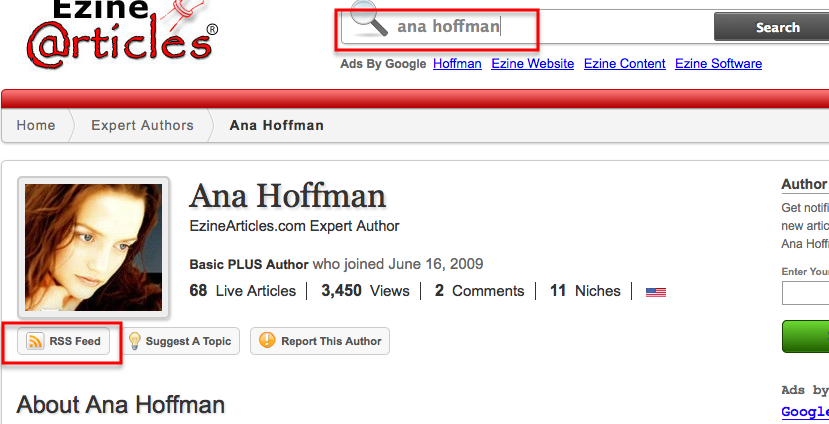
For instance, this is the feed I am looking for: http://feeds.ezinearticles.com/expert/Ana_Hoffman.xml

NOT something like this: http://feeds.ezinearticles.com/category/Internet-and-Businesses-Online:Internet-Marketing.xml.

Step 2. How to Create RSS Feeds

Granted, ALMOST every site doesn’t mean ALL sites - so what do you do when you don’t see an automatically generated RSS feed?

Don’t you worry though, I’ve got a solution for that.

You can create an RSS feed for any website or even website page you wish. Why would you want to do that?

Do you have any static websites that don’t come with RSS feeds, but you update fairly consistently? Do you have pages that you add new products to all the time?

So now you can instantly create RSS feeds for any and all of those web properties you own and start building links to them automatically.

You can create your own RSS feeds at this link:

http://www.webreference.com/cgi-bin/perl/makerss.pl

Remember to pay particular attention to titles and descriptions: make sure to include your main keywords for the search engines, but don’t forget to make them catchy to generate actual traffic through your RSS feed.

Now that you have your list of RSS feeds, you are ready to move on to the next step.

Step 3. How to Create Master RSS Feed

Now that you have a list of all your RSS feeds you could think of, submit them all to RSS directories… one by one.

Kidding!

That would take hours, and hours is what we never have.

To make this process simpler, we are going to create an RSS mashup - one master feed that will include ALL the feeds we have.

I like to use Yahoo! Pipes for that.

how to build master rss feed via yahoo pipes

Actually, you can use Yahoo! Pipes for ALL the tasks I mentioned above, like automatically fetching your existing feeds (just enter the URL), creating new ones based on your URL, etc.

I won’t go into how to use this tool - it’s a post of its own; just make sure you go through their tutorial before you jump into it.

How to Submit Your Master RSS Feed the Easy Way

To make the task less daunting, here’s a free tool to help you: down-load a Firefox extension at www.submitemnow.com, which will allow you to submit your RSS feed to about 100 or so directories for free.

Of course, you need to be using Firefox browser for this to work.

Why this extension works:

  • it’s free :)
  • it’s easy to use - just add your RSS feed and a description to it
  • it submits in half-automatic mode, thus preserving the quality of manual submission while still speeding up the process

If it sounds like a lot of work, it is… in the beginning. But remember, you only need to do this once and the process will repeat itself over and over and over again without you lifting a finger.

Plus, if you don’t have time or don’t want to do it yourself (I include myself in both categories), this is a perfect task to outsource for pennies.

Marketing Takeaway

So let’s sum it up.

  1. You make a list of all web properties you’d like to create more links to and find or create an RSS feed for each.
  2. You create a master RSS feed that includes all of them.
  3. You submit that feed to RSS directories using semi-automated software or outsource it altogether.
  4. Every time those web properties get updated, the RSS directories will automatically create links back to them.
  5. As you increase the authority of those properties by sending them a bunch of links, you will increase the authority of any sites they link back to - I suggest that being your main site/blog.

Now all you have to do is… well, do it.

Love it or hate it? Comment to show me that you’re alive!

ana hoffman link building

{ 64 comments }

link building image

Should've been doing link building instead...

Don’t quote (or fight) me on this, but I strongly believe that link building makes up about 90% of your SEO success.

There is only so much on-page optimization you can do to push your site up the SERPs, but the rest of it will definitely come down to the quality (mostly) and quantity of your links.

The challenge for today: find 10 quality (by “quality” I mean high PR) links from relevant sites in about 30 minutes or so.

All using a free Firefox tool and some common-sense “super-duper secret” (yeah, right!) search engine queries.

Let’s get down to business.

1. Install SEO Quake Plugin for Firefox

Side note: I hope you already use Firefox as your main browser. If not, you are missing out.

You’ll need to have Firefox browser already installed for this to work; so if you don’t have one, download it here:
http://www.mozilla.com/en-US/

Next, download and install SEO Quake plugin from here:
https://addons.mozilla.org/en-US/firefox/addon/3036/

seo quake for link building

I surely hope you don’t need step-by-step instructions to get this done, because you are not getting them from me (too much to type).

After you have the plugin installed and restarted Firefox, this is what you’ll see:

high pr link building

Do you see that little PR up and down arrow? That’s gold mine.

Now you can sort the websites in your niche by their PR and started commenting on/linking from the highest PR pages you can find.

Anything PR 4 and above is great, PR 3 is not too shabby either.

Big fat note: PR is far not all there’s to a good link. This will just give you an IDEA of what to look for. You’ll still need to make sure it’s not a spammy site, that it had very few outgoing links, that it’s an active blog (since your comment will most likely need to be approved), etc.

Now on to the next stage of our exercise: how do you find those valuable websites you can comment on and thus link from in your niche?

2. Use Search Engine Queries to Find “Linkable” Sites

Here’s where you can find the best codes to use when doing link building for your site:

One Way Link Building Codes

3. Sift Through the Search Results

Now that you have SEO Quake plugin and search codes at hand, everything becomes a “rinse and repeat” kind of deal.

  1. Enter a search query with your keyword into Google
  2. Sort the results by page rank
  3. Leave a valuable comment
  4. Rinse and repeat

A few quick SEO link building tips, in case you are wondering:

  • Don’t worry about DoFollow/NoFollow – you need both
  • Avoid heavily commercial sites and bad neighborhoods
  • Vary your anchor text to make it look more natural
  • Don’t go crazy your fist day on the job; stick to 10-20 links per day

So you still think 10 quality links from authority sites in under 30 minutes is a tough one? Not after reading this post, I bet.

Not convinced? Why don’t you try it… after you leave a comment, of course!

ana hoffman yournetbiz

PS The original post was published at Technshare.com.

{ 89 comments }