 Many of you have heard of this issue, but I bet very few of you can actually say it without twisting your tongue: canonicalization.
A mouthful of a word to describe a simple concept:
In Google's eyes, https://trafficgenerationcafe.online and https://trafficgenerationcafe.online are 2 different sites.
Without getting all technical on you (actually, I couldn't even if I wanted to - all I know about the issue is what an average blogger should know about it, and that it how to take care of it painlessly), here's what it means in practical terms:
When any kind of link building to your blog occurs - whether it be natural link building through other people linking to your posts or intentional link building that you do on your own, all your links have a potential to be split between those 2 versions of your site. It all depends what version of link used: www or non-www version.
Also, there is a question of duplicate content issues, since now you basically have two website with identical content.
Bottom line: you need to fix it now.
If you don't know whether you use linux or apache server or what your .htaccess file is, don't fret - I make it my job to not know these things.
Here are 2 practical steps you need to take to resolve this issue:
1. Set It in Your WP Dashboard
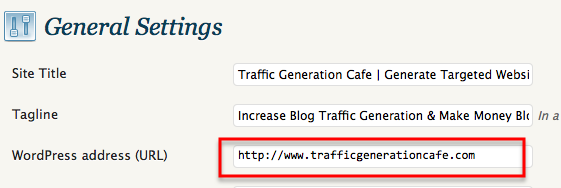
In your WordPress dashboard, go to Settings ==> General.
In the “WorPress address (URL)” box, enter your chosen URL - with or without WWW.
It doesn't matter which one you choose, as long as you choose it and stick with it.
2. Set It in Your Webmaster Tools
If you don't have a free account with Google Webmaster Tools, get it now.
Here's the simple precess step by step.
If this is your first time using Google Webmaster Tools, you will have to verify both of you www and non-www versions of your site. Just follow the directions on how to do that.
Once both sites are verified, click on one of them and go to Dashboard ==> Site Configuration ==> Settings.
Then set your preferred domain as one or the other.
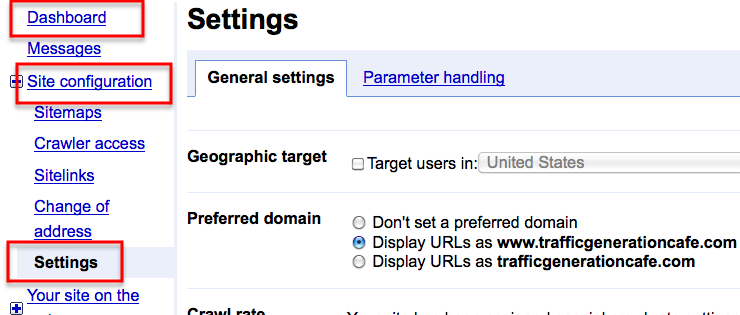
By doing this, you are basically telling Google which domain you prefer and they use that information for all future crawls of your site.
For instance, now when Google see a link that is formatted as http://yoursite.com, but your preferred domain is http://www.yoursite.com, they will follow that link as if it were http://www.yoursite.com.
Plus, whatever version your visitors use to get to your site, they will be automatically redirected to the one you prefer.
Marketing Takeaway
You should be properly canonicalized now and all your links will be just where they should be: in one basket.
And one more thing: to make sure everything is set up properly, just type your non-preferred URL into the Google address window and see if you are properly redirected. If you are, you know you did it right.
As always, comment to show me that you're alive!


Chris Burns says
I’ve written in more detail about this topic that may be useful to your readers. They can learn how to use .htaccess to make their sites www vs non and also to ensure a trailing slash on all URL’s regardless of if they are on WordPress, Joomla, or any other platform.
Added your post to mine, Chris; I am sure my readers will benefit from it, like I did.
Thanks!
This is one of those ‘little’ things that can be frustrating for people who do not have much technical experience. Another part of this is to set up 301 redirect. There are a couple of wordpress plugins that will also do this for you, or someone can google “set up 301 redirect” for directions.
I definitely recommend testing to see if your url with and without the ‘www’ take you to the same page. If so, it is beneficial to fix it.
Great tip!
Ana:
Plain and simple…a lifesaver you are. I visit here everyday and I am running out of things to say to express my gratitude! This issue drove me nuts and I am so glad someone could explain it to me without all the “reflux capacitor” terms!
Lisa
You are great, Lisa - I would write great content even if you were my only reader; you build me up so much!
From a non-techie to a non-techie… that’s the whole point.
BTW, I wrote a post about your guest blogging question, will publish next week. 🙂
Thanks for the idea.
Unlike you and Dwayne…I was clueless until I met you, Ana! Thanks for explaining it so simply and clearly for me. I need to check into the google webmaster tools but when I type in my www, I get redirected to my non www, so I assume I’m somewhat on the right track.
Thanks for the help, as usual!
Heather
You must’ve set it correctly through your WP dashboard, Heather.
I did both just in case. 🙂
Yay - one less thing to do… Always great to know that you are actually ahead on something, huh? 🙂
Ana,
I discovered I had a problem with this when I would comment on sites with Comment Luv. My site URL was www. and when I added my comments I left off the www. and my last post would not show up. Once I wrote the correct URL it worked.
Never even thought about possible CommentLuv implication, Sheila - thanks for bringing it to my attention. Always good to know in case I get a question on it.
Ana
technosuman says
Well Ana! Really a great piece of information. I think I am convinced that we should indeed put our links in one basket.
For a beginner getting traffic through a blog or a website is not that easy. I hope your tip is really going to help us.
Thank your for this wonderful post
I know they will, like they had so many other readers of my blog! 🙂
Hi Ana,
This prompted me to look at my settings in general and I found a few things that were questionable, things I fixed of course 😉 Also I never really recognized the issue of the duplicate content issue. Suffice it to say, I’ve got it fixed now. Thanks so much Ana.
You are so welcome, Liz.
I think the whole duplicated content issue deserves a post of its own; so many bloggers are so entirely confused on what it means…
Alan Mater says
Hi Ana,
After following step 1 and changing the WordPress address URL, I’ve now been locked out of my Dashboard and can’t get in. Is this normal? Is there some way to fix this?
I don’t want to try anything else at this point until I can log back in and know that everything is back to normal. Your help would be appreciated.
Thanks!
Ayayay, Alan - so sorry to hear it happened and the worst part is I have no idea why; I’ve never heard of such a problem! I am also not technical enough to know how to fix it; if this were to happen to me, I’d call my host to see if they can fix it for me.
Please let me know how you were able to fix it!
Alan Mater says
Hey Ana, I did a little research and figured out how to set it back by going into phpMyAdmin and changing the site URL back to what it was previously.
Now, I’m not sure where to go from here. Would following the steps you outline in the Google Webmaster account be enough? Should I still use a redirect plug-in or 301 redirect script?
Thanks for your help!
Glad you fixed it, Alan; still have no idea why it happened.
I never bothered with changing .htaccess since I didn’t want to run any chances I’d screw it up in the process. So all I did was the 2 steps above.
However, if you know what you are doing, that’s definitely the way to go.
Alan Mater says
I’m wondering if anyone else ran into the problem I had?
I tried the 301 redirect route but that sent the blog into an infinite redirect loop. Not sure why, either. I’m not having much luck with this. LOL
In any case, I did set my desired display URL in my Google Webmaster’s account, so hopefully that will count for something.
You know, now thinking about it, I did have problems with 301 redirect when trying to fix the same issue. It didn’t come from my blog though, rather my host server. It’s been a while, so I forgot all about it.
So far, I haven’t heard any problems reported, Alan.
Tia says
Good stuff, Ana. If someone’s blog has been around, they should also do a permanent redirect from the non-www to the www (or the other way around).
The thing about setting it up the right way in WordPress is crucial! Many one-click WordPress installs don’t use the www, and people go for years without realizing that!
Cheers,
Tia
So true, Tia - it’s always great to tie all the loose ends and make a permanent change.
Good to see you here!
Hi Ana
That’s why having super-geeks as friends is a life-saver or should I say blog-saver for me 😉 Great information that those who have to do all this themselves.
For some reason I was taught this when my blog was first being set up, but I’m sure there are heaps of bloggers out there who this is a revelation and a very helpful one at that!
Patricia Perth Australia
Definitely yes to that, Patricia!
This was one of the first issues I somehow knew to fix as well; go figure…
Thanks for this tip Ana. Canonicalization is one thing I do not get and your post helped me fix this with my website. I actually thought I had set this up before, but I checked it in Webmaster Tools after reading your post and - you guessed it, not verified - doh! Thanks again.
Chris
Thanks so much, Chris - it makes my day to know I actually helped someone.
Have a good one!
Linda G. Cox says
Ana,
Thank you! I like the way you educate us in a very simple way! That is exactly what I needed!
Linda
You are welcome, Linda - the only way I know how. 🙂
Ana
Great Advice! Thanks for sharing this information!
You’re welcome, Jackie.
Great post Ana, I had no idea this was even a problem. Thank you so much, now I have something to do today, right now actually!
Glad I am keeping you busy, Ian! 🙂
Hey Ana,
Thanks for sharing this great tip. It does help to have your links in one basket 🙂
All the best,
Mavis
I know you do, Mavis! 🙂
Alan Mater says
How did you fix the problem? I had the same issue and had to change it back. Could you provide some insight on how to change it without messing the blog up?
Thanks!
Alan Mater says
If only it really was that easy. I followed the steps to the T (not that they’re complicated), and I got completely locked out of my WP dashboard.
Any ideas?
Alan Mater says
Yep, did exactly as it said. Got logged out, and when I attempted to log-in again, it wouldn’t let me. I tried multiple times to no avail. Had to re-do the change via phpMyAdmin, and then I could get back in.
I’ll try doing it again to see what happens. Maybe it was just a fluke or something as no one else seems to be having any problems. Fingers crossed.
Alan Mater says
Okay, so I figured it out. When attempting to log back in with FireFox, it won’t let me. So, I opened up Internet Explorer, and it logged me in just fine. Not sure why I can’t with FF, but I’m guessing it’s a cache issue perhaps.
Either way, the URL is changed, and no harm done. I’m a happy camper. 🙂
Hey Ana,
Sometimes you read some of these stuffs, and you are like oh…what is wrong with google?… but you gotta take note of all these simple stuffs because they make a huge difference eventually.
Thanks Ana, for this resource!
Tosin
Another great post. Thanx Ana.
I have already corrected this problem, by having my site redirected from the non-www version to the www one.
“Canonicalization”
When I started my SEO campaign for my site, by adding metatags, I came accross a metatag for CANONICAL url. (rel=”canonical”). It was only after reading the following post that I understood, what it really meant.
http://googlewebmastercentral.blogspot.com/2009/02/specify-your-canonical.html
I couldnt understand, what its meant for, at first. Then I understood the issue of “www” vs “non-www” that you have raised here. A simple solution that google has offered is adding a new metatag for canonical url. I havent added it yet. Coz all my site-pages indexed by google are the www ones. 🙂
Thanx again.
That’s great, Aniket. Glad you got it sorted out.
Claudio says
I went on google webmaster select the Display URLs as harmonianatureza.com.br save command but it appears. Part of the process of setting a preferred domain is to verify that you are the owner of the site. Even confirming and changing the google analytics google webmaster does not change.
Yes, you need to verify your site first, Claudio.
Amit Shaw says
Thanks Ana for this information. Till now i thought that both are same :P.
Currently i am using non www. Soon i will change it. Thanks.
I got this link from Mivis’s Website :).
Is there a reason you want to switch to www version, Amit?
I wouldn’t recommend doing it unless you have to. Once you pick a version, just stick with it.
CYNAMIX says
What about this situation:
I have already confirmed my domain on google webmaster tool with the html file option but recently selected the www option there. That’s what I have selected in my WordPress admin dashboard from time anyway but just chose it on Google. Do I need to re-confirm the site?
Can’t tell you for sure one way or the other, Ahmed, but I would change it in both places just to be safe.
Sounds like a good move.
Roomi says
i watched a video on youtube from google webmasters tool that google takes www and non-www same 🙂 so why you think its different?
I never said anything otherwise, Roomi.
Google doesn’t care if your site is www or non-www. However, if you have both versions, you are creating duplicate content, split authority, and split links.
Google doesn’t care, but you should.
Jason says
Right, I know you can set your preference in webmaster tools but what I wanted to know was. If you had a non-www formated site would google display the urls with WWW if you set the preferences in tools.
I know that they would follow what you ‘choose’ if it matches your site url structure but would they still do it if you wanted the opposite of what it is when you land on the page?
I have a client whos site and links etc are all non www but think it looks really bad in search engines. So we are sticking to non www and I have set preferences as such in webmaster tools. But am wondering if Google could display as www.
Goodle SERPs are dynamic, Jason, meaning that they reflect your current preferences.
If all your preferences are set up to non-www, then the results should reflect that. If you go back to www, then the results should change as well; might take some time though.
I wouldn’t change though. Once you have a bunch of links build to one version, you’ll basically end up loosing them if you switch. In the end, readers don’t care how they get to your site.
Jason says
Thanks for the response.
But does Google have to take your preference into account? Knowing google I would have thought they could have looked at your onsite url structure to decide how it finally indexes the site links.
As far as incoming like; I thought the whole point of selecting preference was that google will treat one type of link as the other. Thus if you change them doesn’t it just treat the links in reverse but still taking them all into account.
Not planning on changing; just trying to grab an understanding on this.
I’ve never come across a site that had a problem with G not “honoring” their selection, Jason.
As far as your second part of the question is concerned, I can only speculate.
If you build links to a certain post, then move the post to a different URL and do a 301 redirect, will the links “follow” the page? I’ve heard many people say they do, but from personal experience, it hasn’t always worked that way.
So bottom line is I don’t really know. 😉
Jason says
Okay; thanks for your replies.
Denis The Marketing Expert says
Hi Ana,
Thanks for the article. I was confused about this as well. But it seems that most websites are directed to the non www. Is there an explanation for that? Thanks!
It seems like the post addresses your question pretty well, Denis.