

There has been a lot of fuss about Yahoo! Site Explore closing down not too long ago and everyone seems to be searching for alternatives.
Sure, the choices are plentiful and many posts have been written listing them from A to Z.
So what are you supposed to do now?
Go to each one of them to see if they are worth their salt?
Dig through a boatload of statistics?
Of course, not. Who has the time, right?
Plus, you've got me to do the dirty work and let you know which backlink checkers worked and which didn't…
Before we start though, let's decide what we are looking for in a good Yahoo! Site Explore alternative backlink checker tool:
Why Do We Need to Check on Backlinks?
We want more SEO traffic to our sites.
The shortest way to high Google rankings is to learn more about the sites that are already ranking for your keywords and match/beat their site optimization, both on-page and off-page.
Off-page site optimization is one of the biggest slices in the SEO ranking pie and it's all about LINKS.
Logically, if we find out what backlinks our competition has and manage to build similar or better link pattern, we should be able to rank above them (providing all other SEO factors are also similar, of course).
And that's where backlink checking tools come in.
Ideally, I'd like my perfect tool to tell me:
- How many links the page has overall
- Link value measurement of sorts, like PageRank, Page Authority, etc.
- Which exact page the link comes from, not just the domain name
- Linking anchor text variations
- Dofollow/Nofollow links
Yahoo! Site Explorer Alternatives: Misses
Link Diagnosis - Free
LinkDiagnosis.com is a free backlink checker tool from SEOMoz.
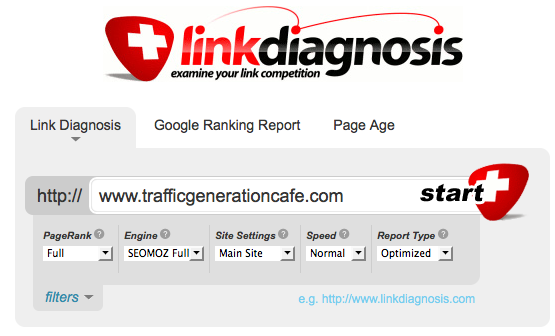
Free is great, but what about quality?
Let's take a look:

According to them, TGC has only 72 pages indexed with a total of 260 backlinks!!!
I'll stay away.
Blekko - Free
First of all, I do love the idea behind Blekko as an alternative to Google search engine.
However, they've got a LONG way to go to fine-tune the results.
The very first alarm went off when I saw Traffic Generation Cafe in Blekko's search results:
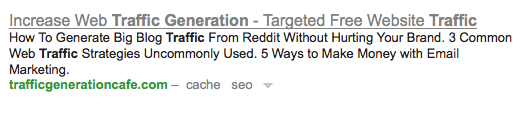
Not only did I change the SEO title a few days ago, but also for some reason Blekko keeps pulling the very first post excerpt from my home page as my meta description, as opposed to the actual description of my site.
Compare it to Google results:
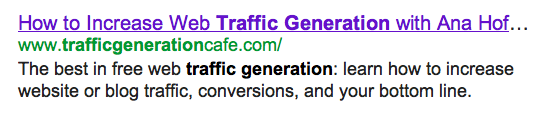
Big difference.
Turned out that, while Google crawls my blog at least once per day, the last time Blekko crawled my site was 6 days ago.
Not great for a search engine…
But back to backlinks.
Here's a screenshot of Traffic Generation Cafe backlinks according to Blekko:
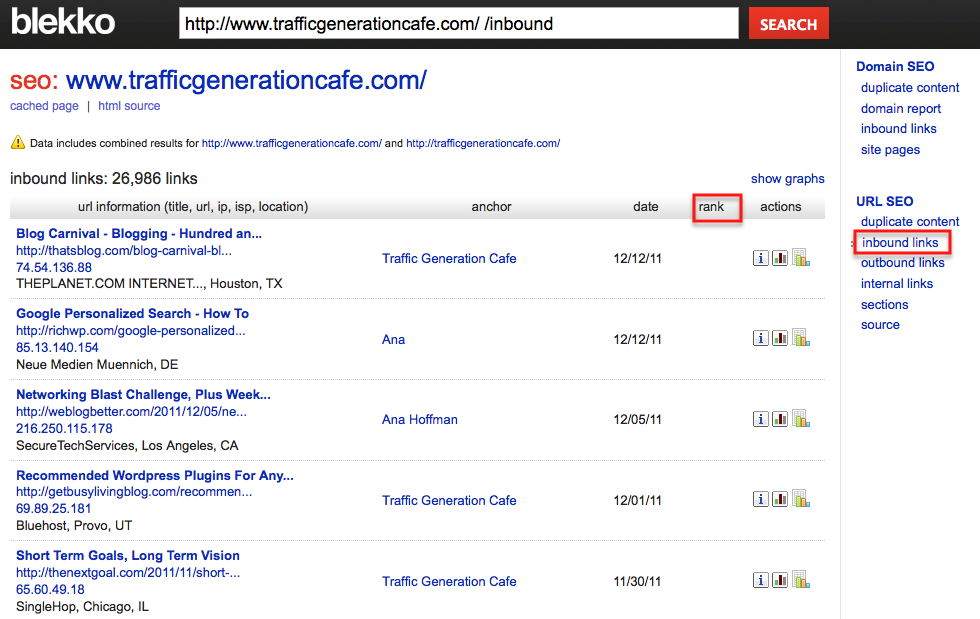
Of note:
- 26,986 links are certainly better than 260, so it's a good start.
- The last date anyone linked to my home page, according to Blekko, was almost 2 weeks ago. Not even close.
- There is no link value indication of any kind - their “rank” graph is empty with a couple of exceptions.
- Limited links: not sure exactly how many links Blekko actually analyzes, but it's nowhere close to 26,986.
Once again, free falls way short.
Open Site Explorer - Free 30-day Trial, $99/month after that
Open Site Explorer is yet another tool by SEOMoz; this time it's a part of their SEOMoz Pro toolbox.
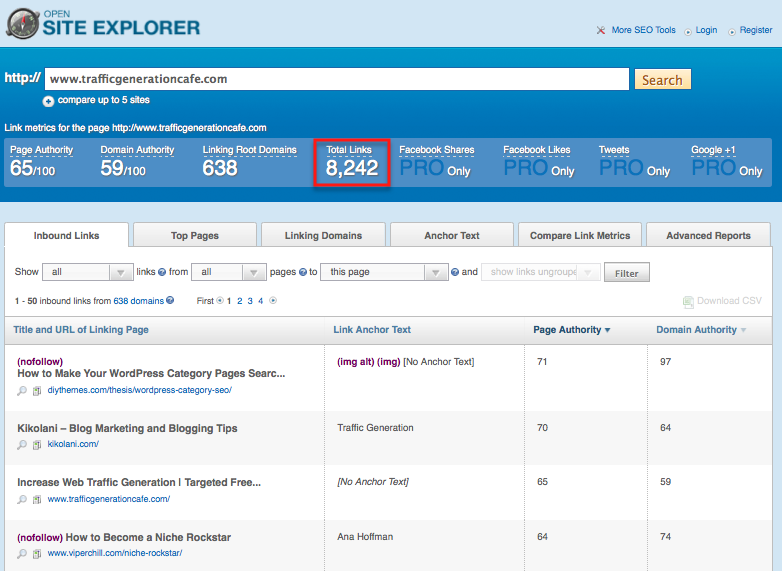
This one showed just over 8,000 links to my domain - way too low as well.
It does have many great features:
- Domain Authority (SEOMoz version of PageRank)
- Page Authority
- Do-/No-Follow links
- Anchor Text
- and more.
However, you can only see 5 backlinks for free and, as I mentioned before, this service comes at a cool $99/month after the 30-day free trial.
Personally, I wouldn't pay that.
SEO Attack - varies
This Yahoo! Site Explorer alternative looks great!… at first glance.
SEO Attack is loaded with features:
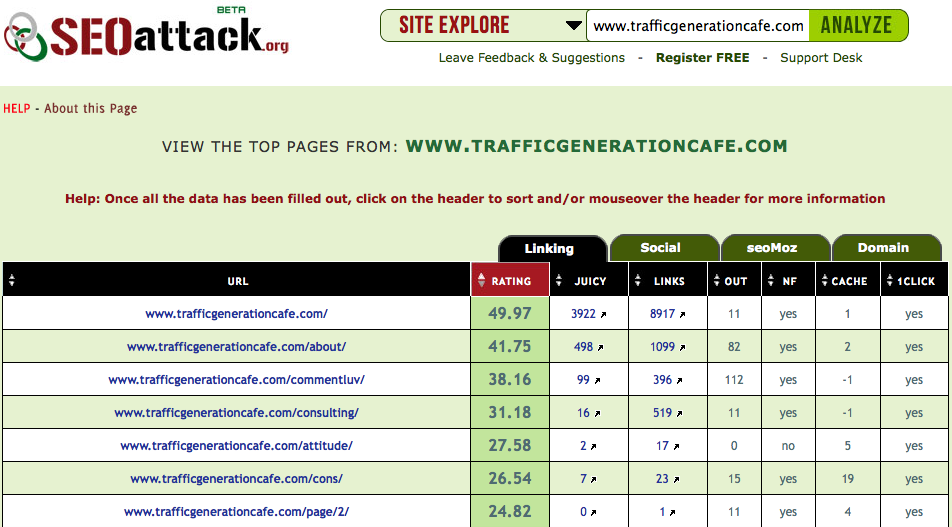
However, even at the highest subscription level ($99/month), you get ONLY 200 links to analyze.
Even worse, the tool itself picks the “top pages” to analyze and from what I've seen, their “top pages” picks are a far cry from reality.
Also, it gets pretty expensive pretty quickly:
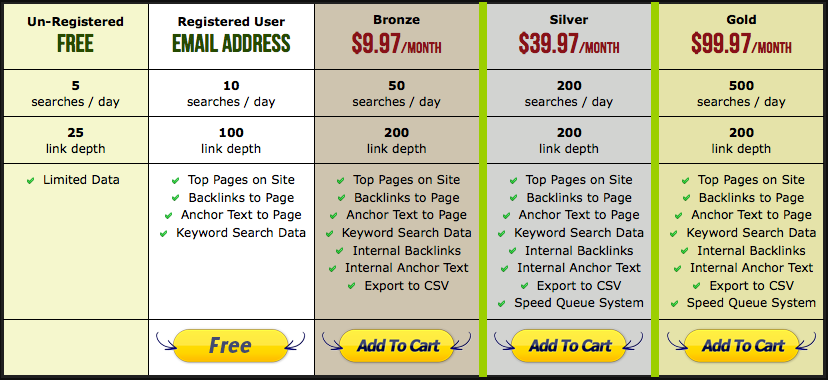
Not something I'll be using in my research…
Exalead - Free
(Hat tip to Sean Si of SEO-Hacker.com on this one)
Very simple solution without ANY bells and whistles, Exalead will spit out SOME of the backlinks to your site; in my case it was just over 2,500:
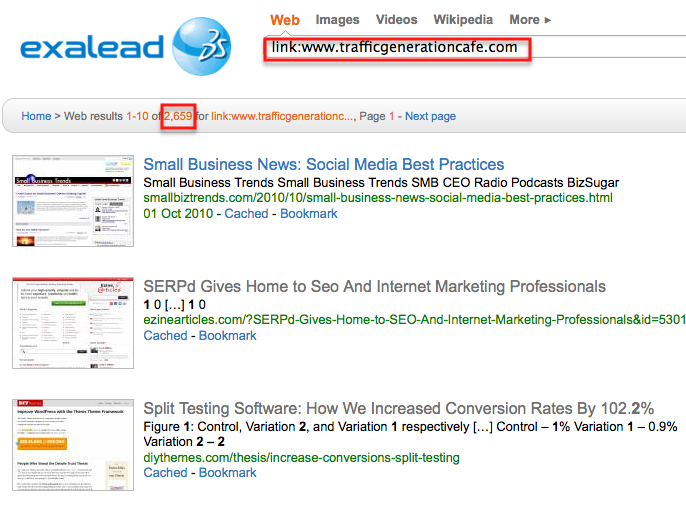
You have to enter your search query like this:
link:yourdomain.com
Exalead won't give you any information on the backlinks (other than the thumbnail of the linking page - no idea why), just a list of them.
From what I can see being free is the only benefit for this backlink checker.
*****
This is not an exhaustive list of Yahoo! Site Explorer alternatives by any means; however, I AM exhausted talking about the tools that miss the mark.
I'd rather talk about the tools that actually work and spend my time using those tools to build up my business, don't you?
Here we go.
Yahoo! Site Explorer Alternatives: Hits
Market Samurai - $97
Chances are you already own Market Samurai.
If you don't, you will pretty soon just out of pure peer pressure.
Kidding.
You should get Market Samurai because it's the best all-in-one SEO tool currently on the market, and actually, I dare to say, the ONLY tool that does pretty much everything you need to start moving your site up in the rankings: keyword research AND backlink checker.
It used to use Yahoo! Site Explorer to power its “SEO Competition” module, but of course, they had to rethink that.
And rethink they did.
Market Samurai backlink checker is now powered by Majestic SEO - another great alternative to Yahoo! Site Explorer, but is otherwise available with a minimum monthly subscription of about $45 per month (converted from British pounds).
No, you won't get all the bells and whistles of Majestic SEO with Market Samurai, but to be quite honest, you don't really need them.
Market Samurai will show you:
- All the links to any given page
- Sort them by PageRank
- Show you the anchor text used for each link
- Allow you to export the data
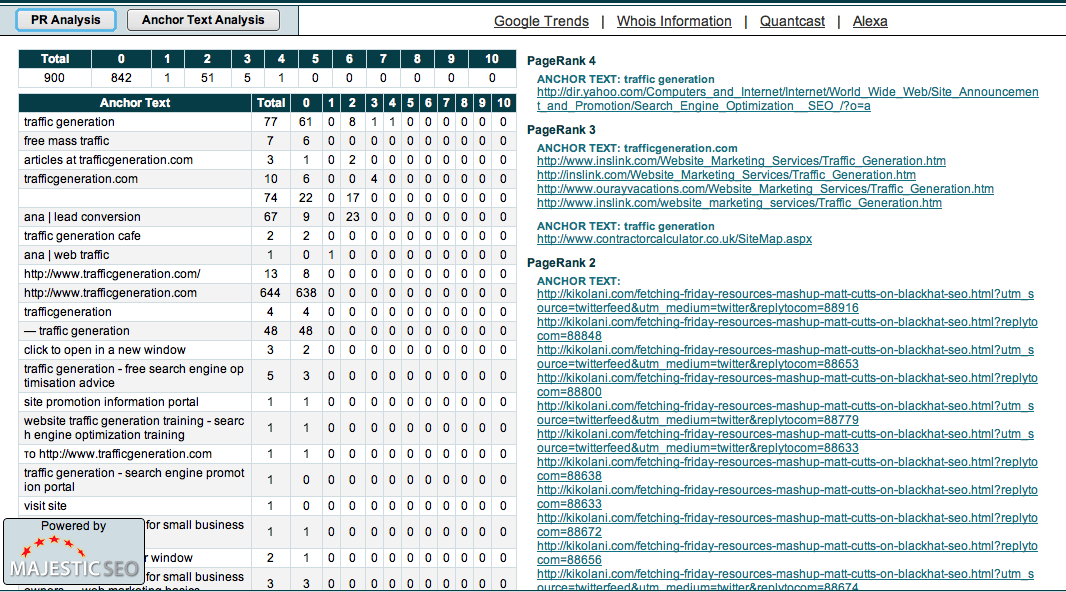
In my book, that's all most webmasters will ever need to learn about their competition.
If you already own Market Samurai, but never really figured out how to use the SEO Competition module, here's a quick video to walk you through it:
(Note: this video was done when Market Samurai still used Yahoo! Site Explorer, but the way you use the tool is still the same)
If you are still not using Market Samurai, but want to start working on your SEO traffic, now is THE time to start 2012 with a bang:
==> Download your FREE copy of Market Samurai
How to get 35% off: sign up for the free trial through the link above and wait for Market Samurai team to email you the discount offer.
Also, if you for some reason choose not to purchase Market Samurai to take advantage of the 35% off offer, the Keyword Research module will remain active for life, but you won't be able to do any backlink spying on your competitors.
SEO Spy Glass - Free
This is another great tool I've been using for years.
Here are just some of my favorite features of SEO Spy Glass:
- Unlimited everything: number of backlinks to find, searches per day/month, etc.
- Gives you all the important stats that matter: PageRank, anchor text, etc.
- One of a kind: calculates the VALUE of each link.

The value of a link could be a post of its own (and I think it will be), but just because a page has high PageRank, it doesn't mean that the link from that page carries a lot of authority, since it shares that authority with every other link on that page.
SEO Spy Glass has a free for life backlink checker version, which will give you all the stats you need as far as competition research is concerned.
==> Download your FREE SEO Spy Glass here
Yahoo! Site Explorer Alternatives Marketing Takeaway
In case you haven't figured it out by now, I am not a big fan of using every single internet marketing tool out there just because it looks shiny or wrapped in a pretty box with a cute bow on it.
I find what works and stick with it until it doesn't work any longer - whatever the reason.
Market Samurai and SEO Spy Glass are my top choices for Yahoo! Site Explorer Alternative backlink checker tools.
If you have something better in mind, give me a shout!

Ana, you are really doing a great job. Let me state clearly that majority of SEO
Experts are not straightforward telling people how to really do an effective SEO for their sites, but you are completely different! It’s a great pleasure to stumble over your blog.
Glad to hear that - compliment much appreciated.
Great. Downloaded SEO spyglass too.
Hey Ana,
Just a few weeks ago, i read a post about checking the page rank of inner pages for any domain. You mentioned the firefox extension SEOQuake.
Well, Try this little software called PaRaMeter
http://www.cleverstat.com/en/page-rank-software.htm
- After installing it, add a domain to it.
- Under tools tab > click extract urls
- It opens a new window. Select the starting url & depth.
- it gives a list of all inner pages. Save it. It takes you to the main window.
- click on the play button, next to add button.
Thats it. Page rank of inner pages.
Its a good software.
Looks like a great tool, Aniket; too bad it’s not available for Mac.
Yes its a great tool.
It works good enough, but I think it has some limitations with respect to depth (max depth - 2) of links within a domain.
Thats enough for now… 🙂
I hope Market Samurai fix their backlink check loading issue. I don’t have a bad internet connection but sometimes I can’t get results.
Anyways, great post! learned some new ways today. Thanks!
It does tend to “hang” sometimes…
Thank you for this list. Spy Glass sounds really interessting so i will test it. And there is a german language file included. 🙂
And the free lifetime keyword research tool from Market Samurai also sounds good.
Kind regards,
Max
You are welcome, Max.
My favorite has been OSO (Open Site Explorer). I find it the most detailed and it has several advanced and good features I couldn’t avoid trying! I rank Blekko & Link Diagnosis second and third respectively.
And the price doesn’t deter you?
The price definitely is a concern, but I have been lucky to get some coupons! So, till now I haven’t spent a dollar on it. My subscription expires some time in March, so till then I don’t have a reason to worry. So far the results are good, so I may consider renewing the subscription or if possible, try to refer some members to them and enjoy a free membership 🙂
Free is always the best way to go, if you know how. lol
Hi Ana,
Thanks for the reminder about MS. I need to go back and play with it again as it is a great software resource. I got turned off of them when they kept sending me emails but I suppose any good marketing company tends to do that :).
We’ve looked through 11 alternatives or so for YSE, and have about 10 more to go. My personal favorite is definitely SEO SpyGlass.
I do like SEOSpyGlass quite a bit, George - my only complain is that it’s a bit slow, but I was told they are working on it.
Thanks for the breakdown. I’ve been using the free version of Open Site Explorer, but that only gets you so far. I’ve never heard of Exalead before. I’m gonna give that one a whirl.
Yahoo Site Explorer will be missed, no doubt.
This is actually quite a groovy resource, once again thanks for sharing some practical information we can actually use.
I noticed the same thing with Blekko, btw, it would appear they index things quite sporadically.
I agree about Market Samurai, now that they’ve moved over to Majestic it works great. Thanks for the tip on SEO Spyglass, going to take a look at it.
Also love the graphs you get with Link Diagnosis.
Thanks for coming by, Cathy!
Hi Ana,
Your email autoresponder is pretty groovy, like the way you’ve integrated engagement into it, rather than just the standard “comment approved” message one normally gets. And I like how you have the free SEO report CTA at the bottom. Just curious how you did that - is that a CL Premium feature? Or is it a trade secret? 🙂
There are two ways to add an opt-in comment checkbox, Cathy.
1. Aweber plugin - if you are using Aweber, you can simply use their plugin to add it to your comments.
2. There are two premium plugins that do that and more; I have them both.
WPSubscribers (preferred) or MaxBlogPress Subscribers Magnet. You can find out more about them here: https://trafficgenerationcafe.online/internet-marketing-tools/
Thanks for offering us some good free as well as paid alternatives. Really thorough as usual.
You are welcome, Clara.
Thanks for doing the work for us 🙂 SEO SpyGlass here I come! I do use seo Elite right now but it doesn’t have the value of each link so I totally want to check that out.
Thanks!
Knowing the value of a link is one of the most important (even though somewhat subjective) metrics.
I wonder why yahoo got rid of the explorer…it’s really the only thing that made me even go to their site…
Anyways, thanks for all the great alternatives. I haven’t used market samurai for a while, and forgot that it has all these capabilities! I may have to brush up on it again.
YSE is gone because Yahoo is no longer in the search business, Paul.
Thanks Ana another really great read! I’ve found this to be one of your most useful articles so far - I’m already have a good explore of spyglass!
You are very welcome, Becky!
Like you, I highly recommend Market Samurai. However, I’m really excited to take a look at SEO Spyglass as an alternative for those needing something fast and free and not as comprehensive of a marketing solution. Thanks for the report on the things that don’t work, that saves us a lot of time!
Kim
You are very welcome, Kim.
Actually, despite being free, SEOSpyGlass is one of the most comprehensive link checkers out there.
Thanks so much, Tanya - just looking at these features like that gives me the Wow factor.
Thanks for sharing this. I have been using the trial version of Open Site Explorer. At initial look it seems pretty good. YES, it does come with a hefty price tag though. Sad.
I will have to try SEO spyglass and see how that work.s
Hope you like it, Matt.
In this case, free definitely beats paid.
You misspelled Majestic in your post - twice 🙂
I’ve tried and used all of the above, and more. Majestic wins hands down, and it’s not even that expensive at 30 pounds (50 USD) per month. I guess it all depends how often you need to grab a backlink profile.
I am blushing, Bob; will have to go edit the post after I am done responding to you.
I do agree that Majestic SEO is a great tool; I have a post written about it for next week.
Is it worth the money? As you said, depends on how often you need this kind of information.
Even for my kind of research, Market Samurai is plenty enough.
Thanks for doing all the hard yards for us all. Little wonder you have so many backlinks even if some checkers aren’t clever enough to pick them up.
You are very welcome, Jon!
Thomas says
Thank you for the tips Ana. The LinkDiagnosis.com and SEO Spy Glass was new to me. I think I will check them out.
You are welcome, Thomas.
Too bad for Yahoo! Excellent research, nice presentation. I found promoted something called “Good Keywords v3”, but I haven’t used it. I think of achieving Market Samurai soon. I wonder if you have any idea about Traffic Travis, if there is something like Market Samurai or better. I guess they’re in the same price range, I’ll have a look later :).
Traffic Travis is on my list of products to test, Daniel - I’ll let you know what I think.
Ana, you’ve gone all out with this one. It must have taken you ages to write. Hats off to you! This is an extremely good article on getting to the bottom of SEO. Thanks for writing it.
You are very welcome, Anne, and yet, it was quite a time killer! I am glad I did it though…
It’s nice to see someone trying to separate quality from crap. The web is full of wonderful, in their own words, services either free or paid but it doesn’t seem that paying equals quality, thanks for showing it. Actually I’m using Traffic Travis, the free version, but I should pay a visit to Market Samurai and Spy Glass too.
Have a great day!
Oversaturation….
Well that is a great reporting. Thank you for the comparison. i wee now why you say that Market Samurai is awesome. I guess sooner or later I will have to invest on a tool.
It is true that free tools you mention in order to check the back-links don’t provide precise results.
I think I will try the free trial …
Thank you !
Yes, Lenia - free tools are free for a reason. lol However there are plenty of paid tools out there (some mentioned in this post) that don’t live up to even some of the free tools!
Try MS, see what you think. Even if you decide not to buy it, you’ll still be able to use their Keyword module for free after the trial is over.
Hey Ana,
Thank you for the information.
Do you know if MS works for other language than english ?
Thanks!
I have no idea, Lenia. lol
Ana, I have been using Open Site explorer, it is slightly heavy on the pocket, but so far i have found it quite effective. I am slo using Raven tools I found it equally effective and good just like Yahoo site explorer. Have you used it? It is not free, but i would like hear some reviews about it too..
I’ve never used Raven Tools, but would like to take a look at them some day.
Hello Ana Hoffman
i got to see your site today from the Myguestblog.com, i liked the way you respond to the comments , I am using the free blog , i want to reply to the comments without any widget installed is it possible? i will visit again for more traffic tips
Unfortunately, I don’t know much about free blogging platforms to help you with that.
Thanks for the citation Ana! LRT’s QBL is my favorite right now. They don’t do affiliate marketing as of yet though - but they give out fast results - and they’re the most complete so far. Really good imitation of Yahoo site explorer. You can try it out and ask Chris Cemper for an invite 🙂
I actually do have access to QBL, Sean. I gave it a quick look, but haven’t dug into it.
Is it worth the monthly subscription?
I think it’s worth it if you’re getting the lowest version. So far, the superhero account doesn’t seem worth my money as I have it right now. But I haven’t exhausted all options from the superhero account. I tried 3 tools in there apart from QBL and it doesn’t seem to give me satisfactory results.
Thanks, Sean!
I was wondering why you had not posted in a few days! You were researching all of these link building tool sites! I appreciate the analysis as it is useful for me to lead a team of people in the industry that I am engaged in. Knowing what is most effective sure helps us save time.
Ana, One activity that also helps me with traffic is writing articles on Ezine Articles. That is one of my goals for 2012. Let’s all have a great year blog world!
Yes, these kinds of posts take hours of research and sifting through, Danielle!
I am surprised to hear you are getting traffic from EzineArticles - I’ve never been that successful with that. Link building - yes; traffic generation - definitely not.
Hi Ana,
First of all, happy new year, and thanks for your wonderful blog.
I started to learn about SEO a few weeks ago, and i love to spy others with Spyglass.
I kind of compared backlinks research between MS and Spyglass, and i have to say that Spyglass is far better for this job. I don’t rely too much on MS result, since the app can’t really analyse all the backlinks. MS has also a bit of a problem when it comes to define the top 10 google SERP. I don’t know if that’s a matter of my location (France), but when i compare with my Chrome results (private session), it’s obvious that the links aren’t the same. I learned that a lot of people do have the same problem as me, and that is related to the multiple servers Google uses to achieve the search.
In consequence, i work with MS + spyglass (Freeversion) + google adwords
One of my friend (kind of a SEO geek), told me that SEOMOZ was great for all the SEO job, but honestly for my little buisness scale, i’m not going to put some crazy bucks per month. MS seems to do the job for Keyword research and basic backlinking.
Anyway.
Thanks again Ana for another wonderful post.
Keep doing what you do, it’s always a pleasure to learn from you.
Thank you so much, Pierre, and Happy New Year to you as well!
I like to use MS for a quick snapshot of my competitors. It’s very easy to see where their links are coming from, what anchor text they are using, etc.
For the most part, that’s all I need for my research.
I do like SEOSpyGlass quite a bit; my biggest problem is that it takes a while to analyze a site, especially the bigger ones. Sometimes, it can take me a couple of hours to do my own site!
As far as the top ten results go, there’s no such thing as universal results - as you rightfully pointed out.
What you see in your SERPs depends on which Google database center you are closest to, your physical location, IP address, your social connections, etc.
When you search something Google Incognito, all it does is stops modifying your results according to your social interactions at best.
The closest you can get to the most unbiased results is through Scroogle.org.
I am with you: I wouldn’t pay a monthly fee for SEOMoz.
Linkdiagnosis used to be better before yahoo site explorer shut down or closed their doors. It would query yahoo for backlink data and you would get more backlink details. Now it uses seomoz some how, and I don’t know for sure but I think you need to be a premium seomoz member to get better results because it can’t or won’t query the data available to seomoz pro/premium members. I have been using it for a long time and like I said it was way better. When yahoo site explorer closed it really messed up a lot of sites including link diagnosis. Kind of a bummer for a lot of sites. Thanks for pointing out a few other options.
I had no idea they used YSE to power their database, Ray. That explains it.
Hi Ana,
I use to use Yahoo all the time and I haven’t found anything better. I have tried some of the tools you’ve reviewed but I haven’t tried the last two you suggested. Since I don’t want to spend any money I’m thinking I’ll give SEO Spy Glass a try! Thanks for sharing these!
I think you’ll find SEOSpyGlass more than sufficient, Ashley.
Hi Anna this is a nice list great resource to refer back to.
I use linkdiagnosis.com quite a bit. The lower link count is because it only shows 1 link from each domain as opposed to showing all of them. Still your link count on there compared with the domain count on Open Site Explorer does seem to be very different. It seemed to get to 260 fairly quickly when I did it, perhaps it is limited or something? It says it uses SEO Moz which is a bit odd.
Also one other thing to note is if you have backlinks to https://trafficgenerationcafe.online as well as https://trafficgenerationcafe.online you need to run 2 searches which has caught me out a few times.
One of the really cool features is the ability to export the list easily and sort them by do follow links and by Google PR. This is a great tool for seeing where your competitors are getting their high PR links. It’s the only free tool that I have seen that allows you do do this.
Unless things have changed SEO Spy Glass is not free. To export the data (which you would have to any time you are working with a team or you want to go through and put notes next to the links as you action them) you have to get the paid version which is quite expensive from memory (again unless things have changed in the last few months).
Since LinkDiagnosis is a free tool, I don’t think it should be limited in any way, Dan.
Also, when you canonicalize one version of your site (WWW or non-WWW), all links should be redirected to your chosen version - ideally.
SEOSpyGlass: exporting is just about the only feature you have to pay for, but if you want to do any analysis within the software (which I normally do), it’s completely free without any limitations.
Ana, thanks for a thorough backlink tools review, our SEO SpyGlass including.
Indeed, Dan, SEO SpyGlass has a couple different versions:
- a free version (which never expires - so in that way it is free, unlimited, for life)
- paid versions for Professional (professional webmasters) and Enterprise users (SEO companies using our tools for backlink data mining for client sites, link analysis and reporting). The exporting and reporting features are available to Enterprise users
I’ve been missing Yahoo Site Explorer a lot. Your post is yet another wonderfully generous gift for those who have been lost without Yahoo’s tool. I’ve been exploring Blekko and there are things I like about it, but like you say it’s still got a long way to go.
Some of these tools are a but pricey for the average blogger, but you the important thing is you share options that are available. 🙂
Thank you for this awesome list of alternatives!
You are so very welcome, Amy.
Of course, one of my favorite tools is free - can’t do better than that! lol
Nofollow links still do pass some juice, Jay; plus, they are great for natural looking link building.
Hi Ana,
After YSE is gone, it wasn’t easy to find realizable alternatives, at least some free. Paying is easier haha 😉
I found not reliable Link Diagnosis for the same motive, very few links.
Backlinkwatch is ugly for the ads, but as an idea it can works.
SEO Spy Glass is good but terrible slow.
I like Traffic Travis, hat off for the NZ developer, is a complete program even the free version. I like it.
I know MS is good for that tasks!
Good recap Ana!
Cheers,
Gera
Traffic Travis… The second time it comes up in the comments today!
I am going to see what the noise is about, Gera.
Do agree on SEOSpyGlass - it could take a couple of hours to analyze a site my size.
I just downloaded SEO Spyglass…
This is a part of the game that I have not gotten into yet. It’s scary to think that I have no idea where my inbound links are.
Time to step my game up. Thanks Ana!!
Ryan H.
I think you could definitely use something like this on your way to pushing your business up the search engine results, Ryan!
You know, Mark, so many people asked me about Traffic Travis that I am going to take a look at it and do a review.
I haven’t seen the comments myself yet… Need to log out.
Thanks so much for your help!
Either way, it looks great, Mark!
Ian says all the credit goes to you - THANK YOU!
I tried the free version of SEO Spyglass recently, but was annoyed by the fact that you have to enter so many captchas. Are you using a Captcha breaking service with it Ana, and if so, which one?
I personally like the paid version of MajesticSEO which is what I use. Ahrefs.com is another one you might want to check out too.
Really, Chris?
I’ve never seen one Captcha come up with SEOSpyGlass…
I did take a look at Ahrefs and some of their info on my backlinks dated back to September - these were their freshest stats. No, thank you.
I will give Majestic SEO a full try.
In SEO SpyGlass, the amout of Captcha’s you are seeing depends on the amount of queries you are sending to a search engine. You can minimize the amount of queries (and thereby increase SEO SpyGlass speed) by adjusting Search Safety Settings and breaking down processes into batches (i.e. collecting backlinks first, analyzing them in chunks second - you get the idea)
Re captcha breaking service, SEO SpyGlass currently works with one outsource captcha breaking searvice called Anti-Captcha (purchased through Link-Assistant.Com site). (We are working on integrating other third party captcha breaking services.)
Majestic SEO is great ad free for checking links on your own site. Of course not having competitor metrics is a drawback.
It gives you your top 5 backlinks, Ian - I’d hardly consider it a great tool.
Yes, their paid version is not bad, but it’s included in Market Samurai and SEOSpyGlass is still so much better.
When you register your site, the free standard report includes all backlinks, referring domains, anchor text, ACRank (a Majestic metric similar to authority/page rank), target URL, flags (redirect, nofollow, image, etc), and date.
I definitely consider it a great too.
You are right, Ian; I can’t believe I never knew that and they don’t make it easy to find the way to register your blog.
I did register mine now and will see what their report looks like.
Thank you.
Looking forward to your feedback and how it actually compares to all the other tools your tried
FYI - I actually wrote a whole post about it; will be published next Thursday, I think.
Thanks for showing me this, Ian!
Done! Just downloaded SEO Spy Glass, had Market Samurai for a while now, but never really took the time to find out how and what to do with all the information. Well, that has changed thanks to you!
Thanks a mil!
You are so welcome, Ruan!
You are an action taker; I love that!
I’m still not sure why they had to close Yahoo Explorer down. It wasn’t perfect, but it did its job.
Well, as a partial replacement i’d always go with Market Samurai, maybe because i’m already using it for a few months and i’m always amazed of what it can do.
Definitely a good effort on your part testing so many programs, helped me put things into perspective.
MS is definitely the best choice, especially if you already own it, Stan.
Good enough for most link building research.
And thank you!
YSE is gone because Yahoo is no longer in the search business. The “last one out please turn off YSE” sign is still hanging in their old offices. Microsoft intends to support YSE on their Bing Webmaster Tools (sounds oddly familiar) but who bothers with anything Bing-related?
Good point, Jon.