- Software:
- TweetAdder

- Rating:
Summary:
Tweet Adder is still the driving force behind my Twitter traffic. When used properly, TweetAdder can do wonders for your Twitter followers as well.
You know others are doing it.
People seem to flock to them like bees to honey.
Their stuff gets shared like wild fire.
It’s their top referral traffic source.
They even make money from that traffic.
They’ve got it made.
They’ve cracked the tough nut called Twitter.
Yet every time you log into your account, you just don’t get it.
You see a bunch of useless updates in your timeline.
The second you tweet something, it gets lost in the sea of other tweets.
How are you supposed to stand out, let alone use Twitter to generate healthy traffic back to your site?
And who has the time to do what it takes anyway?
==> Download Your Copy of Tweet Adder Here
Use discount code AH20 at checkout
My Accidental Twitter Discovery
Back when I started Traffic Generation Café in 2010, I knew no one and I was no one.
Naturally, I needed to come up with ways to quickly generate traffic to my brand new blog.
After all, it wasn’t called Traffic Generation Café for nothing, right?
Since everyone seemed to be singing the Twitter note, I decided to start there.
Little I knew that a little research and a dash of creativity would soar my Twitter traffic generation to the heights I never thought possible.
I, a newbie to blogging and online marketing, accidentally came up with a winning Twitter traffic formula that got me all of the following:
- Twitter followers;
- tremendous amount of social proof;
- thousands (by my second month in business) of visitors to my brand new blog;
- quality visitors most of which still read TGC to this day.
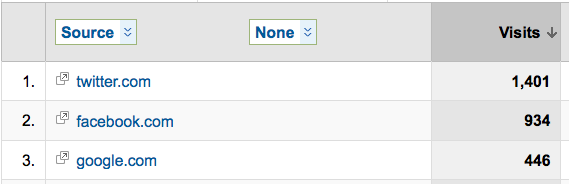
Yes, Twitter was the one traffic source that initially put Traffic Generation Café on the map of blogs to reckon with.
This is a Google Analytics screenshot from my second month in business:
How Did I Do It?
Here are the precise steps I took to make Twitter work for me.
Rule #1: Automation
In the beginning, I tried to do everything by hand:
- following all the right people,
- spending hours sifting through Twitter streams,
- finding more people to follow,
- connecting,
- interacting,
- mingling,
- tearing my hair out because I didn’t have the time to do things that actually made a difference to my business…
You know, all the stuff they teach you in a typical Twitter 101 course.
It wasn’t working very well.
- it took too long;
- the results were dismal;
- I still wasn’t “getting it”.
So I did some more research and found a tool called Tweet Adder.
It was the one thing that radically changed my whole outlook on Twitter traffic generation.
Rule #2: The Right Bait
Call it what you want: enticement, bribe, bait - the principal behind it is the same.
It comes down to the basic human psychology.
“WHAT’S IN IT FOR ME?”
If you want someone to take an action (like to follow you from Twitter back to your site), you need to give them a good reason to do so.
“Come visit my great blog because it’s… great” won’t do the trick, as you may have already learned from experience.
I offered my new Twitter followers a chance to promote their blogs at Traffic Generation Café.
And it worked.
Still does actually.
What’s in it for YOUR readers?
I don’t mind if you copy my bait idea.
However, there were many people who copied me before you.
If you ask me, the Twitterverse is getting a bit crowded with all the “Come promote your business at my site!” calls to action.
BE UNIQUE.
Find what works for YOUR followers.
- Giveaway?
- Free bonus?
- A hug?
Rule #3: The Right Foundation
Another important piece to my Twitter success was my blog itself.
Even though Traffic Generation Café was barely a couple of weeks old, it looked like an authority blog.
- I published several cornerstone posts from start, so my new visitors had some great content to sink their teeth into;
- I bought and installed Thesis theme that allowed me to have a premium blog design at a democratic price;
- I took care of social proof (my posts had comments and shares) by creating my own commenting tribe.
</My Magic Twitter Traffic Formula>
And there you have it - my simply genius, if I may say so myself, Twitter traffic generation formula.
That’s it, folks, it’s a wrap; off you go to generate thousands of Twitter fans for yourself…
…Not so fast.
What about:
“Twitter should be all about quality, not quantity.”
“Would you rather have 10K followers that get you 10 RTs or 1,000 followers who love your stuff and get you 100+ RTs on every post you write?”
“Isn’t automation against Twitter rules?”
“Won’t Twitter ban you if they catch you using Tweet Adder?”
We may have to agree to disagree on some of these points, but here’s my personal Twitter philosophy:
Bring quantities of Twitter followers back to your blog and turn them into quality readers.
Twitter is a third-party platform.
The last thing you want to do for your business is to build an engaged fan club somewhere other than your own site.
Thus, I’d love to teach you how to do just that using Tweet Adder.
How to Make Tweet Adder Work for You
Tweet Adder is an automated Twitter marketing software.
With Tweet Adder, you can do everything you should be doing on Twitter at a fraction of the time:
- find targeted Twitter followers specific to your niche;
- follow/unfollow (semi) automatically - you set the rules;
- automatically greet your new followers with a custom Direct Message;
- manage your tweets: retweet RSS feeds, send @replies, shortened URLs, random time delays, etc.
- keep track of Twitter trends;
- research anything your heart desires.
Now take all of the above and multiply it x5, x10, or xUnlimited - depending on what plan you choose.
That’s right, you can run multiple accounts with Tweet Adder: a nearly impossible feat when done manually.
I personally have the 5 profile version.
Here are some important aspects to pay attention to when using TweetAdder.
Tweet Adder Tip #1: You Need More Than 1 Twitter Account
To maximize your Twitter traffic generation, you definitely want to create more than one Twitter account.
TweetAdder offers multiple Twitter account management - my version allows me to run 5 accounts at the same time.
One of the questions I get a lot is this:
“How do you “theme” those accounts? Are they all for different businesses?”
The answer is no – they are all for my Traffic Generation Cafe.
Here’s how I set up mine and recommend you figure out how to do the same with yours:
 1. Come up with different interests you personally have or different facets of your business.
For instance, for Traffic Generation Café I’d create a specific account for
- SEO traffic;
- social media traffic;
- relationship marketing traffic;
- marketing news;
- etc.
2. Create an account for each different interest.
3. Most of the information you’ll tweet through those accounts will be about those specific interests (i.e. if your account is set up with work at home moms in mind, then tweet info that they might find pertinent and interesting.)
4. DON’T tweet the same info across all your accounts all the time - your followers won’t like it, and neither will Twitter.
Of course, if you have different sites, then it makes your job of setting up accounts even easier - just set up an account for each niche you write about.
Obviously, having 5 accounts over just 1 means that I can get…
- five times more followers,
- those followers share similar interests with me,
- which makes them even more targeted.
==> Download Your Copy of Tweet Adder Here
Use discount code AH20 at checkout
Tweet Adder Tip #2: How to Target Your Followers
Yet another question that comes up a lot:
“How do you make sure your followers are targeted?”
Easy with Tweet Adder.
Here’s a quick video to show you what I mean:
You can get much trickier with your searches than what I’ve shown you.
Example searches include (combine to form more complex searches):
- containing a word: twitter
- Containing multiple words: twitter marketing
- Negation: twitter -marketing
- Exact phrase: “twitter marketing”
- OR: twitter OR tweets
- Containing a hash tag: #twitter
- Not From a user: -from:username
- To a user: to:username
- Mentioning a user: @username
Tweet Adder Tip #3: Automated Following/Unfollowing Features
Tweet Adder can definitely be one of those “set it and (almost) forget it” tools in your internet marketing tools arsenal - my favorite kind.
It has two different kinds of automation levels:
1. True “set it and forget it”.
With this feature, you just need to turn on your automatic feature, and TweetAdder will search for new users/follow/unfollow COMPLETELY on autopilot, as long as your computer is running.
WORD OF CAUTION: I don’t recommend you use this feature.It actually doesn’t yield great results and leaves a huge footprint behind - the kind of footprint that can get your accounts easily banned.
2. Semi-automatic way.
This is the one I prefer to use.
You still do some things manually, like research your targeted audience, set how many people you’d like to follow or unfollow, but you have to start TweetAdder by hand each time a task is over.
However, it still takes minimal amount of time and work.
NOTE ON UNFOLLOWING PEOPLE: this is another sore point for those who are against social media automation.
Doesn’t it seem unfair to unfollow someone after you just started following them?
Well, that’s not how Tweet Adder works.
With Tweet Adder, you only unfollow those folks who are NOT following you because they are clearly not interested in what you have to say.
They are not your targeted audience.
On occasion, it will happen that you unfollow someone who’s actually following you, but no system is perfect!
Tweet Adder Automated Following Features
- Never follow the same person twice
- Special BlackList to block following to specific people
- Auto Follow Twitter Users – Fully Control Twitter following with Follower Ratio, Max # of follows per day
- Auto Follow Stop Feature – Automatically stops when Twitter follow limits are reached
- Random Time Delay Settings- You choose what time intervals between follows, unfollows, tweets, and direct messages
Tweet Adder Automated UnFollowing Features
- Ability to unfollow ALL except your personal WHITELIST
- Auto Unfollow Twitter Users: Unfollow by #, follower to follow ratios, users who do not follow back with time frames
- Safe White List: Create a list of twitter users to never unfollow
==> Download Your Copy of Tweet Adder Here
Use discount code AH20 at checkout
Tweet Adder Tip #4: How NOT to Get Banned by Twitter
But Ana, you say, won’t Twitter ban me for following too many people at once?
And don’t they have limits as to how many people you can follow?
Yes and yes – if you don’t know what you are doing or get too aggressive.
How Many People Can You Follow?
It all comes down to the ratio between your followers and people you follow.
You can follow as many people as you want – just about, until you hit 2,000. (source)
After that, you have to wait until the number of your followers reaches 2,000 as well.
After that happens, you can start following 10% more than the number of your followers.
So if 2,000 people are following you, you can follow 2,200 (10% more), etc.
Additional reading:
- Following Rules and Best Practices by Twitter
Let’s go back to our magic number of 2,000 followers.
How do you get 2,000 people to follow you and jump over that hurdle?
You have to unfollow those who are not following you back.
You HAVE TO.
Tweet Adder Tip #5: Use Proxies
What is a proxy?
A proxy is another computer your computer connects to, and then, so to speak, uses that computer to surf the web.
The result is the internet sees the second computer–the one you’re connect to the internet through–and not you, the actual user.
Why use proxies with Tweet Adder?
You and I know that we are using Tweet Adder to ultimate add value to our new Twitter followers, not to spam them.
Twitter doesn’t know it.
So if they catch too many following/unfollowing requests from the same IP address (yours), they might ban you first and ask questions later.
How many is too many?
Anyone’s guess.
I’ve been able to follow thousands of folks per day without getting into trouble, and then some of my readers got banned after following 50 people by hand.
So now I use proxies just to be on the safe side.
Where to get proxies
There are many proxy companies you can get proxies from.
If you are looking for free ones, check out HideMyAss.com (disclaimer: I’ve never personally used them).
Word of caution: when using free proxies, you’ll most likely get what you paid for.
After doing some research, I ended up going with the one Tweet Adder folks recommended: MyPrivateProxy.net.
They seamlessly integrate with Tweet Adder and have a good reputation.
If you decide to use a proxy buffer between you and Twitter, I’d love it if you went through my affiliate link to purchase your proxies:
==>https://trafficgenerationcafe.online/loves/private-proxies/
Additional Resources:
- How to Use PrivateProxies with Tweet Adder (VIDEO TUTORIAL)
How many proxies do you need?
I recommend using a proxy/Twitter account ratio of 1/1.
So for 5 twitter accounts, I suggest you get 5 private proxies and set one proxy for every account.
By using one different IP address for every Twitter account, the accounts will have their own identity and Twitter will actually think every account is operated by an individual person.
Marketing Takeaway
Twitter is a time dump.
Yet, if that’s where your target audience hangs out, you need to be there.
My entire Twitter traffic generation philosophy boils down to this:
Go for the quantity of Twitter followers, bring them back to your blog, and turn them into quality loyal readers.
True in-depth engagement needs to happen on your site, not elsewhere.
Tweet Adder is the perfect tool for the job.
If you are considering making Tweet Adder the driving force behind your Twitter traffic, you can get a 20% discount by using the following code:
==> Download Your Copy of Tweet Adder Here
Use discount code AH20 at checkout
Happy Twitter hacking!











{ 53 comments… read them below or add one }