
 Last week, I published a post about Yahoo Site Explorer Alternatives.
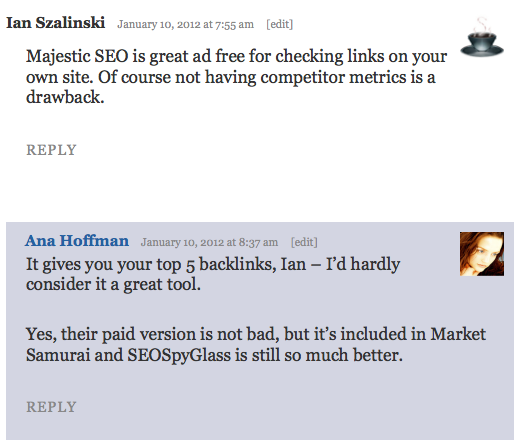
Then I got a comment from one of my readers, Ian Szalinski.
That comment made me double-check what I knew about Majestic SEO (I do hate being proven wrong, so I always make sure I know the answer first).
And after I did that, I - with all the confidence and authority - responded to him:
Then he says “But Ana…“, which makes me a bit aggravated since now I had to go back to Majestic SEO to do some more research and ended up coming back to him humbled…
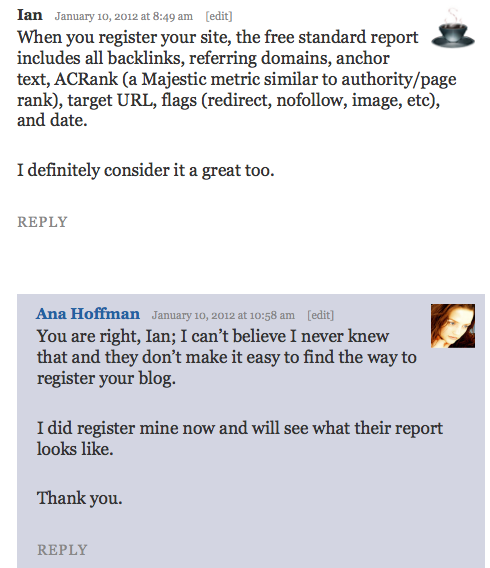
All I can say is Thank You, Ian.
Not only you taught me a lesson in humility, but also introduced me to a great way to use such a powerful backlink checking tool for FREE.
Here’s what I learned about Majestic SEO and how we can use it to stay on top of our competition.
Majestic SEO Review
What Is Majestic SEO?
Basically, Majestic SEO is a backlink research tool with a huge database of links.
I know that’s a simplistic explanation, but I think you get the point.
Majestic SEO is also not the easiest tool to use.
Why?
Because it provides too much information - yes, this is the case of too much of a good thing.
Additionally, there are plenty of posts written about Majestic SEO all over the web; the problem is they complicate it even further, in my opinion.
I realize that most of my readers are not SEO specialists and are not planning to become one in the near future.
So in this post, I’ll go over SOME of the features that will be useful to YOU and show you how to use them to improve your search engine rankings and get more SEO traffic.
Who Is Majestic SEO for?
- SEOs - obviously;
- New media specialists;
- Affiliate managers;
- Product owners (great way to find affiliates for your product);
- Every business owner looking to improve their rankings.
What Is Majestic SEO for?
You can use Majestic SEO for:
- Link building;
- Reputation Management;
- Competitor analysis;
- Monitoring news,
- SEO services
- etc, etc, etc.
This is the kind of reports Majestic SEO provides:
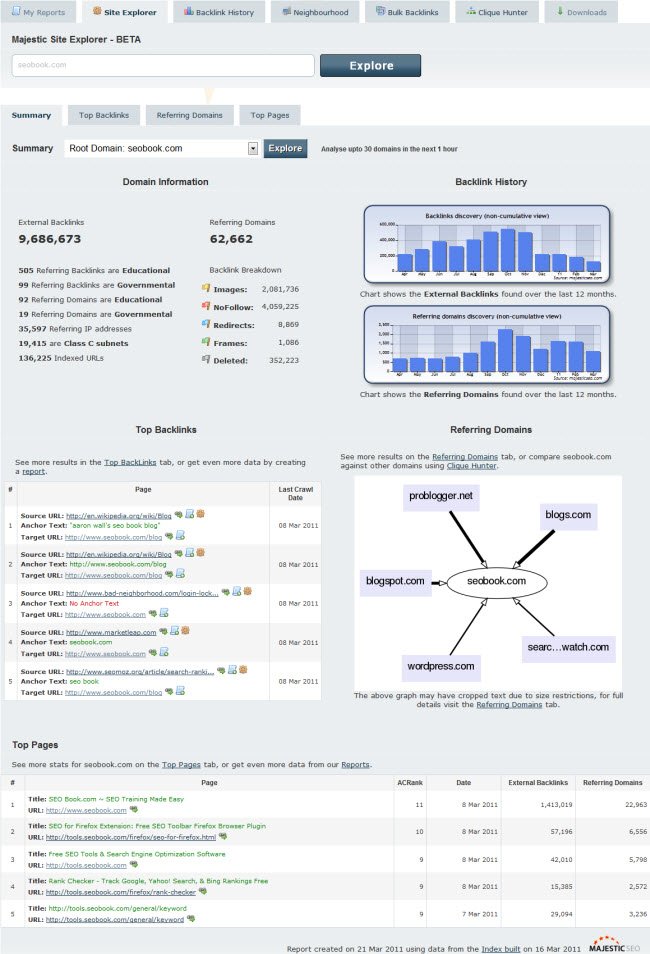
Since SEOBook didn’t mind sharing their backlinks, I borrowed their image for this post - you can also get a 20% discount for the first month of Majestic SEO paid subscriptions in that post.
How to make the most of Majestic SEO with a free account
This is the part I didn’t know before that comment from Ian.
What you need to do is create an account with them and then register your site.
1. Register an account.
Click on the “Register” link in the top navigation menu or click on this link (will open in a new window so that you can follow my instructions).

Once you are registered and logged in, proceed to the following step.
2. Create a report.
This is where it got tricky for me even the second time around; why wouldn’t they just add a “Register Your Site” button somewhere we can see it!
In the top navigation bar, find “Reports and Tools”.

Scroll down the page until you see the “Create Report field.

Enter your URL and click on “Create Report“.
It’ll take you to the following screen where you will click on “Create a Free Report“.

You’ll be taken to the following page:
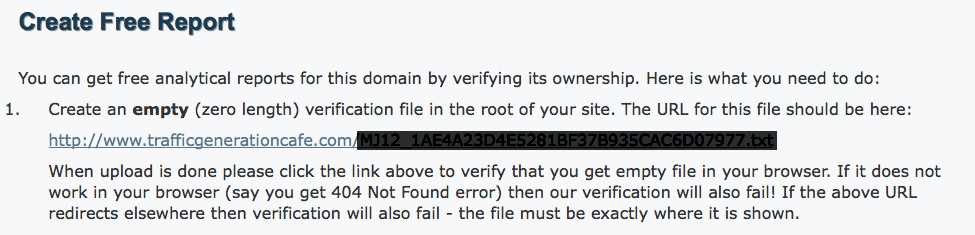
You’ll need that last part of the URL that I blacked out in the next step.
Now it’s time to verify our site.
3. Verify your site
They didn’t make this one easy either.
You have to log into your CPanel and add a file to your main directory.
I promise it’s not as hard as it sounds.
Once you are in your CPanel, go to your site root directory and, once there, click on “New File”.
I am with Hostgator and this is what this process looks like for me:
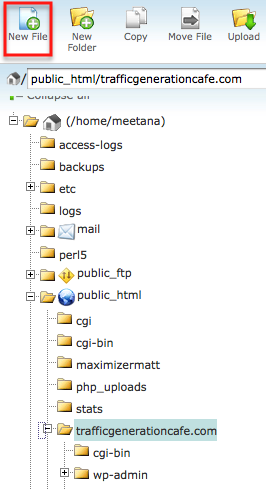
After that just copy and paste the last part of the URL Majestic SEO created for you on the “Create Free Report” page - the one I blacked out in my screenshot above - in the New File window as the name of your new file; click Create New File.
You are done!
With this step, anyway…
4. Back to Majestic SEO
…where all you need to do is to select the type of report you’d like to generate, agree to conditions, and click on the button to have your site verified.
Note: there was another piece of instructions about your robot.txt file, which I didn’t have to touch; it worked just fine and most likely will for your site as well.
Your absolutely free report will be generated within minutes depending on how big your site is.
What can you do with your free report
The report will give you a great insight into where your site stands in terms of link building.
Majestic SEO will tell you which sites link to you, to what particular pages, with what anchor text, and whether the links are do or nofollow.
However, the best part is the fact that all links can be sorted by AC Rank - Majestic SEO way to measure of how important a page is based on the number of unique referring external root domains. The higher the rank, the more valuable the page.
The report will help you to see:
- Which top pages link to you and make sure you keep those links.
- Which content on your site is the most linkable. Once you know that, you need to make sure you continue to build links to these particular pages to get them ranked for your desired keywords.
- Also, once you know your top pages, make sure you do some internal linking from those pages to some of your other pages, which you consider important, but which haven’t received much backlink attention yet.
- If you are hoping to rank a page for a certain keyword, but you see that most of the incoming links have the wrong anchor text in them, you can contact the site owner that links to you and request to change the anchor text. This is an excellent way to leverage your existing links.
Of course, the real value of Majestic SEO lies in the ability to analyze your competitors’ links, find the top pages that link to them and see if you can get links from those pages as well.
Of course, this part of Majestic SEO is not free, but if you are serious about SEO, it’s well worth it.
Here’s the link to Majestic SEO pricing page.
Note: Majestic SEO doesn’t currently offer an affiliate program, so these are all straight links.
Other Majestic SEO Tools
Here are some other free ways to use Majestic SEO.
SITE EXPLORER
This is where you can get a snapshot of ANY site for free.
The SEOBook screenshot above comes from Site Explorer, so you can see the wealth of information you get.
Also, it’ll show you the top five links for the site you are analyzing.
BACKLINK HISTORY
This tool shows backlink discovery by month and will let you analyze up to 4 sites at a time, i.e. compare your site against your competition.
For instance, I compared the top three sites, including Traffic Generation Cafe, currently ranked in the top 3 spots for “traffic generation“.
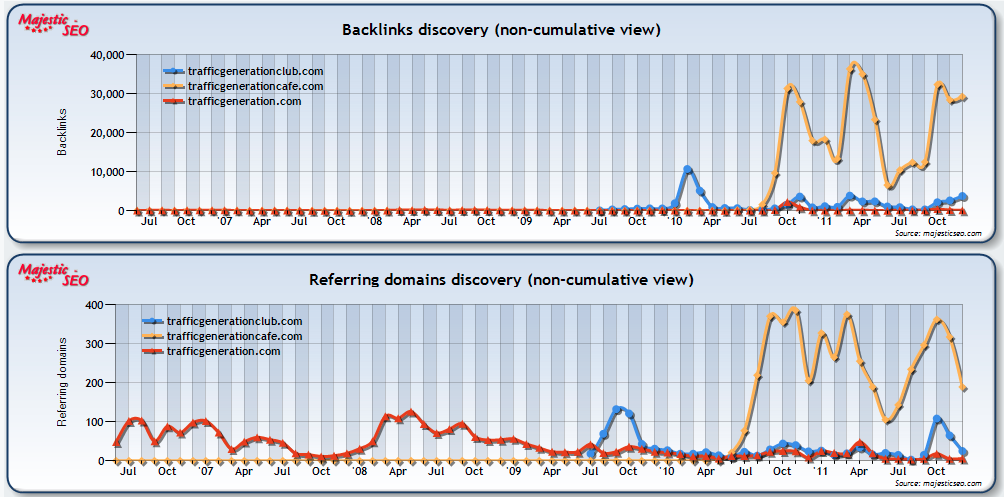
Happy to report that the yellow line is Traffic Generation Cafe.
Now if I can only outranked them with all those links… lol
NEIGHBORHOOD CHECKER
Are you hosting your site in a bad neighborhood?
Neighborhood checker will show you the other sites hosted on the same IP as yours, which will allow you to determine if any of them appear to be spammy and thus potentially dangerous neighbors to have for valid sites hosted on the same IP or even subnet.
Final Thoughts on Majestic SEO
Yes, there are plenty of free things we can do with Majestic SEO.
However, most of those features are just fun to play with and most of us, busy online business owners, don’t have time for fun!
I believe that we need the tool that will actually do the job of checking on our competitors’ links and do it efficiently and without the expense of a monthly subscription.
Once again, I stand by the conclusion I came to in my Yahoo! Site Explorer alternatives post: the two of my favorite tools to check backlinks are…
1. Market Samurai
Most of you already own it anyway, might as well use it to its fullest potential. After all, it does use Majestic SEO to power its SEO Competition module.
If you don’t own it yet, I highly recommend it as the best “all-around” SEO tool that includes keyword research, backlink research, and more.

==>Take Market Samurai for a test drive
Buying tip: if you do decide to buy Market Samurai, sign up for your free trial above and wait for the team to email you a 35% discount coupon.
Also, even if you decide not to join the club of Market Samurai owners, your keyword research module will remain active - completely free.
2. SEOSpyGlass
This one is a great FREE alternative, designed specifically for backlink checking - for any site.
==>Download your free SEOSpyGlass copy
Marketing Takeaway
Whichever tool you decided to use, make sure you use something.
Finding out where you competitors’ links are coming from is the easiest way to match and outrank them = MORE FREE SEO TRAFFIC for your site!


Thanks for the post, I found this a really useful way of analysing the links to my site, and have been using it for months now, thanks to this blog.
In particular, it has a really useful pie chart which I use to make sure that the link profile is nice and broad, to make sure that we’re not over-optimising for any particular keyword phrase. I’m taking a gamble that “Ideal Spanish Property” will be considered a brand-name and not keyword spam though!
Ha, that’s what I hoped for with “Traffic Generation Cafe”, Michael, until Google slapped me around for the term “traffic generation”. It’s all good - the rankings quickly came back.
This is a great and informative post. Majestic site explorer is a reliable tool. I have heard that Majestic site explorer is good when compared to Open Site Explorer. Ana you need to research on both the tools and should come up with an article “Majestic site explorer VS Open Site Explorer” . I’m sorry I was just kidding. Thanks for sharing this article.
Hi Ana,
“Crawl date” you mean? What do you see now?.. You have no confirmative screenshots since January, am I right? We haven’t saved personal screenshots with your blog analysis either. But what you say is really very strange, because it is technically impossible: in January we didn’t have ANY September data, because since December we started gathering absolutely new index of backlinks. Our data is fresh, as crawler is constantly working. And the only true FACTS you and me can operate now - present data. That’s the link I gave above. Sure thing, you may have your own opinion (reluctance to deal with Ahrefs or something else), but this already refers to the issue of journalist’s code of ethics.
Your opinion will by no means hurt our business, it’s just offensive to read these unconfirmed things which look like unconstructive critics.
Wow, Iana… Are you calling me unethical?
Do you have any November-December screenshots to prove me wrong? (that’s when I did the research for this post, by the way)
Feel free to stay off my blog.
Great post about Majestic SEO .I learned many new things about SEO competitions and link buildings. These tutorials help me a lot because am new internet marketer.
Tnx Ana and all the best :))
You are welcome, Erwin.
Thanks for the report Anna.
I have been a long time supporter of spyglass and it was a great shame when Yahoo Site explorer packed up. We struggle hear in the UK when trying to analyse backinks on .co.uk sites. There doesn’t seem to be the same amount of data available to sites hosted this side of the pond.
Yes, Paul, I can see the challenge…
Just wondering, what are your thoughts on Open Site Explorer?
I believe I mentioned it in this post, Matt: https://trafficgenerationcafe.online/yahoo-site-explorer-alternatives/.
Nice write up, Ana.
I was about to sign up for Majestic SEO’S freebie account, a little while back having seen the amount of data you have access to being talked about on a particular website.
The only problem was I have already signed up to a number of tools(sites-products) to go over stats, and I have occasional doses of information overload.
I am actually going to try to stick with a small bunch of tools that compliment each other(serving different purposes) so that I do not spend too much time Analyzing and not enough time actually doing.
As you have mentioned to Sanjay in your reply above, many tools are returning out dated data.
I have used ahrefs(signed up) and noticed the dates provided on the right hand side, were as you have stated from recent to around 6 months old in some cases.
That was the big put off for me, as this ancient data(for certain key parameters) is worthless.
If I remember correctly, that was how old some of the keyword data was, also.
I am with you, Daniel - there’s only that much info we need; and most of what we need to rank our sites better, we already know.
Outdated tools that charge a boatload of money.. I’ve seen way too many lately…
Hi Ana,
This is a detailed presentation of Majestic SEO tool but i think I will start with SeoSpy Glass. And I have already tested Market Samurai but I had a bad luck because during the days o my free trial Market Samurai had some problems (it was a couple of weeks ago). So I don’t have a complete view of the tool.
Anyway, thank you for this presentation.
Oh, yes, that was a bad time to take Market Samurai for a test drive, Lenia. lol
I’ve used several backlink tools but haven’t fully investigated Majestic yet- I might have to.
It’s worth your time, Rob.
Just followed this post.
Created an account & it seems just nice. Thanks a lot.
Good free tool for SEO, surely.
So Traffic travis & now this. Traffic Travis is also good for fetching the keyword positions for our website on different search engines.
I’ve been exploring Traffic Travis - writing a review on it. Looks like a great tool!
I have been using the version 3 of traffic-travis.
Could you write the review for the new version 4 of the tool.
I mean, the ver.3 is very simple to use & does a lot, but ver.4 is a little complicated. 🙁
Also, it (free version) doesnt give the backlinks properly, since yahoo’s site explorer has shut down. But surely is a useful tool.
Thanks in advance.
I had no idea there were different versions, Aniket; thanks for the heads-up!
ver.4 supports better indepth analysis.
Like page rank, on-page SEO, best 5 keywords for a given (domain) project, etc…..
Thats the only difference I could understand.
Your Review would help…
Non Samurai user here asking if anyone can confirm the “broken” status reports that I have seen around the web? Something about a Google change that prevents Market Samurai from pulling some of the data they rely on?
Now, I know that Google pokes a stick in the eye of most working in the SEO space but, like I said, I don’t use MS and was curious if they are suffering from a recent change. Please reply if you can confirm or deny.
Thx!
I don’t know about any Google changes, but MS is still indeed broken.
I am sure you’ll know why soon enough.
Thanks Ana,
This is some great information. I had pretty much thought of Majestic SEO like you did previously. The free portions didn’t seem great and I got the information anyhow from using MS.
This explanation does make it a great tool all on its own. Thanks for the explanation and guidance. It can sometimes be good to be (temporarily) wrong.
Indeed, Steve. lol
:)) Your discussion with Ian was more convincing to test Majestic SEO than your review. Sorry, I was kidding. Your review is great. You are one of a kind, Ana, do you know that? Not many people would confess they were wrong and try to fix that.
I know what you mean, Jack. lol
[full disclosure - I work for MajesticSEO]
Becky, you can currently verify any site where you have FTP access to the root directory. Does not have to be a blog.
If you cannot access the root, the only real option is to have a subscription (£29 a month, no minimum contract) but then you also get to see all you competitor’s backlinks too, which is the real value.
We would like to make it easier to verify your own sites, but so much to do… So little time! 🙂
Dixon Jones.
Thanks for stepping in, Dixon.
Does that help, Becky?
Thanks Dixon I will look into it but I don’t think that we do have access to the root directory. It’s so frustrating not having full access to the website and it means we miss out on so many opportunities and great tools like majestic!
Hi Ana,
the majestic seo sounds interesting but i’m worried that i won’t be able to set it up for my site. Its a website not a blog and i am unable to make any alterations to the home page myself - i do have access for other pages though. Do you think this rules majestic out for me?
Thanks
Hey Ana,
Thanks for the review! I had registered for Majestic SEO (never used it because I didn’t know that they provide these services for free).
Thanks for the comprehensive guide (I have setup my new blog for Majestic SEO). It will certainly be useful for me to check my back links and other stuff (and I like the fact that I am getting all this for free!).
Thanks once again for the review,
Jeevan Jacob John
You are very welcome, Jeevan - thanks for coming by.
It’s not for nothing Majestic SEO is one of the best. Though i have to admit i didn’t know that either, i’m not really a fan.
Everyone can make mistakes like this one, you did cover a lot of options in that article.
We always learn, Stan.
Great review, I’m glad you like the tool. It’s my go-to SEO tool for monitoring backlinks.
I did like it and then some!
Hey Anna, just wondering, rather than loading that file via your CPanel, wouldn’t it be easier just using a FTP program?
There’s nothing really to upload, Sire; you just need to create the file.
True, but I’m pretty sure you can do the same thing using FTP.
I am not techie enough to know the answer. lol
Fantastic post, Ana. And great tutorial. I was able to follow along with it and managed to do something new on WordPress. Thank you and take care.
Glad you figured it out, Anne!
Messed around a bit more, clicking on everything and found it.
I’m trying to follow this, Ana. But got a bit lost when trying to find my root directory. I’ve logged in to my Cpanel, but can’t find ‘root directory’ I’m also with Hostgator.
For instance, my blog root directory is what shows up when I click on trafficgenerationcafe.com - it looks like this public_html/trafficgenerationcafe.com
Also, MajesticSEO just published a training video on how to start with it; see if it helps: http://blog.majesticseo.com/webinars-and-videos/getting-started-with-majestic-seo-training-video/
Hey Anna!!
I accept that many site explorers are here in absence of yahoo site explorer but I really miss that one.
Time to move on for all of us.
I’ve been using SEOSpyGlass since you recommended it, and have been quite happy with it.
But now I’ll take a look at Majestic SEO and see if it’s easier to use for a non-SEO expert like me 🙂
Thanks for the review.
The main difference is the fact that you can use SEOSpyGlass to run reports on your competitors, whereas with Majestic SEO you’d have to pay for that.
Great explanation Ana, well, as usual. Given that I’m not going to play with my cpanel I think I’ll stick with SeoSpyGlass. But the Bad Neighbourhood IP checker is definitely a good tool even if I don’t know what you can do then. Ask the hosting company to move your site somewhere else?
For checking bad links going out from my website I use Dr Link Check but knowing IP bad neighbours would be definitely good.
Thumbs up! 🙂
Yes, you can definitely ask your hosting company to move your site.
Never heard of Dr Link Check - just got back from the site; thanks for the tip!
Nice post, Ana! I’ll have to check into this tool. I swear… I’m always learning something new from you. I hope you have more SEO books/tutorials coming out soon because you are truly the master!
So kind of you, Lisa!
Hi Ana,
Awesome post explaining Majestic SEO. I’m just wondering if most people need both Market Samurai and Majestic SEO, or if it’s enough with Market Samurai?
Thanks.
Sorry about that, just read your reply to another comment with the exact same question as mine 🙂
No worries!
I think most bloggers will be happy with MS, Jens.
Don’t know I could pull a free report from Majestic SEO. I’m going to grab one and grow my blog traffic. Thanks!
Go get it, Kent!
Very good post. I use both, Market Samurai and Majestic, and I’m very happy with their features. It’s fine to know how we can get the most with the register, but I can’t find a big different between this results and those one that Market Samurai offers.
Too much work for getting them? Maybe.
I think you are right - for most people Market Samurai is all they’ll ever need for competition research, etc.
I have been using Majestic SEO site explorer for a while now. I don’t login to the member area all the time. Sometimes I just run a quick test as a visitor and that is all I need. Other times I login in and look at the additional details. Parts of the site are fairly simple, while other parts are a bit confusing.
Truthfully, if I ran several free reports on my competitors and get 5 top links for each, it’ll keep me busy for a while.
Lol at being humbled and having to eat your words. How did it taste?
Well, i think i will buy Market Samurai since you say it is better. And I will be sure to use your aff link as a sort of ‘payment’ for all the awesome content i have gotten from here. Thanks Ana!
I appreciated it, Obinna.
And no, I didn’t like it one bit. lol
Hi Ana, I noticed that Market Samurai integrates some data from Majestic SEO and I’ve been waiting patiently from them to do a video to explain it all. LOL!! Thanks for the walk through. I’d love to see a video on this and how it differs from the other alternatives.
Thanks for the tutorial. I am little worried about my blogger blog SEO as there is no built-in SEO plugins.
Many thanks, Ana!
+1’d
If you are planning on making a business out of it, you need to move your blog to self-hosted WP, Abhi - no question about it.
The sooner you do it, the less painful it’ll be.
Thank you for your suggestions, Ana. I am thinking for that. Fed up of blogger. But… Lets see how soon I can do it….
I would go for SEO Spyglass as a tool for checking my competitors backlinks. The best thing about the free one is that you could be able to extract a maximum 0f 1000 links from a particular site. But you could get way more than that with a licensed one. Guess it’s best for me 🙂
What do you think about the Traffic Travis SEO software as it seems to do the job ❓
Still on my list of tools to test, Caleb…
Thanks Ana. Very useful for me as I’m still deliberating whether to buy Market Samuri or whether in fact to look at Majestic SEO? What’s the main difference with Market Samuri and Majestic SEO?
Market Samurai provides both keyword research and SEO competition research, Lilach, and it’s a one-time fee.
Majestic SEO will only do SEO competition and ONLY if you pay a monthly fee. The only thing you can do for free is check backlinks for your own site.
Thank you Anna for sharing how to use this for free, I am really looking for tools who can do backlinks history & competitor analysis. I also found a website that does this also, you might wanna check them out ahrefs.com
Thanks again!
I found Ahrefs.com info quite inaccurate, Sanjay.
For instance, the last time they crawled a lot of my blog was back in SEPTEMBER. Who needs 6 month-old SEO info?
Really? I just found them today while browsing your site, I haven’t tried it yet. My bad 🙂
Not at all - glad I could save you some time. lol
Thanks for the +1!
Hi guys,
As i see, ahrefs indexed more than 5000 pages from this blog, and the last update for most of them - March 2012.
ahrefs.com/site-explorer/pages/subdomains/trafficgenerationcafe.com
Why do you think that the last crowling was in September?
[I work for Ahrefs.com]
Because that’s what the last update showed as, Iana, back when I wrote this post.