

Any website can be this transparent...
Ever wondered how to find out whether a site or a page is indexed by Google?
Or when was the last time your site was cached?
Or how to find specific keywords on a cached page?
Or what if you site was banned by Google?
There are a few search query terms you can use to find out all this information and more, and all I am going to do in this post is simply tell you about them.
By the way, all this information was collected and put together by Dori Friend from DoriFriend.com; I am just passing it along, because I found it to be incredibly useful.
Search Term: info
Example:
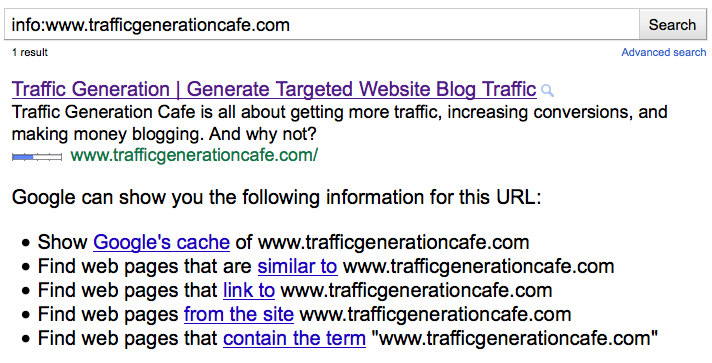
info:www.trafficgenerationcafe.com
Uses:
The query prefix “info:” returns a single result for the specified URL if it exists in the index.
Note: Once here, you can easily get info on backlinks, cache, related and pages indexed.
Search Term: Link
Example:
link:www.trafficgenerationcafe.com
Uses:
The query prefix “link:” lists web pages that have links to the specified web page. There can be no space between “link:” and the web page URL.
Note: Google is never up to date on this so use Yahoo or alltheweb.com for more current backlinking.
Search Term: Site
Example:
site:www.trafficgenerationcafe.com
Uses:
The query prefix “site:” lists web pages that exist in the index. There can be no space between “link:” and the web page URL.
Note: This is where you can tell if your site is in Google’s index. If it says “Sorry, no information…” you either haven’t been found yet, or you got banned! 🙁
Search Term: Cache
Example:
cache:www.trafficgenerationcafe.com
cache:www.trafficgenerationcafe.com traffic
Uses:
The query prefix “cache:” returns the cached HTML version of the specified web document that the Google search crawled. There can be no space between “cache:” and the web page URL. If you include other words in the query, Google will highlight those words within the cached document.
Search Term: Related
Example:
related:www.trafficgenerationcafe.com
Uses:
The query prefix “related:” lists web pages that are similar to the specified web page. There can be no space between “related:” and the web page URL.
Search Term: “keyword”
Example:
“how to increase website traffic”
Uses:
Search for complete phrases by enclosing them in quotation marks or connecting them with hyphens. Words marked in this way will appear together in all results exactly as entered.
Search Term: allintitle
Example:
allintitle: internet marketing tools
Uses:
Starting a query with the term “allintitle:” restricts the results to those with all of the query words in the title.
Search Term: allintext
Example:
allintext: one way link building
Uses:
Starting a query with the term “allintext:” restricts the results to those with all of the query words in only the body text, ignoring link, URL, and title matches.
Search Term: allinurl
Example:
allinurl: how to build list
Uses:
Starting a query with the term “allinurl:” restricts the results to those with all of the query words in the result URL.
Marketing Takeaway
That’s all, folks.
Bookmark’em. Use’em.
Share them with followers and lists.
It’ll be much appreciated.
What think you? Comment to show me that you’re alive!

Idrus
Hi Ana, thank you, you showed how to do a search for more effective search engine.
I found this article from a post about “How To Use Them For Free Keyword Research” in the blog Ian.
I am happy to find some way to simplify my work. Once again thank you Ana.
Excellent article.
Kent
Great list you have here! I have already been using some of these query terms and I really find them useful in my blog optimization. Thanks!
Thank you, Kent. Glad you stopped by.
Steve Rice
Found this article from Ian’s post about Google keyword research.
Your post, like his, was SO helpful to me, Ana. It’s amazing how life unfolds and places resources before us right when we need them.
I learned several things I’m doing right one my site, and some things that I can improve on. These tools will be really helpful going forward.
Thanks.
The connections always intrigue me, Steve. Glad you found helpful tools, too.
Jack
Wow Ana, some of these I have never heard about before. Really useful information you have given once again. Also, I noticed your RT’s have basically tripled lately! What’s your secret?
Jack
Thanks, Jack!
RTs: I’ve been trying out different things lately, but quite honestly might be a glitch in the system as well. You know how accurate those counters can be….
Ana
Wow, I have never imagined that there are a lot of things that we can do with google 🙂
Awesome post
My pleasure, Tho. It sure is a powerful tool.
Hi Ana,
Thanks for this list. I use most of these codes, but I tend to forget them on occasion. I am going to print this page for further reference.
Thanks again Ana and have a great day!
Thanks for stopping by, Ian and a good day to you too!
Great Resource you have compiled here Ana, thanks.
Will share accordingly 🙂
My pleasure, Alex - thanks for sharing.
Hi Ana,
I really don’t know about the usage of some prefixes like “info”, “cache” and “related”. But now I know it. That’s what I really like about this blog. I usually find very important things by visiting here.
Hi Riya - it’s my aim to provide technical info in simple terms and I am glad that I get it right. 🙂
That was really wonderful. How can one get to know all these things by experiments?
Practice makes perfect, Ranjith 🙂
Thanks Ana,
This is fun, I went to Google for links and it was only a couple then switched to yahoo and had over 7000. Very cool stuff.
It’s amazing how different the info is, isn’t it?
Thanks for coming by, Justin!
Whau that is cool. I knew about: info, link, site and cache, but not the rest of them. Think the related term is very useful. Thank you very much Ana 🙂
Very welcome, Thomas!
I didn’t know about those last three options, Ana. Like you point out, Google is always behind on displaying links using this method. It can be a little frustrating when you know sites link to you, and you can even see the links in webmaster tools. I’m always amazed at how random some of the sites are that link to mine, or that mention my site on theirs.
I think most of those sites are scrapers. 🙂
Also one of the reason your links might not show up in Google is because they might not be getting indexed. I always ping all my links. Do you? What do you use?
I haven’t always done that, but I think it was one of you posts from a while back that started me pinging all of my comments. I use pingomatic whenever I comment, but I ping the page I comment on. Should I be pinging the comment, instead?
I always ping the comment URL, Brad.
One of the practical reasons for that is that most blogger paginate their comments, so your comment might not be on the same page as the main article.
Thanks, Ana. Thats what I’ve been doing ever since I read this post, but I wasn’t sure if it mattered. I didn’t think about the pagination issue, but that makes a lot of sense.
That’s great, Brad. Thanks for stopping by.