
Priorities? What's that?
Some of you might’ve heard about the “first link priority” rule.
It goes something like this:
“Google will give the most weight to the very first anchor text link on each page, so it pays to make sure that that link includes your keywords.”
This is a simplified definition; for more information on the first link priority rule, read this post.
However, this post is about a slight variation of the rule, which could be affecting your link building through commenting, guest posting, and even your own internal linking structure.
What Is First Link Priority?
When a search engine spider crawls a web page and finds 2 links pointing to the same page, internal or external, it will count the first link and disregard the second.
This is Google’s way to ensure that the site owners don’t bombard the search engine bots with hundreds of similar links pointing to the same content.
This rule is something that anyone who wants to increase their search engine traffic should consider when building links from other blogs or even deep linking within their own sites.
First Link Priority When Commenting on Other Blogs
The simplest example of this is when you leave a comment on a blog, then the blog owner responds to your comment, and you come back to follow up with yet another comment.
Most bloggers will use the same value in their “Name” field and “Website” field when commenting the second time.
The same goes for CommentLuv links when you comment on CL-enabled blogs.
However, Google will count the link in your FIRST comment, but NOT your second one.
Of course, this is so simple to change that it’s a shame to miss out on an opportunity to build additional links to your blog through commenting.
So next time you leave more than one comment on a post, make sure you vary which pages/posts you are linking to.
For a good example of what it looks like in practice, take a look at my recent guest post at Kikolani.com:
Scroll down to the comment section (after reading the post, of course) to see how I responded to comments making sure I use different posts for my CommentLuv links, as well as my website field. Several times I actually chose not to link my name to my blog at all: how many links do I need with “Ana Hoffman” as anchor text, right?
You’ll also find some solid tips on how to properly use KeywordLuv - something that many bloggers are not very certain about, judging by commenting section on blogs, including mine.
First Link Priority When Guest Posting
Same goes for guest posting.
When you link to your blog from a guest post, make sure that you link to any give page on your blog (including your home page) only once.
If the post content calls for more than one such link, at least make sure that the first link includes your desirable anchor text.
For example, going back to the same guest post at Kikolani.com, my author box looks like this:
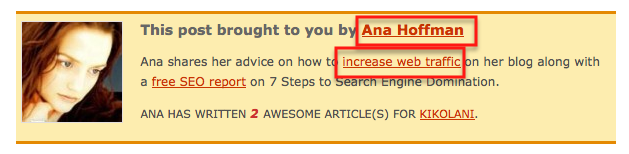
Both “Ana Hoffman” and “increase web traffic” are pointing to my home page.
That means that Google will count the first link, but skip the second - the one that contains the actual anchor text I’d like to point to my blog.
Solution: I need to ask Kristi to change the first link to point to my “About” page - much more fitted for my name as anchor text anyway.
First Link Priority on YOUR Site
If you could care less about link building, fine.
You are not off the hook just yet though; first link priority has a lot to do with your own blog structure as well.
Because of the way Google bots fetch your site, they “see” your navigation menu before your content, so all the links in your navigation menu become your “first priority links”.
Side note: if you are curious to see how Google reads your site, in your browser go under “View” ==> “Page Source”.
For Firefox 7.0.0 users and newer: they changed things around and I could barely find page source. It’s now under “Tools” ==> “Web Developer”.
Google Webmaster Tools: you can also “fetch as Googlebot” under “Diagnostics” ==> “Fetch as Googlebot”.
Since there’s virtually nothing you can do to change how Google works for dynamic websites, like blogs, here are some suggestions on how to make the most of your navigation bar for SEO purposes:
1. Use anchor text instead of “Home” tab in your navigation menu.
Since changing the word “Home” to your actual site name might not look too good visually, here’s the workaround.
“When linking to the home page many websites use the word “home” as a link to the homepage.
You can do that but, if you do, you are missing the opportunity to focus a little more internal anchor text.
Instead use an icon of a “home” and do an image replacement using the site name as anchor text. I have seen people use their primary keyword: use this with caution as it is a risky technique.
The more the anchor text differs from the site name, the greater the risk.” Source
2. Use your keywords for tabs.
For instance, my second-tier navigation bar contains links to my category/resource pages and they are also some of the keywords for my blog.
3. Don’t constantly link to your home page.
There’s absolutely no reason why we should link to our home page bazillion times from each post, yet that’s exactly what most bloggers do.
How?
In your author box.
When responding to comments.
Possibly in the footer.
If you notice, my name is not hyperlinked in any of those places. If anyone wants to learn about me, they can go to my “About” me page.
If all this sounds like too much work to bother with, let me say this: you have a limited time for each Google bot visit and it’s best maximized by excluding all the useless links that won’t be counted for anything anyway.
To learn more about Google crawl budget, take a look at this post:
In order to “unlink” your name in your comment section, in your WP dashboard go to “Users” ==> “Your Profile” and remove your website URL under “Contact Info”. That simple.
Marketing Takeaway
Whether you care about link building or not, do me and your site a favor and implement these two quick takeaways:
- Link to different pages/posts when leaving more than one link on another blog, whether in comments or when guest posting.
- Unlink your name when responding to comments on your own blog.
Simple to do and you’ll benefit from it whether you care about your WordPress SEO or not.
Love it or hate it? Comment to show me that you’re alive!


This post brought to you by Ana Hoffman
I am the founder of Traffic Generation Cafe and if you liked the post you just read, then you'll love my email updates. Just click on "Get Instant Access" below to join me:
Ana has written 258 great posts for Traffic Generation Cafe.










{ 95 comments… read them below or add one }
Great info as usual. I’ve been blogging for 4 years, but this tactic never crossed my mind.
Whenever anyone comments on a blog where the comments must be approved, they should note the comment url.
Once the comment has been approved ping the comment url at PingFarm
Sometimes it takes a day or two before the comments get approved, and the comment page may not get crawled again, so it is necessary to ping it.
PingFarm has a mass submission feature so you can submit multiple comment urls at the same time.10 Powerful Sources Of Free Traffic 
Robert A. Kearse invites you to read:
I do find PingFarm very helpful, Robert.
Another great and info filled article. When you were referring to the home page link, are you supposed to leave it as “home” or put your main keyword. You said putting your main keyword as the anchor text would be risky but that you need to change the home text. So what exactly should I do? I couldn’t really understand the article in that respect.
Mark invites you to read: Hello world!
Basically, instead of having a button that says “Home” in my nav bar, it would be better for SEO to have “Traffic Generation Cafe” there instead.
It’s a bit of a mouthful though… LOL
PS When will you start writing new posts on your blog?
Another great article Ana. I hadn’t realised the second link is disregarded- it makes sense from Google’s point of view though. @creative web design
Robin Jennings invites you to read: Can a Newspaper Design overhaul increase Circulation?
You are welcome, Robin.
Ana,
Great article… Anchor text is something that I never really paid attention to until recently and now I realize all the mistakes I’ve been making… Thank you.
Also is it a plugin that you use for Author Bio “this post is brought to you…”
What is the title is so?
Thanks
Ryan H
Ryan Hanley invites you to read: Why the First 9,999 Hours are the Most Important
Good news about anchor text, Ryan, is that it’s entirely under our control.
As far as the plugin is concerned, I think you are referring to CommentLuv Premium.
If interested, you need to purchase it right away; it’s closing tomorrow. Also I offer $10 off of it right now. https://trafficgenerationcafe.online/internet-marketing-black-friday/
Nice Article @ Ana,
I think First Link and Last Link get Priority More then other link of the same Post/Page.
Here you Talk about only First Link.
But you have notice a great thing to the Blog Commenter(Just for Link Building) in this Article that is :
“Dont Use Same URL when Replying to the a Post 2nd time, use Deep Link”
Cheer
Hi Ana,
I like to know if I am getting backlink from the forum thread which have 10+ links in one thread and I am replying with a link, do it give any benefit to my link? also how link weightage calculated?
Yes, it does, Daniel.
As far as your other question is concerned, only Google really knows.
Usually, if the page has PR, it’s divided by the number of links on the page, including all navigation links, sidebar links, etc.
Also the position of your link in the thread is important - the closer to the top, the better.
this is great information Ana, especially about varying links as Google is not too fond of those dups.
Paul invites you to read: Most Followed Twitter Users & Brands [Infographic]
Hey Ana,
Excellent post! I never even thought about un-linking my name in all of my comments. That is brilliant and it makes complete sense to me, because too many links can hurt your rankings. Even though my domain is my actual name, that is not the main keyword for my site.
Thanks for this post Ana, very valuable!
Ian Belanger invites you to read: No Success in Your Network Marketing Business, It IS Your Fault!
Useful information as usual, Ana. So if I’m understanding the post correctly, if you responded to my comment and I responded back with some form of link, I should link to a page that’s different from my original link. Hope I’m getting that right.
Thomas invites you to read: Google Plus vs Facebook
Bingo!
This does bring up a good point if you’re using an unmodified WordPress template because your first link on any page will be your site name. Not bad if your site name is your primary targeted keyword. Otherwise, not too good. What do you think?
Mike Coday invites you to read: Good Company - Wasting Money on Advertising
Yes I`m agree with you Mike thats why I always try to buy web domains that contains my primary keywords.
First time I landed on your website Ana it was for the nofollow links but now I actually comeback for your posts.
I never think that commenting its so complex and that they are so many rules that you have to obey to make sure Google its frendly with your links from a comment.
By “unmodified WP template” you mean the default theme, Mike?
I am not very technical, but I do think that themes change your link structure…
So I think I have to diversify my anchor text I didn’t know about this till now
because when I am commenting in another blog I just put my name it is rare when I put my keyword because a lot of blog owners will consider it as a spam.
Salah Messaoud invites you to read: How To Encourage Readers to Comment
It’s very true, Salah.
However, you can still use your name and link it to your “About” page instead. You still get the link and it’s better for your SEO.
You are right and you have done research on link popularity. We only try to create link but do not know how can these be considered by Google.
Maja invites you to read: Modern Hair Styles at Fantastic Sams
Brilliant pieces of advice. My internal linking in my blog needs improvement and will keep the first link rule in mind. Thank you.
Cheolsu invites you to read: The New Gmail Updates
Hey Ana,
I have been using different anchor texts when leaving comments. However, one problem with that approach is that many bloggers (for some reason0 dont allow you to use different names (which would be your anchor text for your site), so you are stock with using the same name over and over.
Thats one thing I love about comluv. It allows you to use different urls with different anchor text and it wont look spammy either.
As always, great stuff Ana. Thank you.
Satrap invites you to read: 61 Free Traffic Generation Methods to Increase Website Traffic
You’re right, Satrap. That is frustrating. Simply luv CommentLuv!
Very true Ana
That’s why I always try to link to another page when I respond to comments on many blogs. That way I can have two different links linking to two different pages. One stone and two birds! Thanks for this information.
Duy.
I do the same. It’s really useful.
Interesting information, Ana. I think this one is relatively easy to test, so it’s worth a try for anyone interested in learning exactly how Google prioritizes links. I think a lot of people don’t get aggressive with their linking in blog comments because they don’t want to be labelled as ‘spammers!’
Darren invites you to read: Google Panda SEO Checklist
Agreed, Darren. However, I think as with most other issues, moderation applies.
Brilliant advice as always, Ana!
I’ve heard of the first link priority rule, but I wasn’t sure how it worked with sub-pages. So “domain.com/about” and “domain.com” count as two different links?
Eugene invites you to read: Win $1,500 Worth of Free Consulting to Boost Your Business!
Yes, Eugene; those would be considered two separate links and both of them would count.
Hmmm. I see two links to your home page, and the first one says “Home.” Are you optimizing for “home”?
Frankly, I don’t entirely believe the first link rule, at least not in general. Google would be messing up if it weighted nav links the same as content links and I think they have serious algorithms to distinguish between the two. It’s a similar problem deweighting blogroll links and similar links which look like paid links.
Also, most sites have a home page link at the top, and it is often “home.”
All this said, it would be an interesting experiment: set up a site with a home link at the top and a bunch of content links to the home page with some random string and see if the home page will rank for that string.
Indeed it does, Carl - on my to-do list.
“Deweighing” links is not the same as not crawling/not counting them.
There were plenty of such tests done; I link to some of them in my fist post on the issue (linked at the top of this post).
You can also Google it and find plenty of people who did such experiments.
OK, I have looked at some of the experiments. They are not conclusive, as I haven’t seen home/banner link vs. internal link, but it’s worth a try.
Might I add that you might want to give it a try yourself. I just did a view source on this site to see if you were using an absolute positioning to get your banner down to the bottom of the source or some such. Nope. Not only that, the “home” tab is the first link to the top of you source. It is no-followed, but given all the FUD I have read about using no-follow internally, I’m not sure that this is optimal.
Maybe you should have a hash on the end of the URL for the home tab, or even point to index.php?
I’ve worked online for four years and I’ve been given the advice to put only one link to one URL per article. I never really bothered to ask but your explanation about first link priority makes a whole lotta sense. Thanks for making it simple.
Grace invites you to read: What is a Blog?
At least you weren’t missing out on any links, Grace - whether you knew why or not.
By the way, I’m sharing this post with my team members. That’ll help clear things up for them as well

Grace invites you to read: What is a Blog?
Hey Ana,
Thank for the great tips. Certainly lots of people overlook the first point.
Wonder does linking to your home via your name in the comment section does any harm to your site? I have no idea if there is any negative effect for this kind of internal link to your home.
Cheers,
Ming
Ming Jong Tey invites you to read: Instant Traffic To Your Sales Funnel
A couple of years ago, my answer would be definitely yes, Ming.
Google used to have a “budget” of crawling only 100 links per page; after that the bots would leave the page.
Things have changed since then and per Matt Cutts they removed the limit, but I don’t link to my home page in comments any longer just to be on the safe side.
You never know what Google decides to change tomorrow!
Got it Ana, play it on the safe side is wise
“You never know what Google decides to change tomorrow!” That’s so true, lol
Cheers,
Ming
Ming Jong Tey invites you to read: Instant Traffic To Your Sales Funnel
Rather safe than sorry, Ming….
Good advice, Ana. I have seen a lot of examples where people do just what you mentioned, ie. posting a ton of links pointing to the same content, in hopes of ranking higher.
-Jean
Jean invites you to read: How to stay safe while driving on wet roads
To be honest, this is the first time I’ve heard about first link priority rule. SEO is really a continuous work, I should re-optimize my site with this rule. Thanks for the information Ana.

Myro invites you to read: Speaking at DuPont Legal Network Marketing and Referral Conference
You are right, Myro. It’s constantly changing and if we want to be optimized, we have to keep updating. That’s just the way it is.
Hi Ana.. I even don’t know if Google doesn’t count the second link from the same post. But how if backinks from a single post to different pages of the site, if it is counted or not..
zamahsari invites you to read: Nokia Lumia 800 Vs Lumia 710: What You Need To Know
Yes, Zamahsari, you can link from the same post to different pages within a site without a problem.
Those are great linking tips Ana. It’s true that most people, me included, have the tendency to link to the home page, most of the time. Well, I just linked to my contact page for this one Thanks again.
Sylviane Nuccio invites you to read: Authentic Writing – Can You Define Yourself As An Authentic Writer?
I see why I come back here every day. I learn something new every time I go to your site. Thank you for all of this useful information. It is almost like taking a class on Online Training.
ditto!
Fernando Tarnogol invites you to read: Surfing the Mediocrity Wave
Thanks, guys - always a pleasure!
Hmm. I have never heard of the 1st link priority rule before. Thanks for this education/tips.
GADEL invites you to read: Quote of the Day by St. Anthony Mary Claret
Beautiful distillation of insights.
I’ve heard the information before from various people and in various forms, but you addressed the topic in a pragmatic and insightful way.
J.D. Meier invites you to read: Getting Started with Getting Results Free eBook
Thank you, J.D. - speaking non-techie is my specialty!
If I understand Rohan correctly, he is saying that only 1 link from any page on a domain to any other page on an entirely different domain will pass page rank. Am I reading that right? If so, I do not believe that is correct.
Mike Coday invites you to read: Good Company - Wasting Money on Advertising
I think Rohan might be a bit mislead on the topic, Mike - I don’t agree with his comment either.
Hello Ana. I found the thing you said about the ‘home’ tab link very interesting. How do you place an image there anyway? I’ve tried setting the tabs in Blogengage as keywords. Don’t know how much help that is for search engines, but they should do ok?
I also read that post on Kikolani and thoroughly enjoyed reading about how you should utilize different keywords in the keywords section of the comments. Thanks for that!
bbrian017 invites you to read: The Blog Engage Challenge From We Blog Better
I am not too much of a techie, Brian, as far as adding an image instead of your home button, but I know that it needs to be coded in the theme.
One of my tabs “SEO traffic” is ranking #2 on Google for “SEO traffic” - brings in a great amount of traffic and subscribers. So it definitely pays when done right!
Always a pleasure to see you around, Brian.
…..excellent post, except that the first link rule is a domain level constraint and not a permalink level. So if someone links to different posts from their own domain it is still not going to pass any pagerank unlike what you said. This was rolled in as an additional tweak some time after the 2009 caffeine update when Google changed their algorithm to deter pagerank sculpting. Its interesting how you crafted an entire theory on that to promote CommentLuv. Unless you have actually used the technique and seen positive results, which I am sure you must have since you have written a complete post about it.
Rohan invites you to read: VirtueMart Import BOT Joomla app From Techlunatic
I was just curious about this and did a little googling… found this page from a test SEOMoz did. It seems to be, from what their test showed, that at the very least Google is counting the links if they go to different URLs within the same domain. Whether Google passes PR or not, though, wasn’t determined.
http://www.seomoz.org/ugc/3-ways-to-avoid-the-first-link-counts-rule
I thought that was a pretty interesting test they did. I’m pretty new to SEO but I think if Google is even ranking those pages for the keywords for the multiple URLs, that couldn’t hurt.
Bethany invites you to read: How’s Your Quality of Life?
Thanks for the additional resource, Bethany.
Yes, there were several of such tests done with varying results.
As long as you have DIFFERENT URLs, even if they are leading to the same domain, Google will count all those links.
Rohan:
I had a bit of a hard time following your logic.
Of course, internal links pass pagerank - I’ve never heard anything to the contrary, other than Matt Cutts talking about how pagerank sculpting doesn’t work.
However, what I am discussing here has nothing to do with pagerank sculpting.
And CommentLuv? If you think the post has anything to do with it, I encourage you to read it again.
Hello Ana. I think I read a similar post on Kristy’s blog. Is that right? Anyway, the first link priority rule should be kind of obvious. Everybody should know that a lot of links in a post or comment is just bad taste and reaks of desperation. Once again, good post!
Ivin invites you to read: The WORST Blog Post You Can Write.
That’s possible, Ivin. It is not good etiquette to do that at all.
Hi Ana,
Great post we all know very what is the importance of link building but earlier i wasn’t know how to do it but after learn from your thoughts i will follow these rules and i am sure these ideas will be prove beneficial for me.
Thanks for this.
sam invites you to read: Goa Carnival 2012
Sometimes you really need to look at the page source code to see if a link or which link comes first to know for sure. Some themes or templates look like a link should come first, but actually can come later in the page code. I have also noticed in some themes a gravatar image comes first and it is linked. It also happens to be the first link usually without any alt=keyword. The name or keyworded name comes later along with commentluv.
There is a little more confusion and thinking involved when a site has both dofollow and nofollow links, such as a dofollow name field and nofollow commentluv field, or vice versa.
Ray invites you to read: What happened to Google Dictionary
Definitely so, Ray, and I talk about how to check for that in my first post I linked to in the beginning.
Ana, Isn’t it like
“Google will give the most weight to the very first anchor text link on each page if the URLs are the same and if URLs are different they get equal weightage.”
Eddie Gear invites you to read: Make Money Online Interview With Blogger John Saddington
Yes, Eddie: if the URLs are different, even if they point to the same site, they’ll get equal treatment from Google.
Hi Ana,
Great info again. I did not know only the first link counts.
Hi Ana,
I have actually never heard about the first link priority rule. Your post is brilliant. I’m definitively going to start thinking about how I link from comments (especially using commentluv). And using keywords in the navigation bar is something I should do as well. I’m doing all the mistakes
Thanks a lot.
Jens P. Berget invites you to read: Stay Hungry, Stay Foolish: What We Can Learn From Steve Jobs
As long as we learn from our mistakes, who care that we make them to begin with, right, Jens? LOL
Thanks for the excellent information above and also in your post on Kikolani. Your article on Kikolano has some of the best tips on blog commenting that I have come across, thanks so much for the valuable info.
Thomas invites you to read: Cranberry Juice Superior at Preventing a Urinary Tract Infection
Glad to hear that, Thomas - thanks for following the trail from Kristi’s blog!
As always Ana, reading your articles leave me with a lot of work :p
I’m off again to begin implementing your recommendations.
Learning is for life - A tombstone will become my diploma.
Regards

Michael | BuildinganOnline.com invites you to read: Traffic Generation With the ShareThis Button
When we stop learning, we are dead, Michael. LOL
Thanks for actually doing it and not just reading about it.
Thank you for this tip. I have been reading a lot about link building, but haven’t come across this great information. Link Building is tough, but thanks to you it might just have gotten easier!
Brandon Mulnix invites you to read: Finding a Body while running… Almost happened to me once
You are very welcome, Brandon; thanks for coming by.
Ana,
As always some really good information here. I’m definitely going to take to heart the points you made about changing the navigation bar. That is a really good tip and right now minus definitely “off”.
Once again thanks great information I hope you have a wonderful Halloween.
-Steve
Steve invites you to read: 7 Links of Highly Effective Posts
Thanks so much, Steve, and you do as well.
I should say thank you Ana, its only by now I knew about this link priority stuff… I should better follow your advice of pointing another link to your site on your follow up comment

Herbert invites you to read: Internet Marketing and Website Content
I hope you will, Herbert.
PS Just got back from checking out your blog; looks like a brand new one! Welcome to the blogosphere!
Thanks Ana, hope i will make it through with this one..
Herbert invites you to read: Internet Marketing and Website Content
Great post, I was aware about the first link priority rule but never thought about it like this way. If I check now I have already lost many opportunities till now. I will defiantly keep this in mind from now onwards.
Sanjeev invites you to read: BlogEngage – Can it do Wonders for Your Blog Traffic
Easy to do, great benefits, Sanjeev.
Thanks for stopping by.
Hi Ana,
I have read your first post about “first link priority” and I always try to follow it but I know sometimes I miss it. Thanks for reminding it again.

Riya invites you to read: HostGator Coupon Code
You comment so often, Riya, and these steps are so easy to follow, it shouldn’t be a problem for you.
Hi Ana,
Some really awesome tips, Though it’s difficult and risky to use your primary keyword in place of “Home” tab as you already mentioned your keyword should match with website name. I’ll follow your first link priority point. Thanks!!!
Aarti invites you to read: SEO Company
It makes more sense when the website name contains main keywords like in my case, Aarti, although I haven’t implemented this strategy on my blog… yet.
Hey Ana,
I loved your post! It was another great thing to learn about. I was never aware about the first link priority rule till I read your post. It does make sense leaving comments using different links and sometimes none at all. This is definitely something new to me. I’d like to thank you for explaining it so clearly!
Thanks for sharing this! keep it up!

Pj Zafra invites you to read: Sean’s Thoughts For The Week Ahead - 9
It truly is such a simple thing to implement and the payoff is great, Pj.
Thank you Ana very much for the great tips on the first link priority rule. I wasn’t aware of this and will now pay more attention when posting new blogs and comments.
David invites you to read: Norris Lake added a new event, Christmas in Old Appalachia in Museums
You are very welcome, David.
I had no idea about the first linking rule either. Thanks so much for sharing that. I’ve just recently started my blog, so I’ll make sure to remember this tip when I post.

Ashley invites you to read: Help! I need a Graphic Designer!
No problem, Ashley; thanks for coming by.
Hi Ana,
Another wow lesson to learn!
Honestly speaking, I had no idea about all that you wrote about first link etc, so it is all news to me, though it teaches me a great deal how to go about things. I do know about the link building within your own site or from other blog posts, but this sure is new!
It is always a pleasure to visit your site and learn so many things each time. Thanks so much for sharing

Harleena Singh invites you to read: Throwing a Teen Party for Halloween
And it’s always a pleasure to see you around my blog, Harleena!
Good thing first priority link rule is something very easy to follow.