
1. Blog Titles from Your Inbox
This one is easy, effective, and inspirational for more than just blog titles.
First, create a separate email account with any free email provider (I love Gmail for this because they now allow you to switch between different accounts very easily).
Then, sign up for any and every possible email list in your industry.
Your inbox will be quickly flooded with all sorts of ideas for the great headlines - just use your own “click-o-meter” to judge the title on its face value.
Moreover, you’ll get a good feel for what kind of emails to send to your own list… and what kind not to, for that matter.
Take a look at this one I got from Ryan Deiss; definitely made me click!

2. Blog Titles from Twitter
This one takes a bit more time to set up, but the research factor is priceless.
Plus, you’ll learn how to get Twitter followers in the process.
You’ll need to set up two accounts:
1. A new account on Twitter (you did know that Twitter allows you to have more than one account, right?).
This account will be automatically fed with some of your favorite blog RSS feeds, so it’s appropriate to present it as a news feed of sorts to the potential followers.
Take a look at how I did it with my @SEOTrafficCafe account (no longer in use).
2. An account on Twitterfeed.com, if you don’t already have one.
Twitterfeed.com (now a part of Bit.ly) allows you to post as many RSS feeds as you like to as many different Twitter and Facebook accounts as you like - all on auto-pilot.
Why would you want to use it over any other automated RSS posting service?
One word - tracking.
Twitterfeed allows you to tracks the clicks any one of your shared posts gets on any social media platform.
It looks something like this:
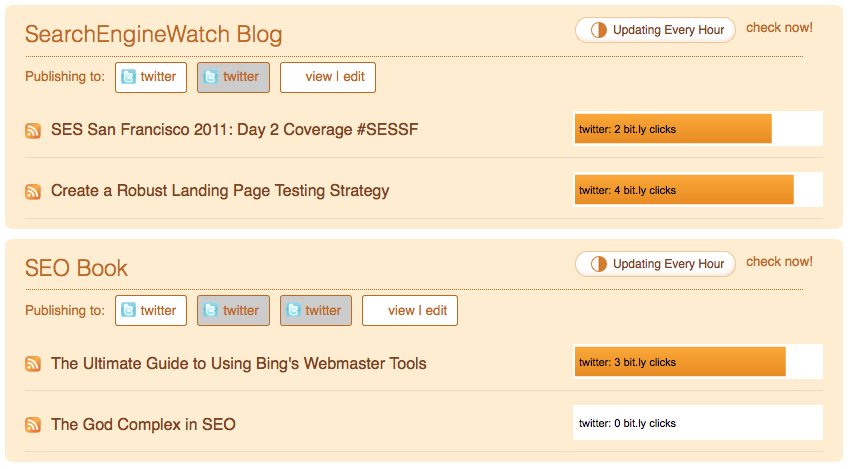
You see those yellow tabs showing me right away how popular a particular title was on Twitter or Facebook?
That’s what I am talking about.
There are other benefits to setting up Twitterfeed to feed your new Twitter account with industry news:
- It creates a great “to-read” list for you and your followers.
- It allows you to feed as many accounts as you’d like and choose which specific accounts you’d like to share a specific feed with.
- It gives you a chance to acquire more Twitter followers.
3. Blog Titles from LinkBaitGenerator.com
This tip came from Gerald Weber.
LinkBaitGenerator.com is another great source for inspiration when looking for a good blog title.
If not that, at least it’ll give you a good laugh.
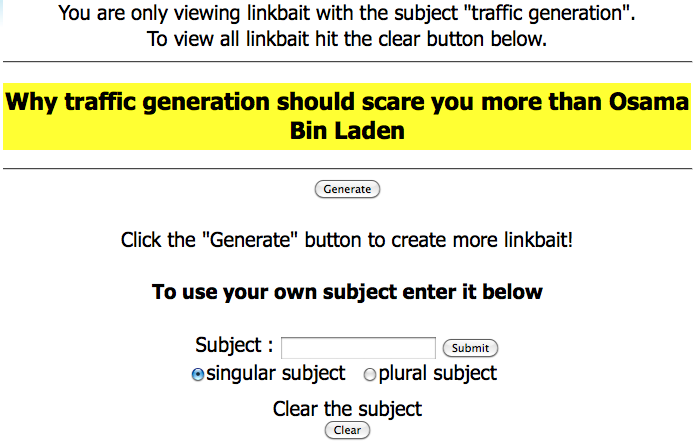
Here’s a screenshot of the tool along with the generated blog title for “traffic generation” as a seed word.
Marketing Takeaway
I wish I could write great titles - anytime, every time.
But until that happens - and IF that happens - I’ve got some resources to help me out along the way.
And you do too now.
Great blog titles: here we come!

Pages: 1 2













{ 118 comments… read them below or add one }
← Previous Comments
Just FYI Ana, clicking on your link to pagerank.com gets a 404 message, and pasting the URL manually gets this message, “PostRank services have been sunset as of May 1, 2012. We invite you to access the new social reports within Google Analytics.” That’s what I get for reading your article a year late.
Thanks for letting me know, Corky.
I knew that the service was taken down, but forgot to edit the post.
There is a quote from famous ad man David Ogilvy that goes “On the average, five times as many people read the headline as read the body copy…”. This applies equally to web as it did to print. Blog headlines, page titles, website H1′s need to be written, measured and tested in the same way that a print headline would be.
And since that’s what most of us do on a regular basis, we know just now true that statement is, James.
Thanks for coming by.
I love this blog .
.
This might sound a little market:y, but doing “IF…THEN” is a great way to “make” anyone open anything. I think everyone, at least in western society, is fed up with marketing, so any claims - made in the headline - have to be paired with a hint of proof for that claim.
Good point, Simon.
Hello Ana, I love you blog and the writing tips. I am brand new to blogging and suffering terrible with writer’s block (go figure). your writing is helpful and insightful and practical.
Welcome, Vonita!
You know I used to have problems with writing blocks all the time when I first started, but then excellence comes with practice! Now I can spit out a blog post almost on demand. lol
Hello Ana,
Coming up with catchy titles is something I always struggle with as well because I write the news section for our website. Unfortunately I am one of those people that constantly need inspiration, I will definitely start using Postrank.com now.
I am right there with you, Wonu.
← Previous Comments