
 Today felt like a good Friday to start a brand new series on Traffic Generation Cafe, called “Blog Audit Friday“.
I get a lot of requests from my readers to take a look at their blogs and see what kind of improvements I can suggest.
And that’s where the idea for the series came from.
Why don’t we all learn from other bloggers’ mistakes? Why don’t we all see how we can make our blogs better, attract better and more loyal readership, and maybe even make a buck or two in the process?
These posts are not meant to be “I write it, you read it” kind - this is a reader participation series.
Every blog I write about, I need your feedback on: go check them out, see what you do and don’t like about them, and let us know in the comments.
Remember: this is meant to benefit us all.
Without further ado, let’s get the party started.
Introducing my first victim/beneficiary:
CleverMarketer.com
November 12, 2010
From the laptop of: Ana Hoffman
Dear Heather:
Thanks so much for being so willing to let me take your blog apart for the sake of my readers. Very brave of you. Even I had no idea what this would look like when I am finished with it.
I’ve been very impressed with your tenacity, great business skills, and the ability to produce high-quality engaging content - can’t wait to see you guest post for my blog!
But for now, here is what I thought about your blog: good and bad.
***
General Stats
URL: http://www.clevermarketer.com
Title: Internet Network Marketing MLM Home Business Blog Tips | WAHM Mompreneurs
Description: Heather C Stephens Sharing Clever Internet Network Marketing MLM Home Business Blog and Social Networking Tips for Work From Home WAHM and Mompreneurs
Google PageRank: 0
Alexa Rank: 124075
Indexed pages in Google: 150
Domain Age: 1 year, 8 months
First Impression
First, I visited the home page URL http://www.clevermarketer.com/ just to get a quick and objective look from a casual browser’s point of view.
What I liked about it:
1. Uncluttered design and sophisticated simple colors.
2. Heather’s smiling face and your signature - it immediately showed me that I am dealing with a real person and the one who I am very likely to like off the bat.
3. Loved the black and white pictures of mothers; being a mother myself, I felt a sense of belonging right away.
What needs to change:
1. Blog Width
The very first thing I noticed was how wide the blog was. Although there is no hard and fast rule as to the optimal width of any website, including blogs, the general consensus is that it should be under 900 pixels.
Make it too wide and you quickly make your site much less user-friendly. Moving your eyes across a full screen like that is very tiring to your eyes and not easily scannable.
2. Information Overload
There are so many things posted on the front page that you visitors might end up leaving without clicking on any of your links or posts.
Give them too many options, and they are more likely to not make a choice at all.
Suggestions:
Cut down on the amount of posts on your main page or at the very least make them look more like magazine-style excerpts.
I see 3 opt-in forms plus a footer opt-in on your home page. One would be better with a clear call leading to it.
3. Main Blog Theme
Every new visitor wants to know right away what your blog is all about. It’s not too difficult to figure it out, but it’s not super-easy either.
I saw 2 potential theme titles on your home page:
“You’re a Clever Mom, become a Clever Marketer too!”
and
“I help moms use social media and fun, clever marketing trategies to create additional streams of income from home.”
Both are nice, but neither stands out or draws attention.
4. Footer Bar
Your MaxBlogPress Subscribers Magnet footer bar shows up every time I reload a page - I definitely think your frequency settings need to be changed. Plus, I am sure you know, that your entire call to action doesn’t show up; only the first line.
Home Page SEO Analysis
1. Heading Tag Structure
What it should be - ideally:
- H1: Blog’s name
- H2: Your blog’s tagline - should be keyword-rich
- H3: Your recent posts
- H4: related content in the sidebar, like the heading of an “about” widget.
- H5: Unrelated headings in your sidebar, footer, etc.
What it is:
- H1: Missing
- H2: Blog tagline - missing. Instead, your recent posts are all in H2. It’s not a terrible thing, but if you had a keyword-oriented tagline in H2, it would be much more SEO-friendly.
- H3: all your sidebar widget have H3 headers. Since I don’t believe you would like to optimize for keywords like “Let’s Connect” and “Recent Comments”, H3 heading could be put to much better use!
- H4 and H5: under-utilized - in other words, non-existent.
2. Home Page Load Speed
Anywhere from 27 to 30 seconds.
Target speed for any webpage download time is 2 seconds. I would say 2 seconds might be a bit unrealistic for a blog; I would set my target at 6-7 seconds.
Suggestions:
- First and foremost, getting rid of as many plugins as you can is a huge step.
- Your home page has too many images to download. Since your browsers has to go back to your server EACH time it needs to load an image, and you have about 47 of them on your home page, that’s a lot of going back and forth.
- I don’t think you need to show your related posts under each post on your home page. Additionally, I would switch to a related post plugin that doesn’t have images to download; just a personal suggestion, but absolutely up to you, of course.
- I know it’s sort of cool to see your signature being written under each of your posts, but that too slows down your page. Plus, using flash scripts is just simply not very search engine friendly. I would definitely change it to a static one.
3. Navigation
I can definitely see that you are trying to keep your visitors on your blog by providing them with as many navigational options as possible.
Makes sense in many ways.
However, too many links can actually cause the opposite effect: readers get overwhelmed and leave. Not to mention, that too many links leading away from any page, including the home page, doesn’t make too much sense from SEO point of view.
Let’s take a look at how some A-list blogs do navigation:
Very sleek on Copyblogger.com; only 4 tab choices.

Same with Pearsonified.com

As busy as it gets on Problogger.net

Of course, this is personal preference.
However, when it comes down to issues like this, I always look for inspiration to those who already “made” it. What works for them, will probably work for the rest of us - of course we always need to do our own testing before know for sure.
Content Pages
Now let’s take a quick look at the meat of your blog - your content pages.
1. Heading Tag Structure
Once again, let’s take a look at your headings here.
- H1: post / page title - perfect
- H2’s and H3’s: subheadings and sub-subheadings - perfect; however, your sidebar widgets are in H3 as well (of course, they have the same settings as your home page)
- H4: your blog’s name, and possibly related widgets - not used
- H5: same as above: sidebars etc. - not used
2. Possible Duplicate Content Issues
I’ve noticed that you are very fond of particular keywords: network marketing, internet marketing, home based business, just to name a few.
The problem is that far not every post will rank on Google for any of these keywords, nor is it meant to.
However, by using the same keywords over and over again, ESPECIALLY in your title and description tags, you may lead the search engines to believe that you are posting a bunch of duplicate content.
Let me explain with an example.
Here are some of your title tags:
- Internet Network Marketing MLM Home Business Blog Tips | WAHM Mompreneurs (home page)
- Twitter | Internet Network Marketing MLM Home Business Blog Tips | WAHM Mompreneurs (category page)
- Social Media | Internet Network Marketing MLM Home Business Blog Tips | WAHM Mompreneurs (category page)
- Network Marketing Home Based Business Activity Plan (post)
Plus each of them has been used more than once on your blog verbatim.
Most internet marketers define duplicate content as syndicating the same article or post to many different sites without changing it at all.
However, that’s not it at all.
Duplicate content issue arise when different URLs on your blog lead to the same or extremely similar content.
I am not going into great detail on the issue in this post, but do take a look at this post Deftly Dealing With Duplicate Content to learn more.
Bottom line: if you use very similar titles for many of your pages/posts, then it might lead search engine bots to believe that this is duplicate content.
Try to avoid any appearance of this by simply varying your page titles more.
3. URL slugs
If you are not sure what URL slugs are, please read this post first:
This is another area of your blog that could use some help.
Using keywords in your URLs can definitely get you a step closer to getting ranked for those keywords.
However, the more words you use in your slugs or what comes after your domain.com/ part, in other words, the more you dilute your keywords, since Google considers ALL of them as keywords.
For instance:
http://www.clevermarketer.com/self-discipline-success-in-your-network-marketing-home-based-business.html
I would change to:
http://www.clevermarketer.com/self-discipline-network-marketing-home-based-business.html (that’s if you want your post to rank for self discipline, network marketing, home based business).
This one is however perfect: http://www.clevermarketer.com/get-blog-comments-part-2.html (maybe just get rid of “part”)
Bottom line for a perfect slug: use as few words as possible while still using your keywords for the post (NOT for the entire blog!).
Link Structure
Last but not least, let’s take a look at your links.
1. Internal Linking
Not good. 
Most of your internal links go to (in the order of the most linked-to and down):
- http://www.clevermarketer.com/feed/
- http://www.clevermarketer.com/comments/feed/
- http://www.clevermarketer.com/category/blogging/blog-seo-blogging/
- http://www.clevermarketer.com/category/blogging/blog-makeover-blogging/
- the rest are mostly going to several category and tag pages.
The point of internal linking is to pass the authority to the pages that you would like to get ranked higher. I don’t think http://www.clevermarketer.com/feed/ is one of them.
Read more on how to properly use internal linking to achieve better search engine placement:
Solution:
- Start linking to the post you want to rank for; don’t link to category or tag pages.
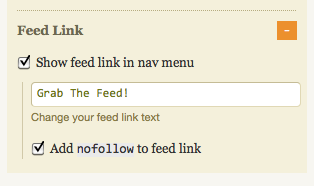
- I don’t think you are intentionally linking to your RSS feed page. The problem is that your RSS feed button shows up on every single page of your blog. Don’t worry; I am not going to tell you to get rid of it - of course you want to encourage your readers to subscribe! However, you can tell the search engines to nofollow those links. The easiest way to do it is to check your theme to see if it offers the option to nofollow certain links). For example, this is what it looks like in the Thesis theme, which I use on my blog:
2. External Linking TO Your Blog
Sorry, Heather, no great report here either.
- You don’t have many links to your blog
- The links you do have are of low quality (coming from Google PR 0 to N/A pages)
- Your anchor text is not targeted, i.e. you are not using your keywords as anchor text to lead back to your blog.
Additional reading on link building:
Link Building Mixology: Your “How To Do It The Right Way” Guide
Treasure Island of Link Building: How to Find the Best Links Every Time
What I would start doing:
- Use this post Treasure Island of Link Building: How to Find the Best Links Every Time to start building links through commenting on high PR blogs leading back to the post you would like to see ranked on Google.
- Do more guest posting on busy, high-trafficked blogs.
- Network with bloggers who have busier blogs than you do - they will end up writing about you and your blog.
This and that
Invalid HTML code
You have A LOT of it. Invalid HTML code can cause problems for search engine bots and can results in not indexed pages, lower search engine rankings, etc. Plus it might cause your blog to render in some browsers incorrectly.
Just to give you an idea, your home page alone returned 169 errors and 112 warnings via http://validator.w3.org/.
To learn more about invalid code, read:
Marketing Takeaway:
Wow, took me 2 days to write this… But I am happy with results; I hope you are as well, Heather.
How can we improve, if we don’t know what we need to improve upon?
I know this sounds like a lot of work, but I am here if you have any questions.
Look forward to seeing the new and improved CleverMarketer.com!
Wow, what an excellent audit. Your detail was an incredible help for me. I’ve recently started a wordpress blog and have been trying to understand how the plug-ins work, what different themes offer, how to write good content, etc. It’s a real learning curve. I’ll be able to take your audit and apply it to what I’ve done. Thank you.
You’re right about that, Connie, it’s really a learning curve. Keep me posted on your progress, I might be able to help you more.
Hi Anna,
I really appreciate your knowledge and the things you share.
I met you on youtube and I wish I would have checked out
your blogs a lot sooner
Great information with great resources,
Thank you,
Jeff Faldalen
Hey Ana,
What a powerful audit you have done for Heather! All I can say is wow, wow, wow!
As you said, we’re all learning here and I got some tips to implement on my blog as well. I’m still frustrated by the h1, h2, h3, h4, h5 stuff Don’t want to mess up the codes in the editor!
I have long been looking forward for an opportunity to have my blog audited by an expert blogger and I hope to be your next beneficiary
What you are doing for the community is just amazing!
Keep up the good work!
Mavis Nong
Hi Mavis,
Thanks for the compliment. I absolutely love what I’m doing. If you want, then let’s go for it!
It’s my pleasure doing that for you,
Ana
Yes, let’s go for it! I did you send you a message on Facebook on Monday about this
Keep ROCKING!
Mavis
This is an entire course on SEO. I find it useful as a reference to some things I can improve on my blog. You put a lot of work into this project. Thanks!
Hello Richard,
Yes I did put lots of time and effort doing this and I’m glad you appreciate it.
Thanks,
Ana
Very nice! With all these great resources I can take a better look at my blog and know how to get in and remedy it.
I am looking forward to see the future Friday Audits.
Hello Sheila,
Thanks for reading my blog. Actually that’s really the point of this post, it’s not only about Heather’s site, but for every bloggers who wants to improve their sites as well. Feel free to come back anytime.
All the best,
Ana
Ana, what a fantastic idea… although goodness knows where you fit it in. Excellent tips indeed. I am looking forward to applying some of these valuable pieces of information to my blog… then when I muster up the courage, perhaps one day you might critique mine?! I have so much to learn … but it is pointers like this that really help… not only to know what to pay attention to, but think about things that I didn’t even know to think about.
One of the first items I am going to look at is the HTML errors on my blog. I know I have a number of them, but not sure how on earth to solve that. I will read on and try to minimize that. Thanks so much. If Heather has a little tweaking, I am sure I have boatloads. Thanks for the generosity with your time.
Always one step at a time, Jayne
4 months ago I had no idea about any of those things either.
As far as code validation is concerned, that’s one of the most difficult tasks for me. I know a little about HTML, but no nearly enough to fix such errors.
I ended up outsourcing the task for a VERY reasonably price; I will be happy to provide my contact info if you are interested.
Best,
Ana
Hi Ana
For such a busy blogger this is a very generous service you give. I’m sure all those who have a critique done by you will see improvements in their blogging journey if and when they take action from your very comrehensive summary of their blogs. I really enjoyed reading your suggestions. Especially as I have only been blogging for months and know I still have heaps to learn. Thanks for sharing this with us.
Patricia Perth Australia
We are all learning Patricia. It’s important that we won’t stop because there’s so much to learn everyday, me myself is going through the process of learning. I absolutely love what I did with Heather’s site and I will definitely do more of it.
Blessings to you,
Ana
David
What a wonderful analysis Ana! You shared some great insightful tips that helped me.
Heather, I love the use of white space and the colors - white, blue and black. Your blog has a great feel.
I would say that one major thing stood out for me is that visitors can’t see any content or the email opt-in form WITHOUT scrolling down.
To help move those important items ‘above the fold’, I would recommend consolidating the clevermarketer.com logo, the mom pictures, signature and byline… into one space, instead of the two separate areas.
There would be more room for those things on the right side of your logo if the ‘Posts’ and ‘Comments’ links weren’t taking up valuable real estate. The ‘Posts’ and ‘Comments’ links could go on the Sidebar.
If you consolidated the images into one space, then you would want to put the Pages menu on the top of the page, so it would be:
PAGE MENU BAR
HEADER IMAGE
POST MENU BAR
Also, part of the problem is that both menu bars are two rows tall, which takes up more vertical space. And it actually gets confusing for the visitor when they hover over the ‘Social Media’ link and a submenu pops up over the ‘Mahms and Mompreneurs’ link.
So reducing the number of options as Ana suggested will clean up the site and make the menu bars so that they are only one row tall.
I hope that helps pull your content and opt-in form up above the fold.
David
David
Hi Heather, thanks for your message. Your site is looking much better. I liked your Clever Marketer logo, but now it’s seems more personal without it. And the menu bars are SO much easier to read.
I would put your signature UNDER your mission statement, so that people see the pictures, read the “I help moms…” statement (get the warm and fuzzies) and then see your signature (so they like you already).
You could modify the image to cut out a little bit more of the vertical white space, to pull the content up further.
The ‘Related Blog’ listings are showing above and below the blog, but you only want it below the blog. This will lift the title and content of your post up the page.
Speaking of, people can’t really recommend your blog post UNTIL they’ve read it. So I would put the social Digg, Buzz, Tweet and Share buttons AFTER the article. On top, they are distracting and they move your content down the page.
On the opt-in form sidebar, you don’t have to include a title, in this case “Did you get your free gift?” I would leave that blank, so that your opt-in box form moves up.
Your goal should be to see the pictures of your ‘Clever Marketer Kit’ above the fold (without scrolling down).
One word about your opt-in box… it’s too long. Look at Ana’s box, it’s short and to the point. She gives the benefit her readers are looking for, then gives them a call to action. The arrow directs them, but is subtle.
Ana’s form box matches the colors of her website, so it stands out, but it’s subtle.
Your website is blue, white and black. And then your opt-in box shouts RED.
When you list too many benefits and details, and have too many arrows, it seems more like a sales pitch.
Final point, you want your visitors eyes to look at the mom pictures, your mission statement, your signature and then your opt-in box. You want the opt-in box to be a natural extension of your mission statement, and you’re simply inviting them to get your Clever Marketer Kit. Make it short and easy for them to do that.
I hope that helps! David
Ana, this a great, thorough critique. No wonder it took you two days! I think the default behavior for WordPress is to make sidebar headings h3. You make an interesting point, though, as once I discovered I was ranking quite highly for one of my sidebar headings awhile back. LOL I never thought to use h4 and h5, but it makes sense to use them for sidebar stuff and reserve h3 for post titles on the home page.
Good stuff.
Cheers,
Tia
Hello Tia,
Yes, doing that is a lot of work but I enjoyed it and I will definitely do more auditing. H4 and H5 can be useful as well, make use of them.
All the best,
Ana
Cate
Thanks so much Anna and Heather for this wonderful blog and tips for all of us!
As we all are on different levels with our blogs from veteran bloggers to newbies who are still figuring it all out, it is great to see such honest and helpful advice for all of us.
All the best to you both!
Cate
Hello Cate,
That’s exactly the idea, by doing this, we will be able to impart our knowledge not only for newbies but even for those who are in the business for a long time but are still eager to learn more.
Thanks for coming,
Ana
Ty Tribble
Wow. Great stuff, Ana. Inspirational for sure. I launched one of my blogs with zero thought (or desire) to attract search engine traffic, but now I am motivated to dig in and get to work. Looking forward to reading more of your blog.
Hey Ty,
I’m glad you find your way in my post. Go for it, start now and you will eventually harvest the fruit of your hard work and feel free to come back for more tips.
Have a great day,
Ana
Good… then it’s decided.
Ana
You are very welcome, Oliver.
I am ready to do yours next. Are you still up for it?
Here’s a great big virtual {{HUG}}, Ana!
I’m loving this and I so appreciate your help. Thank you for auditing my blog. I know you poured yourself into this post and I am so grateful for you for doing it.
I’ve been blogging for 4 months and there are so many things that I don’t know that I don’t know and this list definitely helps for sure. I am excited to have a checklist to work through to make my blog better.
There are several things you’ve listed that I didn’t even knew where things to be careful of, and things I don’t have a clue how to fix right now, but like with everything I’ve done so far, the answers are out there, and knowing what to look for will make that so much easier.
I’m hanging a “pardon our dust” sign on my blog as I work through all your suggestions!
I’m excited to guest post for you…let me do a little dreaming over the weekend.
Ana, thank you!
Heather
It’s been such a pleasure, Heather!
I do love your blog and look forward to it growing by leaps and bounds! Hopefully, my suggestions will help you get there faster.
I am here to answer any questions you might have on how to correct the things I mentioned.
Overall, your blog rocks!
Ana
Ana
Excellent Blog Audit.
Invalid HTML code can be frustrating because many times it can be caused by third party code in widgets etc and hardcoded into the theme’s html.
We all can benefit from a third party review of our blogs, good stuff.
Peter
Indeed, Peter.
You are so right about widgets, etc: things like FB share buttons, tweet buttons, Youtube videos - they all produce invalid code.
Ana
PS Do you have any suggestions for Heather’s blog? I’d love to hear more from the readers on that!
Ana
I am a minimalist when it comes to blogs and you identified what I see visually, that her page was too wide and that her home page was too busy.
Now I would never tell Heather that because being a minimalist is a preference and not necessarily what is best to capture leads
You did a fantatstic job reviewing her blog and Heather is very brave for asking for a critical review, not something everyone can do.
Hi Peter,
Personally, I’m a minimalist too and yes you’re right, it is a preference although I would still insist that it’s better that way for so many reason but most importantly, for attaining target speed.
Thanks for the comment, Glad you came by,
Ana
Some great tips there Ana, although I’d hate to see you pick apart our horrible theme!
Is that a challenge, Andy?
I wouldn’t subject you to it! Our designer’s had “make a good, unique theme” on his to-do list for months now.
Hi Ana,
This is such an impressive critique! I bet CleverMarketer really appreciates this helpful insight of yours. Great recommendations, too!
Indeed, there is always room for improvement.
By the way, I learned a lot myself, too! Thanks!
You are very welcome, Elmar.
I think you might be new to my blog - welcome!
Just got back from your blog; loved your post about headlines.
Ana
Vernon
Wow, Ana,
That really is a lot of useful information. I guess Heather has her work cut out for her.
As Oliver said (previous comment), there are a lot of useful things for all of us to check out on our own sites.
Definitely, Vernon - and I am planning on doing this every Friday, so there’ll be plenty more to learn and digest!
Ana
Vernon
Great, I’m looking forward to reading it. I admire the effort you put in!