
 Today we’re going to settle the debate between Thesis vs Genesis for premium WordPress theme dominance.
But before we get there, let’s recap why a premium WordPress theme like Thesis or Genesis is a necessity to running a quality WordPress blog.
When creating your WordPress blog, one of the most important decisions you’ll make is the theme framework on which to build it.
Think of your WordPress theme as the literal foundation of your blog, on top of which all the shiny features and functions you enjoy will be placed.
Why Premium WordPress Theme?
It’s very easy to fall into the “Free theme” trap.
You just paid for hosting and a domain name and questions begin to pop into your head, like:
Why do I need a premium WordPress theme?
What could possibly be so great that I need to spend more money?
Premium WordPress themes seem more like the luxury of successful bloggers?
And then you start convincing yourself you don’t need a premium WordPress theme.
I’ll just start with a free theme and buy a premium theme once I get going.
Look at Seth Godin, he still uses blogspot.
I’m going to let my content do the talking, no one cares what my site looks like.
STOP.
You wouldn’t wear sweatpants to a job interview, would you?
Think of every visitor who finds your site as a job interview.
The professional look of your website matters… a lot!
There is a ton of content on the Internet, which means people have choices.
If you decide to rock a bush league looking website, that’s your choice, but understand it sends the message you are NOT serious about what you’re doing.
If you’re going to put time and effort into creating a blog, spend a few extra bucks and look like a professional.
There are also site speed and SEO benefits to working with a premium WordPress theme as well.
You absolutely cannot go wrong choosing to build your blog on either of the Thesis or Genesis WordPress frameworks.
Let’s choose a winner anyway.
Thesis 2.0 vs Genesis WordPress Theme
Let’s start with Thesis 2.0.
For a long time, in many respects, the Thesis WordPress theme was quite similar to Genesis WordPress theme.
There was a base framework, which you built upon or you could purchase a skin that sat on top of the base framework, which added additional features.
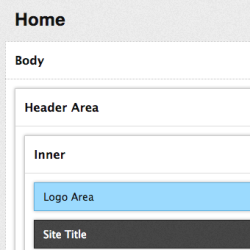
I’m sure that programmers and developers would be able to shed light on specific differences, but to the average blogger, the Thesis vs Genesis debate was more semantics.
However, that changed with the release of Thesis 2.0 and its drag and drop site editor.
What the Thesis team did was create a blog platform that allowed the average blogger to build the site they wanted without having the burden of programming knowledge.
With Thesis, you don’t have to know how to program to build blogs like a programmer.
Advantages of Thesis 2.0
1. The ability to customize and widgetize every aspect of your blog.
 Custom homepage feature box for capturing subscribers
The great part about Thesis 2.0 is you are not limited to the constraints of a specific theme.
You build the site you want, the way you want it.
In this case I’m able to place a very strong call-to-action on the homepage of my own custom design {see for yourself here}.
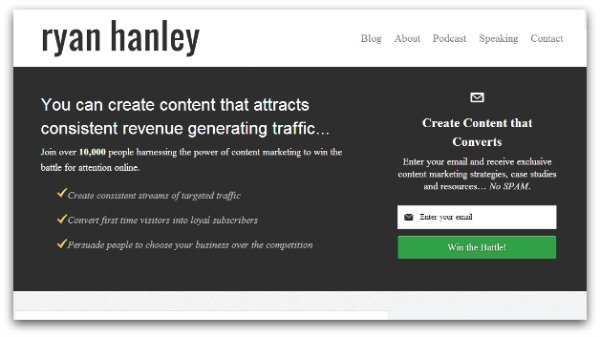
Reduced height feature box for blog posts
Thesis 2.0 allows you to completely customize every page type.
In this case, I’m able to create a separate call-to-action for blog posts.

Widgetize any area you choose
Again, you can add widget areas to any portion of your site that you choose and easily associate that with whatever page style you choose.
In my case, I created this capture area which shows at the bottom of blog posts only and not on pages, the homepage, or landing pages.
If I was so inclined, I could add different capture areas depending on what category the post was created in.

2. Thesis WordPress is built with very light weight, SEO friendly code
Out of the box, Thesis 2.0 is very fast and allows for easy indexing by search engines.
Additionally, built into Thesis 2.0 for those of us not SEO inclined is a home page SEO optimizer feature.
You simply fill in the boxes with corresponding information and Thesis 2.0 makes sure your site is getting found for the terms you choose.
Thesis 2.0 is also the first WordPress theme to add one-click Schema markup, a new SEO industry standard in search marketing.
3. Clean integration with Google+ Authorship and Google Analytics
You no longer have to worry about placing your Google+ Authorship markup and Google Analytics javascript code in the correct places.
Thesis 2.0 takes care of both of these, very crucial functions for you.
This is not a unique characteristic of Thesis 2.0, but it is a function I find to be very valuable.
Disadvantages to Thesis 2.0
1. If you don’t think like a programmer, it’s easy to get lost
The launch of Thesis 2.0 birthed an entirely new way to create WordPress blogs.
For that reason, the drag and drop customization, though easy and amazing once you get the hang of it, can be a pain in the ass to figure out at first.
I know more than a few people who have gotten frustrated and gone (back) to Genesis.
That doesn’t mean I agree with their decision. It just means there will be a learning curve.
2. There are only a few skins available for Thesis 2.0
Thesis 2.0 does have skins that add even more features to your site.
Unfortunately, they are few and far between.
My only recommendation at this time is Thesis Awesome.
There may be others, but I know for a fact programmers and developers are experiencing the same learning curve discussed in #1.
This means that more added features will come, but you may have to wait.
3. In a straight up comparison against Genesis, Thesis 2.0 has a higher price tag
As we discussed before, it’s all about making our blog look professional.
To that extent, I don’t think either Thesis 2.0 or Genesis have a price tag that makes them anything other than a complete bargain.
But since this is a comparison post, you are going to spend about $50 more for Thesis 2.0 than you will for Genesis.
Advantages of Genesis WordPress Theme
1. Genesis skins make website design as easy as one-click
When you purchase the Genesis framework for the first time, you receive two items:
- the framework itself and
- a skin (or child theme as Studiopress, the creator of Genesis refers to them).
There are many Genesis skins both created by Studiopress and skins created by approved 3rd parties.
The skin you choose will ultimately define the general shape and functionality of your blog.

2. You do not have to be a programmer or think like a programmer to customize Genesis
The brilliance of Genesis is that each skin is created with a specific look and feel.
All you need to do is fill in the information as it pertains to your blog and/or business.
You don’t have to worry about any custom coding.
Choose a color pattern, fill in the widget areas, upload your logo, and you’re off.
3. Clean integration with Google+ Authorship and Google Analytics
Just like Thesis 2.0, you do not have to worry about placing your Google+ Authorship markup and Google Analytics javascript code in the correct places.
Genesis takes care of both of these, very crucial functions for you.
One additional benefit of Genesis, and this is especially important if you have multiple authors or guest authors is Google+ Authorship, is added through WordPress profiles.
This means creating authorship on a per post basis is very easy to do and a huge benefit to potential guest authors.
Disadvantages of Genesis Theme
Your site will look similar to other blogs with the same child theme
A little over a year ago, I used Genesis and was one of the first bloggers to grab onto the Eleven40 child theme.
I loved how sleek and simple it was.
To my dismay, I began to find sites that looked very similar to mine. Not exact mind you, but similar and that just didn’t sit well with me.
If you don’t care about this or feel your logo and branding will make your site unique enough, then this is a not a huge disadvantage.
Honestly, that’s the only real disadvantage I see with the Genesis framework.
Genesis is amazing premium WordPress theme that I ran my site on for almost two years and I highly recommend it to everyone that asks.
Why I Switched From Genesis to Thesis 2.0
So if I loved Genesis so much, why did I switch from Genesis to Thesis 2.0 back in November?
Great question.
The answer is simple.
I wanted my own space.
There was no way I could ever be content building my blog in a space that I knew looked similar to a number of other blogs.
To me, blogging is an art form and I want my art to be mine.
I also believe that future customization capabilities of Thesis 2.0 are going to allow me to create projects I would need a designer for in Genesis.
What I’m talking about is advanced stuff like custom landing pages and lead magnet CTAs directed at certain post categories.
I’m actually in the process of creating a podcast site, which will be built with the Genesis Minimum child theme.
So I have no aversion to Genesis.
Truth be told, if you’re a new blogger or aren’t comfortable with programming, I’d recommend the Genesis framework first.
For those of you who have a programming mind or like to tinker, then Thesis 2.0 is probably a better option for you.
Either way, in the battle for premium WordPress theme dominance between Thesis 2.0 vs Genesis the winner is always YOU.
Click here to take a closer look at Genesis.
Thank you and good luck,
Ryan Hanley
Ryan Hanley is the Director of Marketing for the Murray Group Insurance Services, Inc, located in Albany, NY. You can connect with Ryan on Google+, visit his content marketing blog or learn to win the battle for attention online by listening to the Content Warfare Podcast.
Note from Ana: What Does Traffic Generation Café Run on?
When I first started Traffic Generation Café, I did try some free Worpress themes first.
However, I quickly realized that it was nearly impossible to
- Find the layout I liked (most free WordPress themes have very few customization features),
- PLUS, offer the kind of SEO features I was looking for (SEO-friendly theme is your first step to being found and ranked by the search engines),
- PLUS, had clean code (the more coding errors a theme has, the harder it is to get ranked with it).
After wasting a couple of months going back and forth between several free themes, I finally came to my senses and bought Thesis.
Loved it ever since.
I created my first design without knowing a lick of coding.
I bartered for my first professional design about a year after that.
Eventually, I was lucky enough to meet my current designer, Ian Belanger from IMGraphicDesigns.com, who is the wizard behind everything you currently see at Traffic Generation Café.
Premium WordPress Theme Bottom Line:
Every worthy endeavor is worth doing right from the start.
I’d say your business should be the primary example of that.
Don’t skimp on your design or your potential readers will skimp on you.
Whether it’s Thesis WordPress theme or Genesis WordPress theme you end up going with, make sure your blog design reflects the kind of authority and expertise you want your readers to associate you with.
I spent hours googling to find the most suitable genesis child theme for my blog, then lastly I found 2 options which created by 3rd party; Joshua travel theme and kick starter. Do you probably have any suggestion for a more suitable travel blog? Thank you Ana
Wish I could help, Hajar! I am not up to date on Genesis child themes at all; especially, the ones that might be outside of my niche…
I’d suggest visiting other travel blogs, make note of those you like most and see what they are using.
Hi!
Nice write up! Genesis and Thesis are both … one of the best and must have theme for any WordPress users. No doubt, you can’t go wrong with either one of them.
I am using Genesis but I have Thesis 2.0 as well. Thesis offers huge advantages but the only down side, is that you need to think like a programmer and a designer!
If you have that, you can create your own one-of-the-kind, theme.
Good luck!
Reginald
Or if you have a designer who’s good with both… lol
Khairul Zamri says
Once use thesis you will never look at free theme again believe me, I’m trying using genesis soon, thanks you are great gave me correct comparisons
I am switching to Genesis as well; we’ll see how it goes.
Khairul Zamri says
Great Anna 🙂
Khairul Zamri says
I don’t have enough money on buying skin for thesis, hope someone will donate to me 😀
I’ll never go with a free theme ever again, it makes more sense to spend around $100 and get a premium theme like Thesis. What I love about Thesis is that it’s designed for SEO right out of the box. Great post by the way.
I agree with you, Tyronne.
When I first started, I tried to “customize” a few free themes, but after wasting weeks and weeks, bought Thesis. Never looked back.
Taswir Haider says
Good one Ana! I am also using my own blog using Thesis and personally running 2 affiliate sites only for Thesis. But when I first tried Thesis 2.0 myself I was really so confused with the operation of the skin.
Moreover since last October, 2012 they are telling that they will provide pearsonified and social trigger skin free with Thesis but I am not sure how more long the developer will take to include these 2 simple themes! I’m really upset!
They definitely have more work to do on Thesis 2.0, Taswir. I am not upgrading.
Nicholas says
ME too not upgrading to Thesis 2.0 Well I am happy now to take my decision. Thank you trafficgenerationcafe! 🙂
Matthew Horne says
Hi Ana, I commend this review, this is much more fair than other reviews I have seen. As a developer and large advocate of thesis, reviews that spawned from an hours look are based on information that they did not understand.
I have been developing alot of tools for thesis and they all aim for optimization as that is my specialty.
Most people have yet to see what thesis can do, but I saw its potential on day 1, I continue to see its potential today.
Regards
Nice to hear from someone who’s actually worked with Thesis, Matthew.
Maurice says
Great post! Thank you for that. Allthough I use genesis myself, I have not seen many sites within the Netherlands, where I live, with the same layout. In the near future it might change and Thesis could be a great alternative.
I have been working with Blogger and now with wordpress genesis and I am not very experienced yet in building sites. I have noticed though that with free sites it is far more difficult to get SEO and Google+ right.
With my next project I maybe give Thesis a try.
I don’t think building a business on a free site is ever a good idea, Maurice.
Ryan - thanks for your take on Thesis vs. Genesis Framework.
I currently use Thesis 1.8 for my blog and although I do love it. When 2.0 came out? I absolutely hated it. I understand the idea behind it - and sure it is highly customizable. I just loathe loathe loathe WYSIWYG editors.
So I’m swapping to Genesis. The more I work with it the more I am growing to like it. That and I can easily create different pages (i.e. custom 404/landing pages etc.) more then I could with Thesis 1.8.
The huge turn off for me was the fact that you will need to spend $100 bucks to get “lifetime” support. I did not get a developer license as I only have the one site and now Thesis only offers a years worth of updates vs. Genesis which does offer unlimited updates.
With Genesis it is more friendly to those just starting as they can get the Framework and a Child Theme for a reasonable cost - and if they wish to purchase a different theme? It doesn’t cost an arm and a leg.
In relation to the generic look of the Genesis framework you discussed? The same can be said for Thesis as well. Both take quite some finesse to get them to bend to what you want them to do. I can usually spot what framework is being used just by visiting the site after 2 seconds.
It is my hope that Thesis 2.0 grows and remains successful as I did love it. Now I see a lot of people “jumping ship” due to the changes they made and moving to Genesis.
Why didn’t you stick with Thesis 1.8, Jason? Just out of curiosity… That’s what I am planning on doing for a while.
I hear you about support though; I think that was a bad decision on their part.
I know I answered this elsewhere but wanted to re-iterate it here 🙂
The issue is that 1.8 is no longer supported by the Thesis team. Since it isn’t we really got lucky that the last WordPress update didn’t break our sites like it usually does when WP updates.
That and the fact that since I didn’t purchase a developer license and don’t plan to? I won’t get any of the support or extras offered with Thesis 2.0.
The last thing that caused me to move to Genesis? It is similiar to Thesis 1.8 (I know not quite) and the learning curve isn’t too huge a leap for me to learn and transfer my site over to it.
Of course my site is fairly simplistic and nowhere near as complicated as your site is so I can do the work myself. For you? I’m sure it will be a huge outlay of money and time to make sure everything works. But you might want to look into updating to 2.0 or moving off to a different framework before another WordPress update comes along and breaks something 🙁
Wish me luck!
Have fun storming the castle! And thanks for the feedback, Jason.
Tony Nguyen says
Hi Ana,
I understand the debate between Thesis And Genesis that have always been a hot topic among bloggers. A quick question a little off topic, I see that you’re using Wptouch pro for your mobile theme plugin? How do you like the plugin so far? I’m thinking of getting either wptouch pro or one-theme.com, which has very nice them layout on mobile? Any suggestions would be highly appreciated Ana, thank you very much for your thought on this issue
No trouble at all, Tony. I’ve been using WPTouch for a while now and I think it’s simple, doesn’t load the server, and does the job.
That’s probably why I haven’t tested any other options; this one works just fine.
Richard Kovich says
I have considered using Thesis in the past, but I still haven’t made the switch to wordpress. I’m moving in that direction, but I’m not sure I see the benefit. Yes, you highlighted some great points but… I’ve see enough free themes that look significantly better than both listed above.
I dunno, maybe I’m missing something.
Dita Irvine says
Hi Ana,
I really appreciate this post by Ryan. I so much would like to use Thesis but I know that for less techie people Thesis has a steep learning curve. For that reason I never installed it. I did try it once but it was too much for me to handle so I returned it.
I currently use Canvas by Woothemes. I love it. It has many options and one can make the theme quite unique.
Thanks for sharing.
Dita
P.S. I love your theme/site
I do understand, Dita; it definitely requires a commitment to figure it out or hire someone to do the job for you.
Binh Le says
I too haven’t graduated to Thesis 2.0, neither do I plan to anytime soon. I love 1.8.5, and see no reason why I should do the switch given -
(1) DIYthemes will continue to support 1.8.5
(2) Thesis 2.0 is a let down in more ways than one (haven’t used it, but that seems to be the general consensus.)
But I feel that 1.8.5 is here to stay and way superior than most other themes.
Rohit says
hi anna,
very nice and justified article. Presently I am using the genesis theme and having very good experience with it, I had used thesis also, but thesis needs much more customization and all.,
But apart from this, in genesis one can get many free child themes which are specially designed for genesis..
BTW very nice article 🙂
Thanks for a very informative comparison. I purchased Thesis several years ago, actually, when it first arrived on the scene. I’ve upgraded to version 1.8 and then decided to try 2.0. That was an absolute disaster for me. All of that drag and drop left me with too many choices I simply didn’t understand, and I quickly went back to 1.8. I’ve looked hard at Genesis and am seriously considering it if I can find a skin that I like. However, as you mentioned above, it’s very likely that I will find another site that looks exactly like mine. I like the design of this site and it illustrates even more what can be done with Thesis.
Why not just stay with the older version, Gustav? That’s what I am doing at Traffic Generation Café.
Ana,
My concern is that 1.8 will eventually break as WordPress keeps getting updated. So far we’ve been pretty lucky. All it will take is one major update and then *poof* our 1.8 sites no longer work.
It has happened in the past and will again in the near future.
I’m trying to get ahead of the curve - either update to 2.0 or move off to a different solution.
Ahhh, you just answered my question… Makes sense.
Installed it and wish I could say I loved the update but unfortunately my site wouldn’t load after the installation and most of the new options failed to work. Not sure why, probably a plugin conflict. Had to activate 1.6 to bring my blog back to life.
I am not upgrading to 2.0; I’ll have to redesign the entire blog and don’t see the point.
Yeah, that makes no sense. There have been several upgrades with my current theme and each time it got better and not one of them ever required a blog redesign.
I use Thesis on one of my blogs and purchased it only because they said it was easy to configure. That was in actuality false advertising because what they didn’t tell you was that you needed to learn Hooks to get it to do what you wanted it to do. I just had a look and I’m still running 1.6 so I’m going to upgrade and come back if I notice any major improvement.
I’ve never tried Genesis and I don’t think I have to because I believe I have already purchased the best theme out there. I love it so much I use it on 8 of my blogs, the ninth one uses Thesis as my parents always taught me not to let stuff go to waste 😉
I actually thought that hooks were great, Sire; I could do things I would’ve never done on my own with hooks.
All I can say is they should mention that in their sales pitch rather than say it would work right out of the box. As for Hooks I couldn’t get my head around it and didn’t see that I had. My current theme did work right out of the box and that is how it should be.
Tony Nguyen says
I have used both Thesis and Genesis, got many premium child themes from both of them and also from Thesis Awesome. However, I have seen many other bloggers using the same themes as mine with little tweaking. I ended up choosing Elegant Theme for my project right now as I haven’t seen Elegant theme being used that often. Hiring a designer and a coder can be very expensive that’s why I just stick with the premium theme I got. What’s your thought on Elegant Theme? especially SEO aspects and its reliability? I do notice that Elegant theme takes longer to load comparing to Genesis and Thesis..
Personally, I don’t have any first-hand experience with Elegant theme, Tony.
I do know that besides SEO upsides/downsides, loading speed can be one of the primary issues that separates the themes.
Let’s see if anyone else has used the theme and will chime in.
Great review, Ryan!
I was just going through this very dilemma a couple of weeks ago. I was pretty set on going with the Eleven40 child theme & Genesis, but then I ended up finding a review on the Karma theme by Theme Forest.
Overall I’m pretty happy with it. I’ve still got a ton of work to do with it before it’ll be where I want it to be, but it’s got some great features, including many of the important SEO features also built in. The one downside to the theme is that it’s a full business theme, so the blog aspect of it is only one piece of the puzzle. I’ve had to go in and change a bit of the code on it to set up a couple of things the way I wanted it, but there’s a thorough knowledge base and about 20 tutorial videos that walk you through setting everything up.
In the end I don’t think any of them are perfect, some are just closer to others. And as you mentioned, it’s about being as close to perfect as possible for each of us as individuals.
Thanks again for sharing, and thanks Ana for having him here.
I hope you both have an outstanding weekend!
~Barry
Very true, Barry - in the end, no theme is perfect.
Juan Castillo says
Great and useful post. Before launching my blog, I was thinking about which one to use, but then decided to get a premium theme in solostream. I’m currently using WP-Mystique and it works well for me.
Hi Ryan
Your article has given me new insights as to which theme to use. A course I’m currently going through recommends Thesis, but after reading your article and the comments, I’m not sure if I have the knowledge to go it alone, and may I should go with your advise and use Genesis.
My current theme is Kippis which was okay to start with but now I need to improve my image, can content be changed from Kippis to Genesis?
thanks again for your information, it was most useful.
Glenn Paul says
I love this article. I am in the process of starting a WordPress blog and have been trying to decide on a theme. You have given me a lot of food for thought. I haven’t really thought about having “my own space”, but I can see that it would help us feel that we have our own brand.
I’ve been using Genesis for more than a year and I’m happy with it.
I heard good things from Thesis until they launched their 2.0 version, but if you say it requires technical knowledge and some research, then it’s probably for me.
I’ll have to give it a look after all.
Servando,
The people that were hating on Thesis 2.0 just don’t like change. I seriously believe it’s a completely new and improved way to build a WordPress blog… That being said is it definitely NOT for everyone.
All the best,
Ryan H.
You like tinkering, Servando?
Bryan Clark says
I prefer Thesis, but I’ve used both with great success. I like that blog themes are moving toward being easily user-customized rather than having to understand basic HTML and CSS or PHP.
I believe that Thesis is better because it allows you to customize whatever you want how ever you want and this is a plus. It will be a bit tricky for non-geek programming guys but hey, Google can be very helpful.
Excellent post Ryan,
You couldn’t of had better timing.
I have been watching many large blogs switch back and forth from Thesis to Genesis and vice versa.
I think the best looking site I’ve seen on either platform has to be the latest famousbloggers version of thesis but I know Hesham also develops skins so his look may be custom.
I’m not sure if you can get all of the features on his home page with thesis 2.0?
Anyone know?
Darnell,
You mean the http://www.ryanhanley.com isn’t the best looking Thesis 2.0 site out there? I’m joking…
Most of those features are “Boxes” that can be easily added into Thesis 2.0. I think that Hesham has actually created a few Boxes himself.
I would check into it. Pretty doable I think.
Ryan H.
My D-I-L runs her blog on Genesis and I run mine on Thesis so we have this discussion a lot. Thesis gives you a lot of creative freedom, but it’s at the cost of a steep learning curve and not for the feint of heart.
As much as I love Thesis, I would recommend Genesis for the newbie who’s hosting their own blog for the first time. Spending time customizing shouldn’t be your first priority. Creating great content and engaging with your readers, should be your priority.
Susan,
I agree Genesis for all newbies that aren’t going to pay someone to design for them…
Thanks!
Both of them are great but as you said genesis is way more easier than thesis and is more suitable for someone who is just starting. After all, at the beginning there are many things to figure out and adding thesis complexity will make the whole thing even harder.
Great post Ryan. I went with Thesis and it’s probably the best $97 investment I’ve ever made. But I guess you can’t go wrong with either one. Thanks for the informative post.
I also use Thesis and love it, Tyronne.
You are very welcome Tyronne… If you like to build your own site Thesis is a playground for sure.
Ana,
Thank you for letting me share some thoughts on my two favorite WordPress theme frameworks. It’s always a pleasure to contribute to the great Traffic Generation Cafe community.
Hanley
Loved having you, Ryan.
I’ve never personally used Genesis theme before, so it was great to have you outline the pros and cons of both Genesis and Thesis.
Tim Huntley says
re: Switching from Eleven40 to Thesis. I installed Eleven40 last week and am thrilled, but when I looked at blogs writing about baby boomers and retirement, they mostly use blogspot and free themes. I think my theme will stand out 🙂
…Tim
Tim,
You certainly will without a doubt. Eleven40 is a great design.
Hanley