

It comes as no surprise that Facebook has been and continues to be one of the top referral traffic sources for most websites that actively engage within it.
As Danny Sullivan’s recent conversation with Facebook staff reveals, there are quite a few impressive numbers to support the fact that doing more will have even better effect on how much traffic you get and what quality traffic it will be from the social media giant.
Let’s take a look at some of the stats to illustrate the point.
Facebook Stats
Here are just some of the highlights:
- The average media site integrated with Facebook has seen a 300% increase in referral traffic.
- People who sign in with Facebook at The Huffington Post view 22% more pages and spend 8 minutes longer than the average reader .
- ABCNews.com, Washington Post and The Huffington Post are said to have more than doubled their referral traffic from Facebook since adding social plugins.
- Levi’s saw a 40 times increase in referral traffic from Facebook after implementing the Like button in April 2010 and has maintained those levels since.
- American Eagle added the Like button next to every product on their site and found Facebook referred visitors spent an average of 57% more money than non-Facebook referred visitors.
- ShoeDazzle lets people login to its site using Facebook, and Facebook-connected users were 50% more likely to make repeat purchases every month than average shoppers.
Great stats indeed.
How to Make Facebook “Like” Button More “Likeable”
According to the same source, Facebook says Like buttons get 3 to 5 times more clicks if:
- Versions that show thumbnails of friends are used.
- They allow people to add comments.
- If they appear at both the top and bottom of articles.
- If they appear near visual content like videos or graphics.
How Metacafe Tripled Their Likes
According to this source posted by MetaCafe, the video streaming mogul, their “likes” tripled (!!!) once they added an additional “Like” button to the top of their videos.
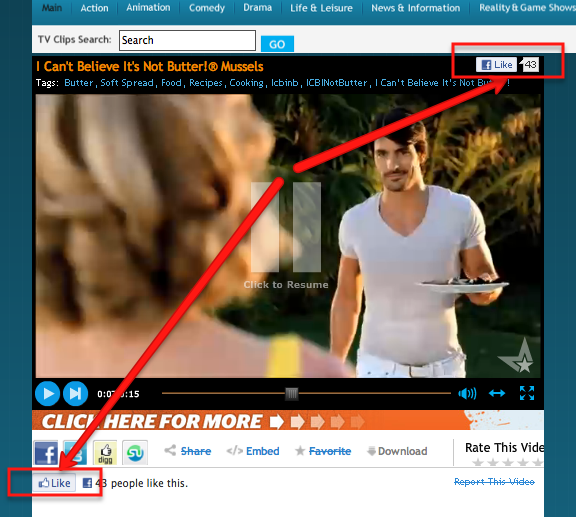
Their “likes” soared from 2,000 to 7,000 per day and their daily referral traffic from Facebook went up from 60K to 120K.
Simple change - huge difference.
Facebook New “Send” Button
This came as news to me - well, probably because it was news not too long ago.
Yes, Facebook instituted a new “Send” button in addition to their “Like” button.
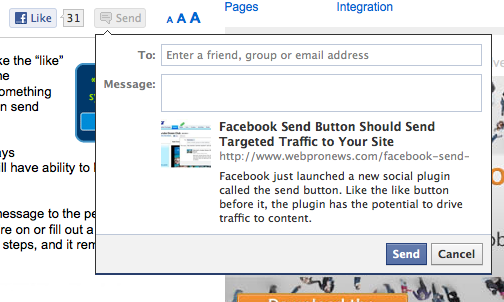
From what I understand, the new button is for more personal sharing, as in: you can send something to a single person or a group of people.
Quoting from an article from WebProNews:
“We designed the Send button to be used alongside the Like button,” says Facebook’s Abe Parvand. “By including both on your website, people will have ability to broadcast the things they like and also send it to specific people.”
“The Send button drives traffic by letting users send a link and a short message to the people that would be most interested,” he says. “They don’t need to leave the web page they’re on or fill out a long, annoying form. Compared to the alternatives, the Send button has fewer required steps, and it removes the need to look up email addresses by auto-suggesting friends and Groups.”
Will this new button be useful to our blogs in terms of any significant traffic generation?
Probably not in numbers.
However, I’ve seen some of my new clients pop up from stranger places…
Practical Takeaways
I don’t believe these impressive stats are reserved for the big players only.
There’s a lot of potential Facebook has for generating better quality traffic and more of it for blogs in any niche.
So what are the practical suggestions we all can take back to our blogs?
1. Implement Facebook “Like” buttons both at the top and the bottom of each post - preferably with the little thumbnails.
2. Add Facebook Comments plugin (I had it on my site for a while, but noticed that it slowed down my site a bit. In the light of the stats above, I am willing to give it another shot, this time tracking the FB traffic a little closer than I was before).
3. Always respond to Facebook comments left on your blog in the same manner you would to a regular comment. Even more so, since the potential for your comment to be seen by so many eyes is exponentially greater.
4. Be more engaging with your Facebook followers by asking questions (“Would you…?” format works the best), changing things up a bit by posting videos, pictures, etc.
5. Use @Tags (works pretty much like Twitter @Mentions) to give credit, acknowledge, thank, etc.
6. Institute a day when you fans can promote themselves on your page in some fashion, for instance: “Share Your Blog Monday”, “Promote Your Business Tuesday”, “Share Your Twitter Account Wednesday” - you get the idea.
7. Give away a free gift to your FB fans exclusively.
8. Chat live with your fans using Clobby Chat.
9. Do a live event on your Facebook page like I did in my series “Sunday Coffee with Ana“. You can use Vpype (that’s what I did) or Ustream for that.
10. Involve your fans by asking them to help you with your future content creation or a product - this is referred to as “crowdsourcing”.
Side note: I know there are many concerns about Facebook privacy settings, but that comes with the territory, doesn’t it?
Well, this should keep you busy for a while and bring you masses of both new and repeat referral traffic from Facebook.
Would you like to add anything? Comment to show me that you’re alive!

Image source: idontwannagrowup.com
Nathan Frazier says
Thanks for the training. I just started back marketing online in 2012 after a two year layoff. Due to a few issues, I couldn’t focus on my business. I’ve realized that facebook has changed a lot since 2010; therefore, I’m thankful for your up to date training. I have a lot more understanding now. Thanks
Great tips Ana. I’m going to check out the Facebook Comments plugin. A few days ago, I added the Facebook like widget that shows the profile pics and already I’ve noticed more FB followers. That one is definitely a keeper for me.
You’re welcome, Sherryl. It is a great plugin and good way to get more followers.
I love the way to install FB comment on the blog. It is another way to capture the FB traffic. I tried it once but I think it sort of crash with my theme so the look is very weird (only half of the box displayed…)
I’ll tried out the send button 🙂
Cheers,
Ming
Hey Ana! Great Article!
I actually LOVE Facebook for generating traffic and building relationships. One very powerful tips besides Fanpages is joining Facebook groups in your niche.
I’m part of several Facebook blogging groups and every week we each share an article for the group members to share. 8)
Joshua the ZamuraiBlogger
I think its time to implement FB Sent button in my blog. Nice tips!
I am not a big fan of the Send button, but you can try it out, Irfan - let me know if it works for you.
Hey Ana,
Fantastic tips you’re sharing as usual. I love Facebook and I get tons of traffic from there.
Warmly,
Mavis
Yes, I do too. It is certainly a great place to build.
Hey, Ana. I noticed that the Facebook comments weren’t showing up today. Did you decide to remove them again, or is this just temporary hiccup? I had them on my site for a while, but received little response from it so I removed it. I think in principle it’s a great idea, but it seems to have too many issues for me in the execution.
Hi Ana,
I am one more proof that putting the like button above the fold works. I used to have the link to the fanpage so hidden that I wouldn’t find it myself. I was hoping my visitors will go to the page, then “like” it but that required 2 clicks instead of 1 🙂 As soon as I put the Like button at the top, the number of likes doubled overnight.
I have tried to use @Names to tag my fans but it just wouldn’t work. I gave up thinking that this was not possible. Pls how do you do this? I know that my posts will go viral if I am able to!
FB is my best social traffic source and it works well for my niche. I understand how it works and I have fun doing it at the same time. I only wish I can ‘get’ Twitter that way 😉
I still need to try Nos 6, 8 and 10 in your practical giveaway. And I can’t wait for the day when I can implement No 9 by cooking for my fans live. wo ho!
Great tips created especially for ME! Thanks for sharing.
I am glad it works for you. To tag someone on Facebook, you simply type the @ sign followed immediately by their name - do not add spaces. When you type @Their Name, a drop down will appear with matching names, of which you then select.
Thanks for the reply Ana, but this only works when tagging your FB friends. The problem is that I cannot tag fans if I choose to use FB as my page. I have searched the FB help documentation but there is nothing on that there.
Will keep searching …
You are welcome, Barb - thanks for implementing my advice!
Hey Ana-
Awesome stats that shows the proof is in the FB puddin’:). I send messages to those who ‘like’ my FB fanpage, and it’s amazing how many responses I get stating they can’t believe someone would take the time out to thank them.
I noticed when my posts are shared on FB my traffic spikes in a way that Twitter doesn’t normally do. Not that I don’t love Twitter…:).
OK, my lunch break will be spent trying to add the FB share button. Wish the Luddite luck!
Good morning, Linda - I love Twitter as well, but I still think that FB sends better quality traffic.
Plugins make our lives sooo much easier; I am sure you’ll get it done in no time. 🙂
Thanking your new fans… How do you know who’s new?
Well, Ana-unlike yourself, I don’t have thousands of FB followers, so it’s easy to keep track of my new, intrepid ‘likers!’
With your personality - not for long, my friend!
Great Post Ana. I saw this come up on my reader (and Blokube and Facebook - actually that’s where I came from ironically) and I knew it was going to be good.
You talk FB, I listen - so here I am.
Great takeaway and I have taken notes of all of them.
Personally, I have increased the likes (fans) AND traffic I get from FB at my blog but noticed the levels of likes and shares on individual posts has not changed dramatically.
I have the FB plugin so maybe will take these tips and add that like button to the top and bottom of each post again.
Definitely a lot to take away from this post, and like most of the content you produce - I leave here with an actionable step I can take to get more traffic. Brilliant.
You should call this the traffic gener… never mind.
Funny guy. 🙂
You are most certainly welcome, Alex.
I think as your authority on Facebook and in blogosphere in general grows, your fans are simply more apt to act on your postings when you share something. That’s why your traffic is constantly increasing even if you visible likes are not.
‘nuf said 🙂
Quick practical advice. Just the way I like it.
Glad you like my advice, Eugene - hope you had a chance to “like” it as well. 🙂
Katie says
Thanks Ana! I just added a FB share button to the top of my posts. Awesome info as usual 🙂
I am working on adding mine today as well, Katie.
Katie says
I had a problem with FB comments… Do you know how to set it up so they’re linked to the specific post? Right now I can only get it to show the same comments on every page…
I’ve had problems setting it up in the past (actually right now as well - that’s why my FB comments are still not up and running), but I’ve never encountered this problem before.
My problem was usually a conflict with a Facebook widget in the sidebar, Katie; if you have one, try to disable it to see if it works.
Sorry I couldn’t be of more help.
Maybe other commentators would know?
A call to the wild! 🙂
Ross Murker says
The latest example of practical, USEFUL, information to help us grow responsibly: Thank you again, Ana!
You are so welcome, Ross, and it’s GREAT to see your comment!
Ana