

As I look at many blogs on a daily basis during my blog audits and other consulting services I provide, I run into the problem of bloggers squandering their precious time with Google bots on all sorts of links that shouldn’t be on their home page to begin with.
In order for me to explain what I mean, we first need to address the way Google crawls any website and how they determine how much time they would spend there.
The way Google bots first discover and consequently index and rank your blog pages is by following the links from other sites and within your own blog.
This is how Matt Cutts describes the process in one of his interviews:
“The best way to think about it is that the number of pages that we crawl is roughly proportional to your PageRank. So if you have a lot of incoming links on your root page, we’ll definitely crawl that. Then your root page may link to other pages, and those will get PageRank and we’ll crawl those as well. As you get deeper and deeper in your site, however, PageRank tends to decline.”
I need to remind you here that there’s a difference between the PageRank displayed in your toolbar (visible PR), which is updated every once in a blue moon and is obsolete the minute it’s updated and actual PR that Google updates on an ongoing basis.
According to the green bar, Traffic Generation Cafe has no PR, yet Google crawls my blog on a daily basis - a sure sign that my PR is higher than Google would like to show, for whatever reason.
Learn more about the difference between real and visible PR in this post:
So, Google follows links from other websites to your home page.
As they crawl your home page, they discover other links that lead deeper into your blog. But since Google bots won’t follow all those links to the infinity, wouldn’t you want to make sure they definitely crawl the most important pages first?
And that’s precisely why what you link to from your home page and other important pages is so vital for you to maximize your face time with Google bots.
Now let’s talk about some to the links that I often see on the home page that really have no business of being there.
Admin Login
Do you have that little link at the bottom of your blog that says “WordPress Admin Login“?
Sure it might be useful to you as far as logging in to your dashboard from any page on your blog, but what if I told you that this is one of the most linked-to pages on many blogs I see?
Do you really want to waste your crawl budget on an admin page? I know, rhetorical question…
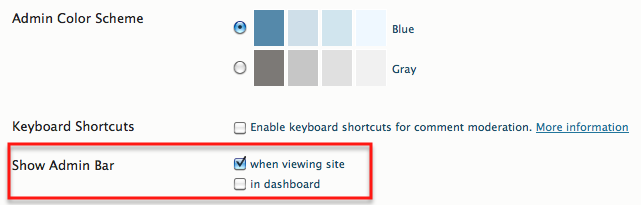
Plus, now WordPress gives you an option to display an admin bar on any page of your blog without it actually being shown to your readers.
It’s an option you can choose under Users ==> Your Profile:
So how do you get rid of the link?
Your theme is what you should look into.
I use Thesis theme on my blog and with Thesis, I would go under Design Options ==> Display Options ==> Administration.
If you are using any other theme, just poke around to see if you have a similar option.
Pagination
I had no idea this was an issue until very recently when I started seeing these kinds of most linked-to pages on different blogs:
http://www.YourSite.com/page/2/
As I did a little digging into, I realized that my blog had it as well, and it all stems from using a plugin that would display page numbers on your home page for all the posts you’ve ever written as opposed to just giving you the default “Older Posts”, “Newer Posts”.
What happens when you use a plugin like that is that you are essentially adding more and more links to your home page, sending Google bots all over the blog, as opposed to strategically showing them the posts you’d like them to crawl.
So get rid of any plugins that create pagination like that and stick with the default Wordress way to separating your blog posts into pages.
You can find this option under Settings ==> Reading.
 Just choose the number of posts you’d like to show on each page and you’ll be all set to go.
By the way, the same goes for comment pagination.
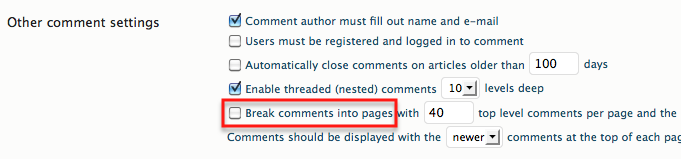
When you choose to break up your comments into pages, not only do you create the extra clicks your readers have to navigate if they want to see the whole discussion, but also create a bunch of useless pages with DUPLICATE content on them.
To learn more about duplicate content and its effects on your blog, read the following post:
Getting rid of comment pagination is pretty simple: go into Settings ==> Discussion, and make sure your “Break comments into pages” box is unchecked.
Word on Duplicate Content and Google Crawl Budget
Even though duplicate content is a common problem that you can find on pretty much any site with more than a couple of pages, there’s a good reason to be aware of it and how it affects your face time with Google bots.
Here’s another excerpt from Matt’s interview:
“Imagine we crawl three pages from a site, and then we discover that the two other pages were duplicates of the third page. We’ll drop two out of the three pages and keep only one, and that’s why it looks like it has less good content. So we might tend to not crawl quite as much from that site.”
The duplicate content post above will give you all the info you need as to how to avoid the issue of duplicate content on your site as much as possible.
Categories and Tags
This is one of the most overused blog structuring techniques I see on so many blogs.
Somehow many bloggers decide that the more categories and tags they use, the better - not quite sure why.
Your categories and tags determine your basic blog structure as well as the theme of your blog.
The more categories you use, especially generic ones or the ones that are not really related to your blog theme (see the screenshot below), the more diluted your overall blog theme will appear to both your readers and particularly Google bots, which might in turn affect your search engine rankings.
 What is the benefit for your readers to see a category “focusing”? Or “success”?
Look at it from the search engine perspective as well. How are they supposed to theme your blog with generic categories like these?
My suggestions on categories:
- Keep the focus as narrow as possible - I’d suggest to stay within 5-8 categories. I know it’s an arbitrary number, but it’s a good one to keep in mind, IMHO.
- Use your KEYWORDS as category names. Take a look at mine in the navigation bar below my header - these are my categories and I would love to rank for each and every one of those keywords.
- Don’t dump each post into every imaginable category; pick one or two only.
- Don’t link to categories from your home page UNLESS they are well-researched keywords and are highly related to the theme of your blog.
TAGS:
The same goes for tags.
Tags are nothing but well-researched keywords you assign to each post hoping to rank for them at some point.
To learn more about tags and how they can affect your rankings, read this post at Kikolani.com:
Here’s also some additional reading on how to correctly structure your blog:
Tag clouds
Whether it’s big or small, they are still links, and your page rank will be leaking from your main page to the tag pages.
It’s smarter to have your page rank flow to your individual posts rather than tag pages.
I would definitely remove the tag cloud, if you are still using one.
Affiliate Links
Affiliate marketing is how many bloggers make their money online, including yours truly.
So of course I won’t tell you to get rid of your affiliate links on your home or any other page you’d like to display them on, but at the very least, NOFOLLOW those links! Plus, make sure they open in a new window to prevent your readers from leaving your blog.
Social Media Widgets
Let’s face it: we all feel pressured to display all kinds of social media icons and widgets in our sidebars.
Their positive effect on getting connected with our readers in social media realms is debatable, yet their negative effect as far as leading both our readers and Google bots away from our blog is obvious.
Once again, I am not going to say you shouldn’t have them, but use common sense as far as how many different widgets and icons you choose to display: once again, this is the case when more is not better.
ALWAYS nofollow those links though and make sure they open in a new window as with affiliate links.
Personally, I would stay away from displaying various networks that are not widely used by most of your readers, as well as widgets that display Twitter feed, etc. Not too many of your readers find any use for them, trust me, yet they add the amount of links that lead away from your blog.
Recent/Popular/Most Commented Posts
I am definitely a big fan of displaying one of these widgets in your sidebar, but only one.
To me, popular posts widget, which is determined by the amount of comments each post has, makes the most sense to display.
If you choose to show recent posts, you are just duplicating what your home page already shows, plus it’s easy to find that info by clicking over to home page from anywhere else on the blog, whereas getting to most commented/popular posts is impossible without the widget.
DO: Link to Your Best Content
This is how you can easily improve your rankings for the posts you are trying to rank for.
Create a sidebar widget where you simply link to your best cornerstone pages using keywords as anchor text and you instantly gain some great internal backlinks leading both your readers and Google bots directly to those pages.
Take a look at how I do it on my blog (you can see the widget towards the top of the sidebar):

Marketing Takeaway
Displaying hundreds of links that send your visitors as well as Google bots on a wild goose chase looking for your best content isn’t a great way to go, as you can see.
I would strongly suggest you strategically narrow down the number of links you display on your home page that will be beneficial to your overall linking strategy.
Don’t be afraid to give your visitors fewer choices. Clean, uncluttered look definitely shows to convert much better and decrease your bounce rates, providing for easy navigation that makes sense.
Can you think of other links I forgot about? Comment to show me that you’re alive!

Image credit: TheChive.com
that’s a great one,, thanks for sharing these tips, especially for admin login and comment section.. Happy Blogging 😀
Thanks
Khabri Chacha
You’re welcome, Khabri. Thanks for stopping by.
A while back my google webmaster tools account report said it crawled 17,000 pages and over 300 mb’s in one day. I don’t even think I have that many pages unless it crawled each page more than once. And 300+ mb’s in one day seems like a bit much. I don’t mind google crawling, but for some reason it went a little crazy that day.
I try to keep the total link count as low as possible per page. I see some sites and pages that have tons of links per page. Even as much as 500 total links per page. That is just a little too much if you ask me. I shoot for 100 or less per page, but occasionally I get a few 120-150 per page. Ideally the homepage - main page tends to get the most page rank so I try to keep the link count as low as I can on the homepage.
I’ve seen Google do stranger things, Ray - go figure.
I agree with you on the amount of links; about 100 is ideal and I definitely prefer to stay under 150.
Hi Ana,
Great post again thanks. One thing I am a little confused about though.
The SHOW ADMIN BAR? I am using “Standard Theme.” Currently it is selected for when I am viewing the site? Do I need to turn that off?
Thanks for your help and your blog
Geoff Talbot
“Show Admin Bar” is a function in your WordPress dashboard, Geoff, and it has nothing to do with your theme.
If your blog runs on WP platform, you have that option.
Ana
Nice post.
Great advice as usual, Ana.
Add-ons, plug-ins, widgets gadgets can be great if they do not detract from the site.
Some of these can slow your loading time down quite a bit.
I think there are some really important points in this post(Duplicate content being a standout). Matt Cutts(The go to man at Google) who you referenced, is a source for great insights into all things Google.
I had thought you had a PR ranking already, Ana. You have all the boxes ticked, in regards to the requirements.
Thanks for coming by, Daniel. Re: PR - it’ll show up at some point; not sweating it. 🙂
Hi Ana,
Thanks for the always useful info. I do not know how to make a link no-follow, when you were talking in regards to affiliate links.
Have you ever written a post on this? If not I will check Google.
I haven’t, but it will make for a good topic. By the time you see my response, you have probably found the answer already.
Hey Ana,
What I say about this post…. Another amazing and brilliant one. Keep up the good work and keep sharing your brilliant mind with us.
Will do, Riya - thanks for coming by.
This is interesting post because I am also puzzled on how Google page rank works. I also wondered why my page rank decreases. I learned not to let my site admin showed to my viewers as well. I only know that it is not necessary for the readers to see this. As for the widgets, tags, and other stuff, maybe I will try to learn them in the near future.
I am glad you found this interesting, Daniel. Thanks for visiting and return again soon.
That’s some nice content Ana, STUFF, I mean. I usually plug all those link leaks by nofollowing the ad banner links, other aff links. I have removed the login link on my homepage. And I don’t display recent posts; I have never done that. I used to wonder why people display recent posts while that is what is shown on a blog’s homepage (unless they choose to have a different static home page).
So it seems that I am doing good. I adjusted some of the reading settings.
Thanks.
Jane.
Of course you are doing a good job, Jane, that is why you have such a strong online presence. Thanks for visiting! 🙂
Bookmarked! There’s so much information in this single post, Anna, I learned a lot. I always liked putting widgets of different sorts on the sidebar and footer. Now I have to really clean up the links on my blogs and sites. Thanks a lot for this information.
Thanks,Calli. Glad you found useful info.
Hi Ana,
Some really intelligent suggestions from users and google-bots point of view. I really like not to use so many social media widgets. I think everybody knows that Facebook & Twitter are most used and almost everybody got their accounts there as well.
Thanks, Sam. Yes, those are the the best to use as they are most popular.
Thanks for the post. These are some really great ideas on minimizing the “leakage” of the PageRank between pages. With every link, one should think “Does this increase the user experience?”, as in the category and tag links, and “Is there relevant anchor text I can use for the link?” If you’re going to use a link, then you might as well use text that you are trying to rank for as long as it’s relevant.
That’s 100% right. The user experience should be your #1 priority.
Hi Ana,
Some great tips. Do you think at some point google will penalize sites that use a lot of no follow links? I am not up to speed on what Matt Cutts says on when to use no follow links.
I don’t think that’s going to happen, Chris.
Nofollow attribute is Google’s invention and originally was meant to protect websites from spam.
Most large websites (including WordPress by default, as I am sure you know) are entirely nofollow and that has never affected, if not helped, their rankings.
So nofollow is here to stay. For now anyway.
I have never heard about penalizing for using nofollow links. For ordinary readers there is no difference between nofollow and dofollow links at all! But for reader-bloggers there IS difference and your site will attract less attention.
It is not so good if your own site doesn’t have enough dofollow backlinks.
Yes, there is a difference for reader-bloggers and ultimately it affects your traffic.
Ana - Great advice and information. As you suggest, most blogs and websites could benefit from an audit of all the links on their homepage based on three factors:
1) does the link make the site more usable for a viewer;
2) does the link generate revenue; and
3) does the link flow PageRank to an important page from an search engine optimization standpoint or does it leak PageRank to a page that will never generate any search engine traffic.
Love your concise summary, Randy - definitely great way to put it.
Ana,
I have to tell you, I started a bookmark folder just for your site in my browser favorites because so many of your articles are packed with major value. There are some great points in this article that I will for sure be looking into on my blog. I really appreciate your dedication the quality content you put out, it really is awesome my friend, and thank so much for your dedication. 🙂
Mark Harbert
Hi Mark,
That is so nice to hear. Thank you for visiting!
Hey Ana,
This is one of the most valuable post that you have written, in my opinion. Directing the google bots and people, where you want them to go, is a huge factor in search engine rankings and readability.
I know that I have some work to do on my blog, after reading this post. One thing that I always do, with external links is add this target=”_blank” before any external link in your blog.
I always did it to improve my bounce rate, which is about 17% for the last 3 months, of which I am very proud.
Ex of an external link on my blog:
Every external link on your blog should look like the one above. Also don’t forget your alt and title tags. That is one thing I see many people not doing. Whenever I hover over an image or text link, with my mouse, I expect to see some text pop-up, maybe that’s just me.
Doing the little things for you blog can really help it’s readability and ease of use.
Thanks for sharing Ana, you always over-deliver and of course, Have a great day!
That’s great, Ian. Thanks for sharing this method with the readers.
No problem Ana,
I am happy to share any knowledge that will help your readers, because I receive many of my blog visitors directly from your blog.
Ian
That’s good to know, Ian. 🙂
Hey Ana, if your outbound link opens up in another tab, would that be considered good SEO in the eyes of Google? Good stuff BTW.
Thanks, Tyronne, and not, it won’t make a direct difference to your SEO; mostly will help to keep your readers right where they should be, which is reading your blog.
Brilliant Ana. I often do some “link” cleaning on my blog, but have been neglecting it lately. The “comments” part was definitely something I was doing, breaking it into 40, and you are so right about all the side effects that small action can do. Taking care of that now despite not having too much pages that has over 40 comments 🙂 Timely post indeed…
You’re welcome. Glad you are seeing the benefits of that technique.
Definitely something I haven’t thought about - I bet I’m spending budget on a lot of unnecessary things. Thanks for sharing your insight!
You’re most welcome, as always, Kristi. 🙂
There are so many factors in making a blog stress free. These are some of the small but main issues we all must do in time.
“Black Seo Guy “Signing Off”
You’re right. Thanks for stopping by!