






Ta-da!
No, this post is not about how great CommentLuv plugin is or how to use it.
Chances are you already know it and even have it installed on your blog.
If not, here are a couple of great posts for me by Gail Gardner of Growmap.com:
and
by Ileane Smith of BasicBlogTips.com.
Today, I’d like to give away a little trick that I’ve been using for a long time now.
I wouldn’t have written about it today (or maybe ever) but for Kristi Hines from Kikolani.com mentioning it in her to-the-point and very much Ultimate Guide to Blog Promotion. I highly recommend you pick up a copy if you haven’t already.
She uses it for a bit different purpose, but the goal is the same: to get a link to a deep page on your blog via your name/website fields, yet still get to pick one of your last post from CommentLuv.
By “deep page” (also referred to as deep links, inner pages), I mean any URL that is not your home page. Any post, in other words.
This is a bit tricky, so let me explain.
When you leave a comment on a blog, chances are you fill out your name, email, and website fields, like you should.
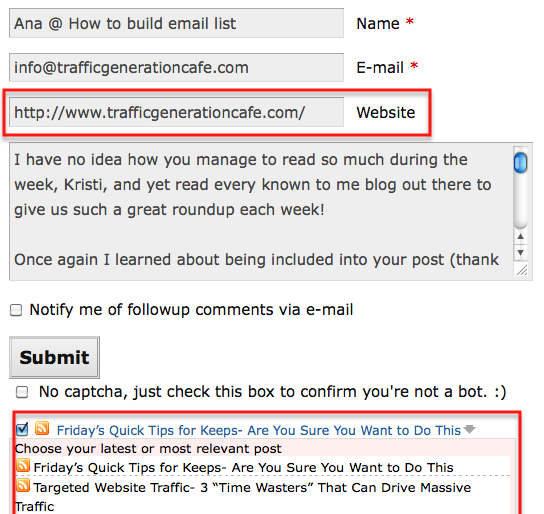
Then after you type up your comment, you go to CommentLuv field and choose one of the last ten posts the plugin produces.
The Problem
Now, what if you didn’t want to link your name field, which might have and really should have your keyword in it, to your home page, like I did above?
What if you wanted to link it to the post you are trying to optimize for that keyword?
You see, when you use anything other than your home page URL in your website field, CommentLuv will give you a choice of only your LAST POST (you can see that at the end of the post).

And what if it’s not the one you’d rather choose? What if there’s a post on your blog, that perfectly fits in with the post you are commenting on and you’d rather have that link show up as your CommentLuv link?
Now you see where I am getting with this?
Yes, you can have your cake and eat it too.
The Solution
Here’s what you do.
Fill out the comment form with your home page URL to begin with and add the comment in the comment field.
Then choose one of the ten latest posts CommentLuv will show you.
After you are done with that, go back to the “website” section and change the URL from your home page to your post one.
The next step is very important: don’t touch anything else!
Don’t tab, and definitely don’t click the comment section.
Simply press SUBMIT.
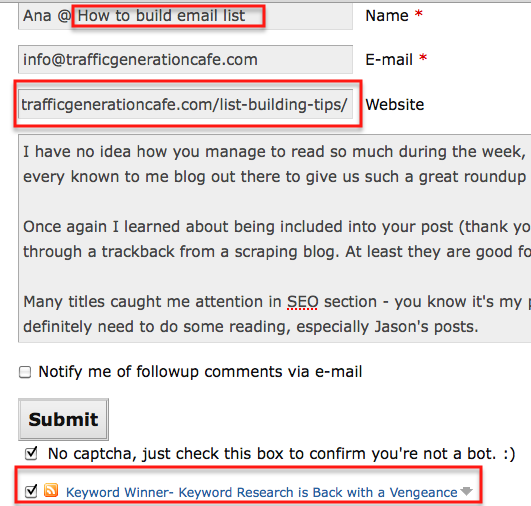
And viola! Your name/keyword field will be deep-linked to your post and you still get a choice of what CommentLuv post fits the content you are commenting on best.
Marketing Takeaway
I anticipate that several of my readers might feel uneasy about this process.
It does feel like hacking, doesn’t it?
However, let’s look at it this way: the blog owner doesn’t really care whether you link to your home page or any other page on your blog - I know I don’t!
They are much more concerned about abusive keyword usage, which you should be always respectful of.
Take a look at this post to learn more about how not to be labeled as a spammer:
And just because CommentLuv doesn’t yet provide a way to recognize deep pages as ones belonging to the same domain, that doesn’t mean that you cannot ethically bypass the lack of this feature.
Image source: http://www.gotit.co/
Love it or hate it? Comment to show me that you’re alive!

- » Link Building: What's Naughty, What's Nice?
- » The Ultimate DoFollow Blog Finder Tool
- » Link Intelligence: What Goldilocks Can Teach You About Linking Out
- » Your Ultimate Anchor Text Tutorial - from Basic to Advanced
- » Tumblr: How to Get Free PR7 Links Within Minutes
 Digg it
 Delicious it
 Stumble it
 Kube it

This post brought to you by Ana Hoffman
Ana is the founder of Traffic Generation Cafe and wants you to know that her 7 Steps to Complete Search Engine Domination free SEO report = SEO Made Simple. Don't forget to pick up your own copy today - just click on the link above!
Ana has written 249 great posts for Traffic Generation Cafe.


 A wife to a great husband, a mother to a beautiful and, no doubt, genius little girl, and a successful internet entrepreneur. I also devoted my life to Jesus Christ many years ago, and He remains my true priority, focus, and hope.
{ 118 comments… read them below or add one }
I just read another one of your posts regarding CommentLuv and again you amaze me. I never knew how powerful this plugin could be. I’m going to try your technique on this comment and see if I was able to follow your directions. The screenshots with the red outlines are very very helpful. Great post
Scott invites you to read: Personal Training Certification – ACE Overview
It’s even easier on my blog now, Scott, since I am using CommentLuv Premium.
You have a useful tip here Ana, CommentLuv is definitely a great tool for deep link building..There’s a lot options out their to link on your homepage..
What a great hack (hacks are cool; they don’t have to be malicious!) Seriously that’s a great tip I’ll remember!
Mary invites you to read: Cigarette money
Love the dogs ‘ photo here!!Anyway, thanks for the post then…
Thomas invites you to read: murano glass tableware
Thanks for all the tips and advice, I have been trying to learn how to build stronger links and this has helped a lot.
Thanks guys!
Just added Comment Luv to my blog and came back to investigate the subtleties. Was wondering about your recommendation for Do Follow settings? Registered users, everyone or no one?
AstroGremlin invites you to read: TimThumb WordPress Vulnerability
I used to have Dofollow for everyone for ComLuv links, Astro. Now that I can easily get 100+ comments on any given post, it drains too much authority from my site, and since I work very hard on my SEO traffic, I chose to do Nofollow on my ComLuv links.
The other links though (in the commentator into) are still Dofollow.
The old site already includes links pointing to it and it is more established than starting with a brand new domain.thanks.
Dams invites you to read: MLSP
Hiya very cool site!!Ana .. Excellent .. Wonderful .. I’ll bookmark your website and take the feeds also¡KI’m happy to find a lot of helpful information here in the publish , thanks for sharing. . . . . .
Darl invites you to read: MLSP
Hey Ana. I have found Google devaluing links in the name field and putting more emphasis on links in the actual comment.
Lacey invites you to read: Baby Food Coupons - Get Free Baby Food for your Baby
That would be the first one for me, Lacey - hearing about it, I mean.
However, Google does undoubtedly value links within posts more than anywhere else on the page (those are called in-content links).
Thank you, Damay. It’s good to have you here and thanks for the kind words.
Hey Ana,
Now I get it. I actually tried but must have hit the comment section again. Thanks for breaking each post down in a way for us that aren’t tech savvy. You are bringing us to the next level. Thank you sincerely for that.
Rob invites you to read: Sweat. Bleed. Cry. But Don’t Even Think About Quitting
Sorry Ana,
One question: My wife and I set-up a site for our daughter who has been playing piano for 10 years now (teaching for three). She plays and sings a wonderful version of Come Thou Fount (if you’re familiar). She will soon be 14. Anyhow her site isn’t a blog, so comment luv doesn’t work for her either way (to offer to readers or leave comments herself). Do you have any suggestions for a site like that to build links and keywords?
Rob invites you to read: Sweat. Bleed. Cry. But Don’t Even Think About Quitting
You can still comment on other blogs, Rob, and leave your site URL under the website tab. You won’t get the benefit of the CommentLuv, but still get links.
You’re welcome, Rob.
Ana | Traffic Generation invites you to read: Is CommentLuv the Plugin of the Past?
Thanks for the tips.
Comment Luv is definitely a good tool for deep link building. There are a lot of options out there for linking to your home page, like directories and signatures, but with the big G checking our link building tactics now, you’ve got to get the links going to your posts too!
John invites you to read: Surplus Steel Buildings
Absolutely. Thanks for stopping by, John.
I know this sharing will help on cause from now on I am planing to use commentluv.in short this post of you Anna is the best on me from now on.
Dar invites you to read: Lead Generation Software
Glad to hear that, Dar.
Hi Anna - another great tip and I agree with what someone here said - your posts are always so well documented and easy to understand.

Let me see if I can do it.
Gary Johnson invites you to read: Never Give Up
Thank you, Gary.
For me I think CommentLuv is the best in order to get more traffic.that’s why I appreciate your effort for posting on this.+)
Dane invites you to read: MLSP
You’re welcome, Dane. Thanks for visiting.
You should be more strategic in doing SEO. This is not that easy. You need to be more dedicated to your love so that you wont bored with the work. Many are saying boring work but for me, ins very interesting work.
Jacob Griffin invites you to read: Mobile Marketing
I also find it interesting, Jacob.
There are many comment plugins available now. But I always love commentluv because I’ve seen significant improvement in my SERPs after I’ve used it in my link building campaigns.
Jessie invites you to read: Shopping for Small LCD Monitor with RCA Input Online
Me too, Jessie. I’m a big Commentluv fan.
ANA,
nice post…
but if i want to link to my main home page, how to do that???
Then you just fill in your homepage and link to it. CommentLuv is more for deep-linking.
Thanks for explaining this Ana. I actually read Kikolani’s post, that is where I first found out about CommentLuv and KeywordLuv (only yesterday!) However, I did not understand what she meant. As your post provides screenshots, it is a lot easier to follow…. However, ironically, this is all very well but I don’t actually have a WordPress blog, or last blog post, or indeed ANY blog post to link to - at least for this site… but CommentLuv is looking more and more like a “must have” option for my current WP sites, at least to “get the ball rolling” (sorry for the cliches!)
Tosin, it seems like you will just have to find a blog to link to! Get it going wherever you can.
Thanks for your reply Ana. Actually, between yesterday and today I’ve actually gone ahead to set up a WordPress blog to make the most of CommentLuv and KeywordLuv! I’m looking forward to seeing what difference it will make traffic wise….!

Tosin invites you to read: Tell the world about your business!
Doing link building is very difficult because you need to have an informative blogging.It also becomes my problems and Good that I read your post because I learn a lot of tips that I an use enable to have a good blogging strategy.
I’m glad you found my blog helpful. When it comes to link-building, you have to post valuable comments. If the blog owner is impressed, it will be posted and if it is engaging, other users will visit your site.
Hi Ana,
I’ve been wanting to do this for ages, and every time I did, I’d switch back to just the blog’s front page URL, concerned the blog owner where I was commenting would think my comment was spam.
Serendipity! I finally deep-linked the URL on a blog tonight … just before I came across your post. I didn’t run into the CommentLuv issue, purely by chance.
Still, this is excellent advice. Glad I stopped by!
Vernessa Taylor invites you to read: All About The Suds: Business Development Video
Well, then I’m glad you found my post too. Welcome, Vernessa!
Ana | Traffic Generation invites you to read: 5 Lead Conversion Ideas To Turn Blog Traffic Into Cash Magic
ComLuv is a fantastic tool which I have been using for my sites keyword link building campaigns. Your sites receive great quality backlinks from high PR sites just like this one. All links are Do Follow and what is also great it that most site cache you link so that your link doesn’t disappear in a couple of weeks.
Well Done and a big thank you to Andy Bailey CommentLuv founder.
I could not agree with you more, Spreet. It is an excellent tool. Andy rocks!
Excellent article and what a cool little trick. I am new to the whole Comment Luv concept, and so far I rarely see any of my blog posts after leaving a comment on a CL enabled blog. I’m not sure what I’m doing wrong. Any suggestions?
Thanks. It could be that the comments are in moderation. I suggest you mail the site owner and ask.
These tips are absolutely helpful and it is a way of driving more traffic to our website. Anyway, I was amazed in your tips and tricks in blogging and it sounds interesting! I will bookmark this site for future reference.
Thanks for all the enthusiasm to offer such knowledgeable information here.
You’re most welcome. Thank you for stopping by, I value all my readers.
I use CommentLuv basically to get exposure than to get backlinks from the blogs…It helps in spreading words that what you are posting on your blog recently
Shaan invites you to read: Top 10 Best BuySellAds Alternatives To Make Money Online
That’s another good use of this excellent plugin.
Very true…. Its really helping in the communications of bloggers and building relationships

Shaan invites you to read: Can You Make a Living Through Professional Blogging?
Luv it!

Ana | Traffic Generation invites you to read: How To Turn Every Post Into A Sticky Web For Readers
Wow, this is kind of cool and might experiment on that.
Marco Lee invites you to read: The List of Personal Development Blogs with CommentLuv and Why They are Kind of Gay When You Think About it
It is cool and you should definitely experiment

Ana | Traffic Generation invites you to read: Free SEO Report- Much Ado About Nothing
Ana,
This is a great tip. It is not completely transparent, but is something that with all the commenting i have done, i feel I should have known already. I will certainly be putting this to use. This is certainly another great tool for the toolbox.
Steve invites you to read: Information Overload YOUR Blueprint for Turning Information into Action
Few of the tools are completely transparent and it’s up to us to find the techniques to optimize it. You should certainly give it a try!
It topic is very good and we see the all people i think love comment is very good for all.
Comment love is great indeed. Thanks for stopping by!
Hi Ana,
Thank you for the useful screenshots of this plugin, including the review.
I will install this plugin in the weekend when I have time.
Thank you
J~
Jenn invites you to read: ViewSonic g Tablet Review ViewSonic gTablet with 10″ Multi-Touch LCD Screen- Android OS 22
Glad you found it useful, Jenn. Let us know how it works for you.
I love CommentLuv for the single reason that it encourages people to become simply engaged. To communicate and share ideas beyond the “oh, great post!” thing. Useful to share tips on how to use this feature at its optimum potential. Thanks!
Joshua invites you to read: Plumbing Schools – Finding the Right Plumbing School
It’s only a pleasure, Joshua.
I still remain skeptical of whether going to such lengths to manipulate out keywords is really all that beneficial. I tend to think that it is better to simply comments, and build a reputation rather than links.
I tried CommentLuv for a while but ultimately turned it off because I got tired of all the spammy comments it attracted, and those keywords instead of names really annoyed me.
I’m taking a wild guess also that Google has by now taken notice and compensated to keywords preceded by an @ symbol, though I could be wrong.
When I am commenting on ComLuv blogs I don’t even bother to choose the post it links to either.
Jonathan invites you to read: Miracles Coaching- Joe Vitale Responds
Building a reputation is a good strategy indeed. I must admit I don’t get all that much spam, despite using Commentluv. I just like the fact that the tool is so efficient when it comes to linking back to my posts, etc.
Hi Ana,
Great to see that you are benefiting from Kristi’s excellent Blog Promotion Guide. Your screen captures make this strategy much easier to understand and implement than when I wrote about how I used a very similar strategy of blog commenting and then sharing to greatly increase my blog traffic.
I wrote that post over a year ago, but it has some excellent stats on how much doing this can increase blog traffic.
Gail Gardner invites you to read: Why We Need Group Geo-Targeted Niche Blogs
Thanks for your comment, Gail and thanks for stopping by.
I think in SEO deep links are very useful to get the high ranking of the site.
steam shower invites you to read: Steam showers steam saunas steam cabins steam shower enclosures
Absolutely! It is a very powerful tool.
Ana | Traffic Generation invites you to read: Targeted Website Traffic- 3 “Time Wasters” That Can Drive Massive Traffic
Awesome tip, Ana. I deep link on occasion (mostly on non-commentluv blogs), but hadn’t done a lot of deep linking with commentluv yet. I’ll have to give this a shot.
Richard invites you to read: What Kind of Blogger Animal are You
You must - it’s an excellent tool!
Ana | Traffic Generation invites you to read: Top Google Rankings- Straight From the Horse’s Mouth
Ana,
I will try this out on your blog first. Thank you for the always very useful information.
Justin | Mazzastick invites you to read: Cultivating A Real Relationship With Yourself
It’s my pleasure, Justin.
Ana | Traffic Generation invites you to read: Friday’s Tips for Keeps- How to Guide to Better Link Building on CommentLuv Blogs
Thanks, Ana.
It continues to amaze me just how powerful this plugin is, and how little I seem to know about it!
I’ve used this little trick to bring people directly to my About Page, which I felt was more appropriate than the home page, but I never thought about directly linking to one of my posts.
Thanks for this strategy! I’ll be using it… now!
Dr. Bob Clarke invites you to read: How I Boosted my Blog’s Alexa Ranking by 108 in 30 Days
Try link it to the posts - you will get better results right away.
Ana | Traffic Generation invites you to read: Top Google Rankings- Straight From the Horse’s Mouth
Nice tips from you. I appreciate you kind consideration to share this article to us. This trick is very useful. Thank you!
Ecommerce invites you to read: Googles SEO Rules Change In 2010
You’re most welcome! Thanks for stopping by.
Nice one Ana.
I honestly thought this tip spoke for itself but obviously not.
Great that you shared it so that it IS obvious now.

Alex invites you to read: 8 Completely Free Tools That Will Catapult Your Link Building Efforts
It certainly is
Thanks for stopping by.
Ana | Traffic Generation invites you to read: Blog Commenting Flops- Do These to Lose Traffic and Links
Excellent tip Ana, I too have been doing this for years. I usually use my about post in the URL field. On my last blog, my about page jumped from a PR0-3 on one pass, the consensus among a few was because of this practice.
Warning: Ana is correct about most bloggers not caring. Do not abuse it by linking to sales pages, affiliate pages, and the like. They will start to care.
Deep link to normal posts and all will be happy.
Btw, Lynn Terry of ClickNewz.com wrote an excellent post sometime back entitled, Stop Linking To Your Homepage!
Dennis Edell | Direct Sales Marketing invites you to read: 100 Down Thousands to Go!
You are right, it was because of that. Thanks for another great comment.
Ana | Traffic Generation invites you to read: Blog Commenting Flops- Do These to Lose Traffic and Links
Hi Ana,
I noticed that feature before but didn’t know what it was for. It seems like a great way to link to inner pages. Hopefully the search engines will notice and rank more pages. If you comment a lot, it would speed that process along, I think.
Lou
Lou Barba invites you to read: Is There a Fungus Among Us
Commenting a lot should help, Lou.
Ana | Traffic Generation invites you to read: Blog Commenting Flops- Do These to Lose Traffic and Links
One important thing that i have found about CommentLuv is that, some of bloggers change CommentLuv codes and they are NoFollow, so be careful about these cheat CommentLuv websites!
Jack invites you to read: How to Transfer Your Website From One Web Host To Another Without Losing Data
Thanks for telling us about that, Jack!
No ones cheating Jack, Andy set the settings page so the blogger can make it either do follow or no follow…no one says it has to be do follow.
Dennis Edell | Direct Sales Marketing invites you to read: 100 Down Thousands to Go!
Thanks Ana for providing detailed information about how to get backlink. During blog commenting I have noticed many comments are deleted after approval. Blog commenting is very good way to generate backlinks but it requires lot of time to find dofollow blog and getting comment approved because of spmming issue.
Yes, blog commenting is a time-consuming, yet necessary link building and networking method, James.
I am surprised to hear that some comments get deleted after approval - the only way it would ever happen on my blog is if the comment is spammy and somehow managed to pass my spam filters.
Blog Commenting is a great thing to do. But I do not expect too much results from it, because lot of blog webmasters usually remove the link in comment. Anyway your tips and tricks are simply helpful so I’d like to implement them.
That’s right, Paul. Glad you found some valuable info.
Thanks for your reply. One more thing. I would like to know your opinion about hyphens in domains. Some people think it is beneficial for SERP. Do you think it is that much beneficial? I think domain name with or without hyphens is not for a SEO purpose. It is just a business decision. As I am not so expert in SEO so I need expert’s feedback on this issue, because lot of people on our Live chat ask this question before going to purchase domain name.
Hey BOD, I’m not Ana and don’t mean to hijack your thread here, but let me ask one question:
Which is more important to you, the slim possibility that it’ll help in SERPs or a guaranteed fact that it will be extremely difficult for humans to remember your name and pass it on to others?
Skip the hyphens if at all possible.

Dennis Edell | Direct Sales Marketing invites you to read: 100 Down Thousands to Go!
Yes, I agreed with you Dennis. And usually I suggest the same thing that you mentioned. But you know clients, they also browse Internet regarding to this issue where they get experts suggestion that using hyphens in domain is beneficial for SEO. Anyway, your reply is very identical and I will use it if any client ask me the similar question again. Thanks for reply
Just ask if they care anything for word-of-mouth advertising, if they say no then so be it.
Whilst it has never been factually proved that hyphens helped, I don’t think it’s proved that they hurt either, within the SE’s.
Dennis Edell | Direct Sales Marketing invites you to read: 100 Down Thousands to Go!
Let me jump in here, boys.
I’ve never read any worthy SEO expert saying that a hyphen is a good thing in domain names.
As a matter of fact, many spammer are very fond of this technique, so I would stay away from it.
I don’t see a whole lot of top-ranking websites with hyphens in them.
Keyword-rich, no hyphen would be my domain of choice.
Ana
Ana | Traffic Generation invites you to read: Top Google Rankings- Straight From the Horse’s Mouth
Ana is right, while I personally have not heard of spammers love for them, I can see how they could.
Hi Ana,
This is another great tip I have learned here just now. Thanks for sharing such important info. This is great way to optimize deep or inner pages of the site.

Riya invites you to read: HostGator Coupon Codes- Latest Promo Discount Vouchers Daily Updated
It is indeed. You’re welcome as always, Riya.
Ana | Traffic Generation invites you to read: Improve Google Rankings- First Priority Link
Thanks, Ana. I started to do this about a year ago, but quit doing it because of the latest post issue with CommentLuv. This is an interesting workaround.
I have some commenters that change it every time they post on my site. Sometimes they’ll do multiple replies to comments on the same page with different keywords. Having to approve each of these is a little frustrating. I seems like they are taking it too far. What do you think?
How often would you suggest changing your keywords on one site?
If we are talking about commentators that come back, read my articles, share them, I absolutely don’t mind them changing their keywords - I completely understand the need for link building.
However, when I get someone I’ve never heard of, posting 5-10 comments per day with varying anchor text, I don’t care who they are, I won’t approve their comments.
Does it take an extra step? You bet. Is it worth it with my regulars? Absolutely!
Ana | Traffic Generation invites you to read: Blog Commenting Flops- Do These to Lose Traffic and Links
Hi Ana,
I had noticed a while ago that CommentLuv needed you to tab into a different field before it would provide the link list, and that changing the URL wouldn’t automatically change the links provided. I had vaguely wondered if there was a way to utilize this glitch. You were way ahead of me! =)
Delena
Delena Silverfox invites you to read: epc Lisburn
Sounds like we are on the same page, Delena!

Ana | Traffic Generation invites you to read: Free SEO Report- Much Ado About Nothing
Hi Ana, You cleared it all up for me. I love when I learn something that will save time, possible generate more opportunities to earn money. I’m sooo happy! Thanks.
Thank you for sharing these tips. I had recently discovered ‘something’ about CommentLuv put didn’t fully understand what it all meant.
Piano Lesson Girl
P.S. I love your site! Coffee, yumm, that and dark chocolate
P.S.S. My site is not a blog, but I’m working on building one so this is very helpful.
Thanks for stopping by, Dakota. Glad you learned things and glad you like my site. Every girl needs, coffee, chocolate and a blog!:-)
Great idea, would you say to have both links deeplinking to the same post? Because I do think that if both links deep link to the same post then google will apply the text that comes first on the page. i.e the linked text in your name will override the linked text in the comment luv deep post that comes further down the page. Feel free to correct me on this while I search for evidence to support this (i think it was seomoz)
rohan {at} 365 Things to do in DC invites you to read: 60 Fojol Brothers Food Truck
No, you are absolutely correct, Rohan - Google will count the first link leading to the same page on a page.
However, not sure what it has to do with this post. Did I say something that made you think about it?
Ana I think you have given great value to this topic and there are probably some networkers who are not familiar with “deep-linking” their blog posts. Great step by step instructions that anyone should be able to follow
~Darlene
Darlene invites you to read: Health Care Today-Antidepressants May Make Your Mental Illness Worse Why Antidepressants Don’t Work
You’re always welcome, Darlene. Thanks for stopping by.
This is awesome. thanks. I have often wondered about doing that myself. Now I know ( just used it here!) I generally look for commentluv blogs myself. its an awesome way to get loads of traffic tomy blog.
James Pruitt invites you to read: Overcoming the Google Dance And How it Factors into Your Rankings
It definitely is. Thanks for stopping by!
I like it very much. I have been doing something different but this works well for “extra” deep linking indeed. Like Ileane, I often have the same problems with “cached response” and I noticed that if I use any other link but that of the homepage, ComLuv picks up the most recent post. Combined with this trick, it would go a long way. Thanks
DiTesco invites you to read: What I Learned From The Traffic Generation Blogging Contest
I’m glad you find the post useful. All the best!
Ana | Traffic Generation invites you to read: Improve Google Rankings- First Priority Link
That’s a nice tip Ana. Thank you for sharing it. Will be linking back to this post, when I collect a few CommentLuv tricks & post on my blog.
Mani Viswanathan invites you to read: HowTo - Find Search Engine Traffic of any Site
You’re always welcome, Mani and thanks for stopping by!
Ana, thanks for sharing this tip! I also need to use this when I get a message that says “Response cached until Fri 6 @ 20:34 GMT (Refreshes in 60 Minutes)” but it only works when you have additional URL’s on your account. This just happened to me here because I’ve been blog hopping most of the afternoon.

Andy assures us that this message will go away when he gives birth to the new version of CommentLuv
Ileane invites you to read: How To Ignore Google And Still Get Higher Search Rankings
Good to know, Ileane - thanks for the tip!
Ana | Traffic Generation invites you to read: Top Google Rankings- Straight From the Horse’s Mouth
Hi Ana I am a fan of Commentluv and I am really excited to see what Andy are working on for the next version.
That really is a great “hack” that I will try out here on your blog right away. Yep you just told me that you don’t mind
Thomas invites you to read: My Google analytics stats for Q1 2011
That’s great, Thomas - hope it works for you!
Ana | Traffic Generation invites you to read: Top Google Rankings- Straight From the Horse’s Mouth
Great tips, this has been a ‘shhh!’ type 0f feature for a long time.
When new commentluv comes around, things will be slightly different, it will be up to the blog owner to allow 10 last posts to everyone or not. (if they do, you can use deep links in the url field and still get 10 posts to choose from).
Andrew Bailey invites you to read: Congratulations to our Traffic Generation Blogging Contest Winners
Thanks for stopping by, Andrew. Great news!
Sounds very interesting Andy. Keep up the good work

Thomas invites you to read: Twitter Guide For Dummies part2
I was introduced to comment luv only a few days ago and I love the concept. To be frank this is how I found your blog. You left a comment on one of the blogs I frequently read and I just followed your link because of the title of your post. I have several niche blogs but I don’t do much commenting in those niches. I thought that comment luv would help increase backlinks to inner pages but you made this post before I had a chance to implement it.
Thanks I’ll give it a try and see how it goes.
Well that’s great! Thanks for stopping by.